
Enter Capital Gains disposals in Corporation Tax
- SelectAccounts, thenChargeable gains.
- Select theGain/Losstab.Example
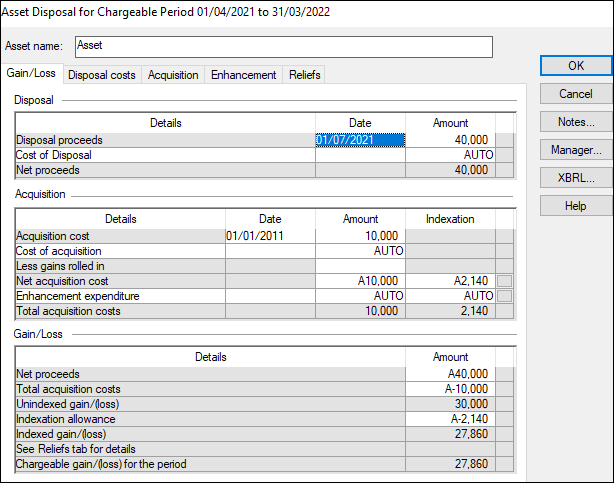
- Enter details of the disposal proceeds.
- Enter details of the initial acquisition including dates and cost.
- If you need to include more details about the acquisition, add them on theEnhancementstab, including dates.
- Select theAcquisitiontab and enter the costs of acquisition.
- Select theDisposalcosts tab and enter the costs of the disposal.
- The total of the Capital Gains will be transferred toIncome/(Deficits) Not Assessed as Trading Income.
- If the gain or loss is included in the profit/loss before tax, then you can also adjust for it in this schedule by manually entering the amount in theProfit/(loss) from sale of assetsrow.noteThis box pulls through information from theCapital Allowancesschedule, so you may need to add or deduct from the figure here. A profit would be entered as a positive figure and a loss would be entered as a negative figure.