
System Admin
Enable or disable HighQ Forms
HighQ Forms is an add-on feature that allows users to design custom forms based on iSheets. A form can be embedded on your site, on other sites, or in Microsoft Teams
HighQ Forms must be enabled at the system level, then Site admins can enable HighQ Forms for individual iSheets.
note
By default, the HighQ Forms are
Enabled
.Enabling or disabling HighQ Forms at system admin level
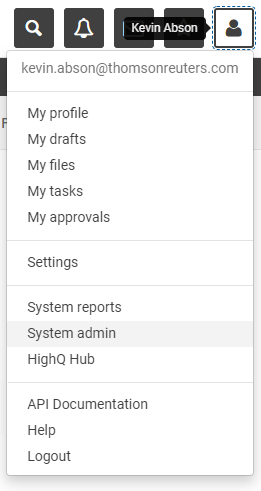
From your profile drop-down, select
System admin
.
The
System Admin
screen opens. In the System Admin
screen, open System settings
in the left-hand menu.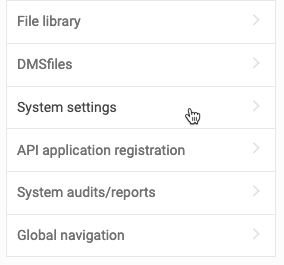
The
System settings
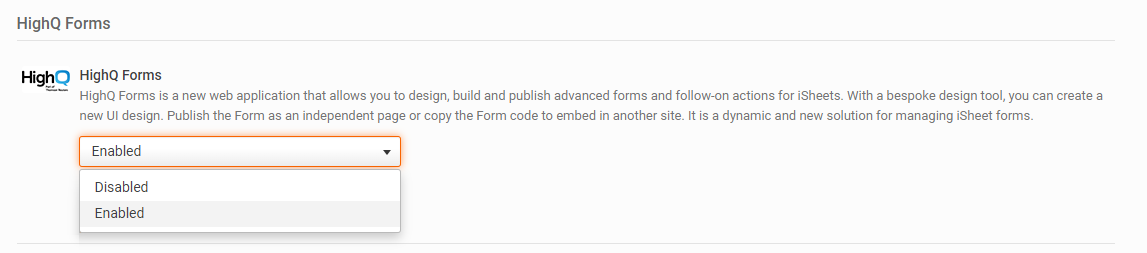
screen opens; scroll down to the HighQ Forms
section.By default, the setting is
Enabled
. To disable HighQ Forms on your entire instance, click the drop-down menu and select Disabled
then scroll down and select Save
.
note
Please note: HighQ Forms is not available for Task or File and Folder metadata iSheets.
While HighQ Forms is enabled, a site admin can enable HighQ Forms for individual iSheets.
Creating forms for public sites
If you need to embed the form for 'public' access, such as a website, and the form will be filled by non-members of the site; i.e. they do not have an account and are not expected to create an account, then check that
Enable iSheet form sharing
is ON
.
While iSheet form sharing is enabled, a site admin can enable iSheet form sharing for individual iSheets.