
Amending a Return
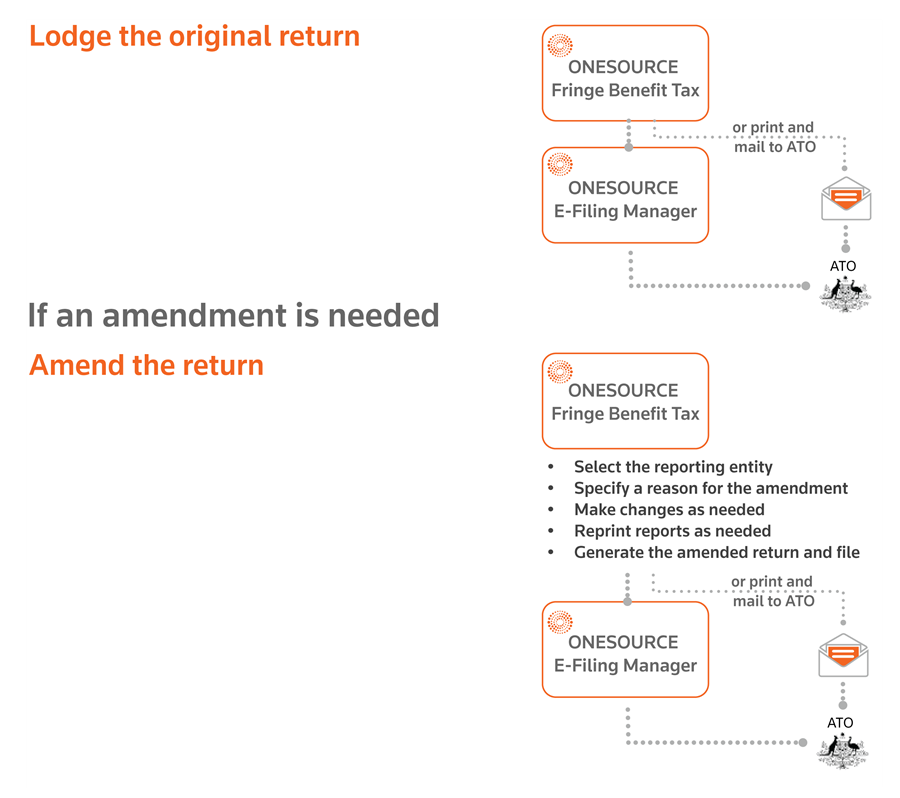
You can file an amendment electronically using the Thomson Reuters ONESOURCE E-Filing Manager application. You can also still do a traditional non-electronic lodgment and we have made this easier for you.
It is not sufficient to just copy and amend the entity. If you simply make a copy of an entity under the same client, there is a risk that certain threshold tests such as RFBA and in-house reduction may be applied twice. The preferred process is outlined below.
note
Before starting an amendment of your FBT return, see the ATO guidance for advice.
Processing an amendment
- SelectATO Return, thenATO Returnagain.
- Use theReporting Entitydropdown to select the reporting entity or reporting group to be amended.
- Select theAmend Returnbutton on the toolbar.tipThis button only appears if a return has been filed for the reporting entity.
- The Amend Return page provides a checklist of questions you must answer before submitting an amendment. Verify these conditions have been met, then type your reason for the amendment in theAmendment Return Reasonbox.
- Click into theAmendment Typesection and use the dropdown to indicate the amendment type (tax office or tax payer error).
- Select theOKbutton on the toolbar.
Send an amendment to the ATO
For non-SBR lodgments
(manual amendment): Collect and compose the required information in your request for an amendment. Post your request for an amendment to:Australian Taxation Office PO Box 3004 PENRITH NSW 2740
For SBR lodgments:
You can submit amendment requests online through the ONESOURCE E-Filing Manager
. Import the e-file for the amended return and process the amendment. The steps to amend are very similar to lodging the original return.