
Roll forward
You can use ONESOURCE Fringe Benefits Tax to roll forward the previous year's closing balances to the new FBT period.
There are 2 options for rolling your data forward. You can:
- Either roll forward your data in the current year's program to the next FBT year (licence permitting), or
- Wait until the new FBT year when the new rates and rules are available, then roll forward using the new rules and rates.
Thomson Reuters have already opened your 2023 – 2024 license for you to start rolling forward.
The 2023 – 2024 new FBT rates will only be updated in our November release (24/11/23).
The following can be rolled forward:
- FBT form organisation information
- Cost Centres
- Standard categories
- User defined columns
- Employees, except if they have an end date in the previous FBT year and no carry-forward benefits.
- Undisposed vehicles:
- Registration number
- Shared status
- Base value
- Calculation method
- Drivers
- Log book details (if applicable)
- Closing kilometers
- Shared or pool cars: Shared car details and the last driver of cars using the allocation methods of date ranges or kilometre ranges. The driver must be listed as using the car on 31 March or the car must have an end odometer that equals the cars closing odometer reading.
- Car parking: Ongoing car parks with no end date entered are rolled forward.
- Loans: Loans with no end date, the closing balance becomes the opening balance for the new FBT year LAFHA: Any LAFHA benefits with no end date will roll forward.
- Housing: The house details for houses with no end date are rolled forward and a new indexed Current Rental Amount is calculated (if applicable).
A range of FBT options are rolled forward. Several things happen during roll forward and you can view the roll forward log to see these.
User Defined Column
names are also rolled forward. Any data entered in a column will roll forward to the next year in these workpapers:- Employee
- Vehicle Benefit (but not Vehicle Allocation)
- Housing Benefit
- Living Away From Home Allowance
- Car parking
The drivers of shared cars with last day usage are rolled forward. These are cars allocated to a driver on 31 March using the date ranges allocation method, or with an allocated end kilometre reading that equals the closing kilometre reading for cars using the kilometre ranges allocation method. Shared cars using a different allocation method must be reallocated to drivers following roll forward.
Rolling Forward
Before You Begin
If you are attempting to roll forward to the current year (2023 – 2024), select
Calculation Settings
and be sure that you are currently in the prior year (2022 – 2023).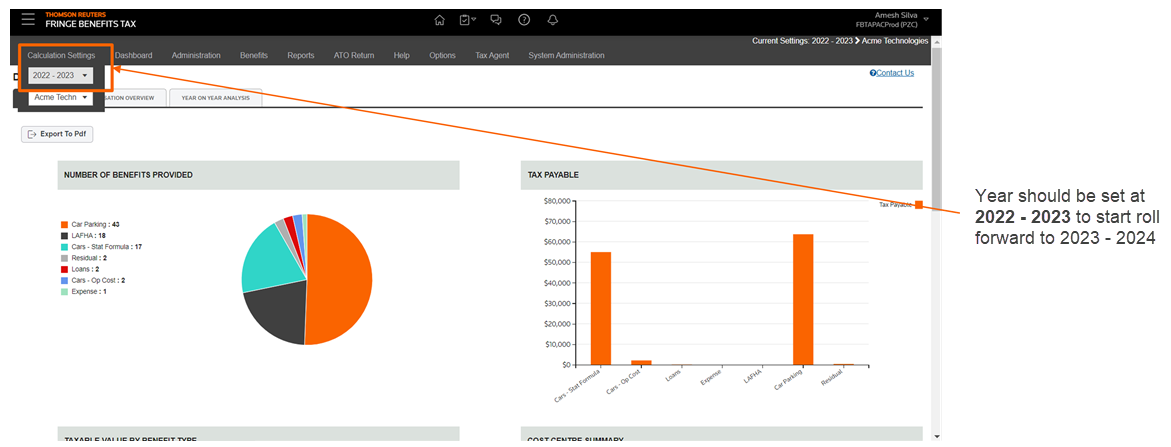
Roll Forward Procedure
- SelectAdministration, thenOrganizations.
- On the toolbar, selectRoll Forward.
- In theNamefield, enter the name of the organization that is to be rolled forward from the previous year to the next.
- SelectNext.
- Check the checkboxes next to the reporting entities to be rolled forward and selectNext.
- Select the workpapers to be rolled forward. The workpapers that will be included appear in theCarry forward opening balancesbox.
- SelectRoll Forward.
You will now receive notifications about the procedure, such as what details have been forwarded, such as roll forward employees and roll forward loan benefits.
Once you receive notification that the roll forward has been completed, you can expect to see the new roll forwarded organisation in the following FBT year.