
Administration report
2 administration reports are available:
- User Access By Reporting Entity Report: Allows you to see the users that have logged in.
- Aggregated Reporting Entity List: Shows reporting entities and their codes.
Using Reports
- You can group reports by dragging a column header into theDrag a column header here to grouparea at the top.
Example
This example shows the
Reporting Entity Code
column header being dragged into the area at the top.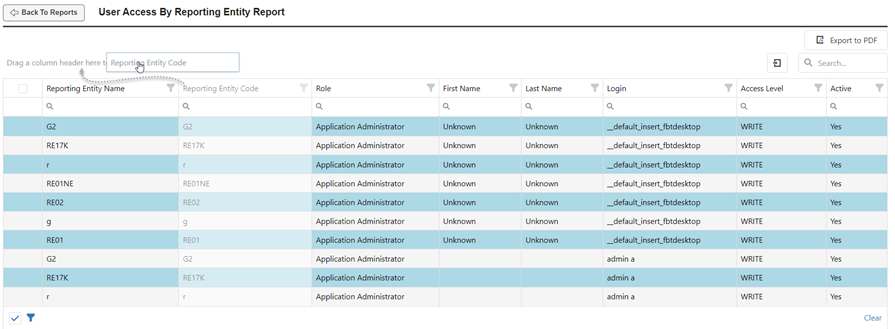
The data in the report is now grouped by entity code. You can click on the small arrow selector to expand and collapse the groups.
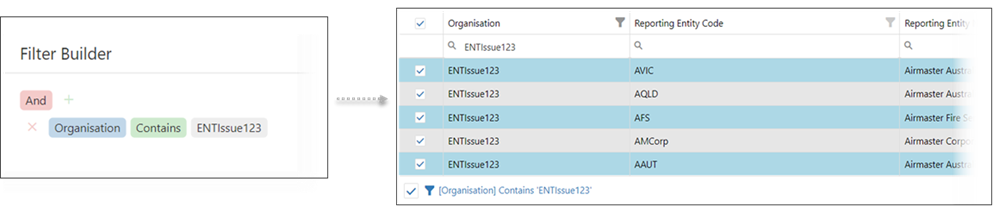
- To help you quickly find important information, you can use filters to narrow your selection. Select the filter icon
 in the bottom left corner. On the window that opens, you can use the
  icon to add parameters to your filter.
Example
This example is being filtered so that only results for organization ENTIssue123 are shown.
- SelectRun Selected Reportto create and download the file. You will be prompted to select a file type for the report. Reports can be saved as .xls, .xslx, or .pdf. When finished, it is downloaded to yourDownloadsfolder. Reports can take a few minutes to build.
- SelectPreview Selected Reportto view the report results immediately.
- Select theExport to PDFbutton to save the report to yourDownloadsfolder as a .pdf.