
User permissions
As a CoCounsel administrator, you can manage granular user-level permissions to CoCounsel skills and other CoCounsel capabilities like databases, giving you control over capabilities within CoCounsel.
Access user permissions
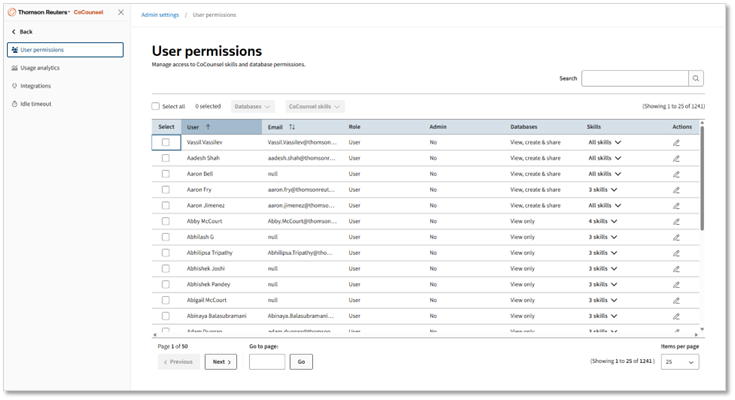
CoCounsel administrators can access the
User permissions
screen by selecting Admin settings
from the menu and selecting User permissions
. You can view a list of all users in your firm who have access to CoCounsel core and review their current access to databases and skills.
Initially, by default, all users with CoCounsel core access are automatically granted full access to CoCounsel databases (view, create, & share) and all core skills.
Edit user permissions
Administrators can adjust user-level permissions for regular users (non-administrators) by selecting the edit icon in the Actions column for the user you want to edit or using bulk action at the top if you want to make changes for multiple users.
Update database permissions
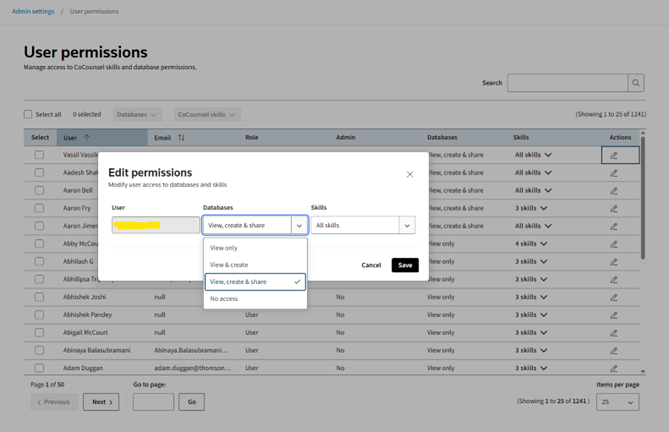
- By default, users with CoCounsel Core access are automatically granted full access to CoCounsel database-related permissions (view, create, and share).
- CoCounsel administrators can adjust user-level permissions for databases by selecting the edit action for each user or using a bulk action.
- No Access: Users can't access the databases page.
- View only: Users can access databases but can only see databases shared with them.
- View & create: Users can access databases shared with them and also create new databases.
- View, create & share: Users can access databases shared with them, create new databases, and additionally share databases created with others.
Update CoCounsel skills
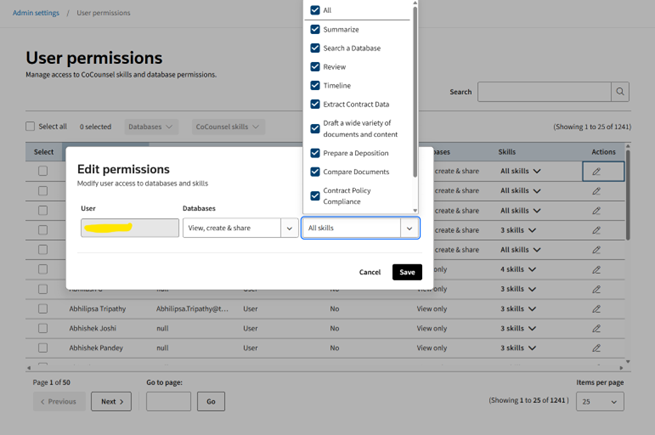
- By default, users with CoCounsel Core access are automatically granted access to all CoCounsel core skills.
- CoCounsel administrators can adjust access to specific skills by individual user or in bulk.
- Removing access to a skill means the user won’t be able to see the skill in the list of CoCounsel skills and can't run the skill from CoCounsel AI Assistant across all platforms like CoCounsel Application, Teams, Outlook, Word.
note
At this point, it is not possible to manage granular user access to non-CoCounsel core skills from
User Permissions
.Common questions
- Which skills can be managed from User Permissions?Currently, only CoCounsel core skills access can be managed from User Permissions.
- What happens if access to a skill is removed?When access to a skill is removed, users can't access that skill from CoCounsel AI Assistant on any platform.
- If Westlaw AAR access is removed fromWestlaw Admin tool, does CoCounsel also remove access?No, if Westlaw AAR access is removed in theWestlaw Admin tool, CoCounsel doesn’t remove access.