
Cancel a skill run
For many skills, uploading documents to search against is required to execute the skill run. You can tell that a skill has been started in CoCounsel when the skill name shows on the progress bar.
Do the following if you want to cancel the skill run:
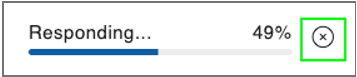
- Go to your skill run and find the progress bar. It will showResponding...and the percentage of the progress.
- Select thexnext to the skill's progress.
- The skill run will stop and you'll get a confirmation message that the skill run has been cancelled.