
Resetting your DT Client Portal password
Updating or changing a password
- Log in to dtnetlink.ca.
- Click your name and choose Update Password.
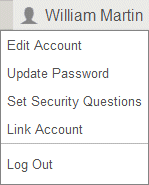
- Enter your new password.A Password Requirements popup opens and shows password requirements. For information about creating secure passwords, see Password guidelines and tips.
- Enter the new password again in theConfirm Passwordfield.
- Click Enter.
If you lost or forgot your password
Reset your password using the steps below.
- Navigate to dtnetlink.ca and click the Forgot password link.
- Enter your login ID and the email address to which your login is registered.
- Click OK.
If you don't remember your registered email address, or if you don't have access to it, you have a few options.
- Reset your password by answering security questions. You can only use this option if you set up security questions for your account.
- Contact your accountant or tax preparer. They can reset your password manually.