
More about security privileges
The relationships between security privileges in DT Practice can be complex, especially for multiple-office firms who wish to restrict access to items by office. For example, if you set up a security group whose members can view and print various client-based reports, but have not first set restrictions for viewing clients, you may unwittingly enable the security group to view clients from other offices. Consequently, knowing how security privileges are related (also known as "dependencies"), and understanding the default behavior of the Security Groups setup screen, are crucial for ensuring that your security groups are set up properly. Fortunately, DT Practice provides a way to check whether security changes affect other, dependent areas of the application.
Using the Privileges changed pane
In the
Security Groups
setup screen, you can use the Privilege Selection pane to modify the security privileges for a security group. Each time you make a change in the Privilege Selection pane, the results of that change are displayed in the Privileges changed
pane.note
The Privileges changed pane only shows the results of your most recent change.
Types of privileges
The privileges in the
Security Groups
setup screen are divided into two groups: menu privileges and data privileges.- Menu privilegesrelate to items in the DT Practice user interface, such as dashboard portlets, entry and billing screens, and other screens and dialogs. These privileges also relate to reports. Items affected by menu privileges allow you to view or manipulate data.
- Data privilegesrelate to data entered into or produced by DT Practice, such as client or staff data, billing data, time & expense data, or project management data.
Menu privileges are often dependent on data privileges, so if you enable menu privileges, DT Practice will also enable the corresponding data privileges (unless you have already enabled compatible privileges). When you disable data privileges for a security group, members of that group will be restricted from viewing and/or using the affected data, so DT Practice automatically disables privileges for related menu items that require the data privileges you disabled. The purpose of the Privileges changed pane in the Security Groups setup screen is to show you when these additional, automatic changes occur.
note
Currently, some "data" privileges appear under Menu on the
Security Groups
setup screen. One example is Menu > Setup Menu > Clients > View.The DT Practice Help and Support provides information about security privilege dependencies, where applicable.
Enabling menu privileges
In the example below, privileges for the Billing Worksheet report were enabled.
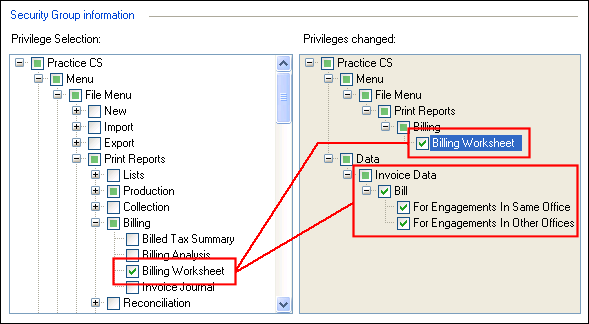
As you can see, the Privileges changed pane shows that in addition to the Billing Worksheet report, DT Practice has enabled privileges for viewing invoice data in all offices, because access to invoice data is a requirement for the report. The Privileges changed pane alerts you to all changes that will result from your most recent change, so you can adjust privileges as necessary.
note
DT Practice will not enable full access to data that you have previously restricted. In the example above, privileges for viewing invoice data had not previously been enabled for the security group, so DT Practice enabled full access to that data. If, however, you had already set up privileges for viewing invoice data — for example, enabling access for engagements in the same office, but not for engagements in other offices — DT Practice gives precedence to your previous settings and does not overwrite them.
Restricting data privileges
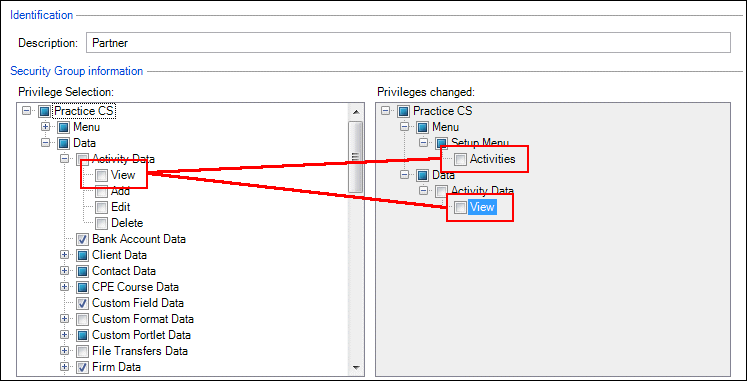
While enabling privileges to certain menu items may cause DT Practice to enable privileges for related data, restricting certain data privileges may cause DT Practice to remove privileges for related menu items. In the example below, privileges are disabled for viewing activity data. The result is that privileges for the Activities setup screen are also disabled, because that screen relies on access to activity data.
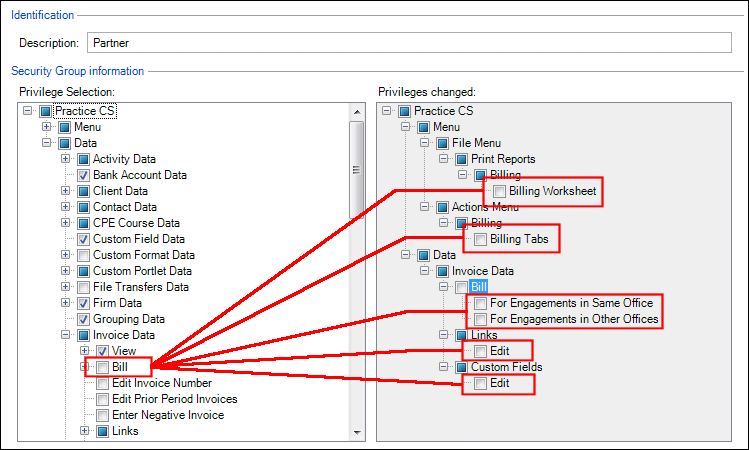
In the following example, privileges for billing invoice data are disabled, which also disables privileges to the Billing Worksheet report, tabs on the Billing screen, and for editing links and custom fields related to invoice data.
note
When disabling data privileges, DT Practice does not defer to previous security settings the way it does for enabling menu privileges. If you disable privileges for a type of data, DT Practice will also disable privileges for all related menu items that require that type of data.