
Resetting your DT Staff Portal password
Updating or changing a password
- Log in to dtnetlink.ca.
- Click your name and choose Update Password.
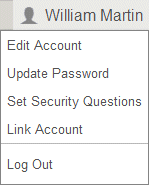
- Enter your new password.A Password Requirements popup opens and shows password requirements.
- Enter the new password again in theConfirm Passwordfield.
- Click Enter.
If you lost or forgot your password
Reset your password using the steps below.
- Navigate to dtnetlink.ca and click the Forgot password link.
- Enter your login ID and the email address to which your login is registered.
- Click OK.
If you don't remember your registered email address, or if you don't have access to it, you have a few options.
- Reset your password by answering security questions. You can only use this option if you set up security questions for your account.
- Contact your DT Firm Portal Administrator. They can reset your password manually.
- If you are the DT Firm Portal Administrator, call Technical Support at 800-663-7829 to request a password reset.
Information for DT Firm Portal Administrators
To reset a password for a DT Staff Portal user, follow these steps.
- Log in to dtnetlink.ca
- Click the Admin tab.
- In the DT Staff Portal section, click Users.
- Click the DT Staff Portal user you need to reset.
- Enter a new password in thePasswordfield.
- Re-enter the new password in theConfirm Passwordfield.
- Click Enter.
The DT Staff Portal user should now be able to log in with the new password.
If you need your own DT Firm Portal Administrator password reset, you should try the Forgot password option above. If you don’t have access to your registered email and you don’t have any security questions set up, contact Technical Support at 800-663-7829.