
Setting security questions
We recommend that all users set up security questions. If you click the
Forgot password?
link in the login page after you set up security questions, the application will prompt you to answer the security questions and then allow you to reset your password.- Click your name and choose Set Security Questions.
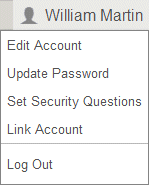
- Select a question from eachSecurity Questionfield.
- Enter the answer to each question in the correspondingAnswerfield.
- Click OK.