
Manage linked accounts
If you have two or more linked accounts, which allow you to log in to multiple Onvio staff or Client Centre accounts using the same email address, you can manage your accounts by making the following changes.
- Make an account active or inactive
- Designate an account as your home (default) account
- Edit the displayed nicknames for your accounts
Staff Users
- Click your profile icon (near the top right of most screens), then click the View Profile link.
- Select the Linked Accounts tab.
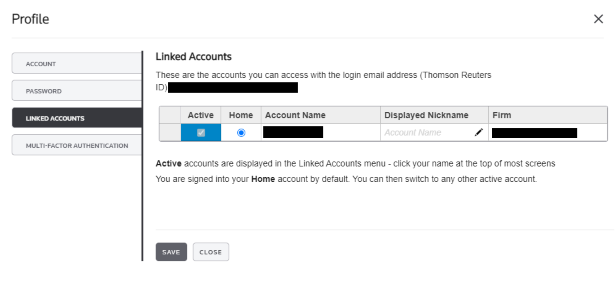
- In the Linked Accounts panel, make any desired changes.
- In the Active column, mark or clear boxes to change the active status of accounts. Only make an account inactive if you no longer use it.
- In the Home column, select the account that you want to log in to by default. This account opens every time you log in.
- In the Displayed Nickname column, you can change the name that appears on-screen for each account. Your Account Name is used by default.
- The Firm column shows the firm with which each account is associated.
- Click Save.
Client Users
- Click your name (near the top right of most screens), then click the Edit Profile link.
- Select the Linked Accounts tab.
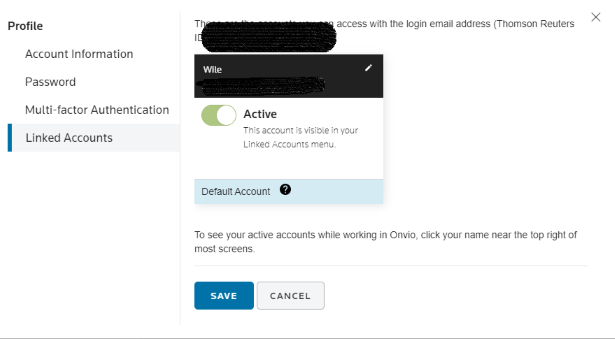
- In the Linked Accounts panel, make any desired changes.
- Click the Active switch to change the active status of accounts. Only make an account inactive if you no longer use it but your accountant has not yet removed it from their database.
- Select the account that you want to log in to by default. This account opens every time you log in.
- Click the Edit icon to create a nickname for an account.
- Click Save.