
Prepare unaudited consolidated or group financial statements
The FRS 102 Consolidated Financial Statements are audited by default. To prepare unaudited consolidated financial statements, you'll need to amend the report manually.
- Remove the Auditors Reports:
- Open theFRS 102 Consolidated Financial Statementsreport from the Reports List.
- Find the 2Independent Author's Reportsin the Report Structure.
- Right-click on the 1stIndependent Author's Report, then selectDisplayandNever.This will clear the box next to the folder in the Report Structure.
- Repeat the previous step for the 2ndIndependent Author's Report.
- Replace the XML code in theCover Pagefolder of the report:
- In the Report Structure, right-clickCover Page, then selectProperties.
- Select theXML Sourcetab.
- Delete all the text in theXML Sourcewindow.
- Download the following ZIP file: DAPA group cover page unaudited.
- Extract the contents of the ZIP file and paste the code fromdapa-group-cover-page-unaudited.txtinto theXML Sourcewindow.
- Make sure that the following a message appears in theXML Sourcewindow:Report template is syntactically correct.
- SelectOKto save your changes.
- Add 4 new variables to the root folder in the Report Structure:
- Run theFRS 102 Consolidated Financial Statementsreport.
- Right-click the 1st folder in the Report Structure, then selectProperties.
- Select theVariablestab.
- For each of the following variables, selectAdd, enter the variable name, then select the ellipsis button to add the variable code:
- IsAuditExemptreporting.queries.client.lookupaccountingperioddata('Disclosure|AuditorsReport|AuditExemptions|AuditExemptions|Exempt477|Current Period')[0].Value = true or reporting.queries.client.lookupaccountingperioddata('Disclosure|AuditorsReport|AuditExemptions|AuditExemptions|Exempt480|Current Period')[0].Value = true or reporting.queries.client.lookupaccountingperioddata('Disclosure|AuditorsReport|AuditExemptions|AuditExemptions|Exempt479A|Current Period')[0].Value = true
- Exempt477reporting.queries.client.lookupaccountingperioddata('Disclosure|AuditorsReport|AuditExemptions|AuditExemptions|Exempt477|Current Period')[0].Value = true
- Exempt480reporting.queries.client.lookupaccountingperioddata('Disclosure|AuditorsReport|AuditExemptions|AuditExemptions|Exempt480|Current Period')[0].Value = true
- Exempt479Areporting.queries.client.lookupaccountingperioddata('Disclosure|AuditorsReport|AuditExemptions|AuditExemptions|Exempt479A|Current Period')[0].Value = true
- Copy the templates needed for non-audited accounts from the FRS102 Financial Statements:
- Follow the steps in our "Copy a note or report element from one client report to another in Accounts Production Advanced" help topic to copy the following templates from theFRS 102 Section 1a Small Entities Financial Statementsreport to theConsolidated Financial Statementsreport.noteThe templates you need to copy are as follows.
- Accountants' Report
- From theBalance Sheetsubfolder of theFinancial Statementsfolder:
- Company audit exemption under s477
- Director responsibilities
- Compliance
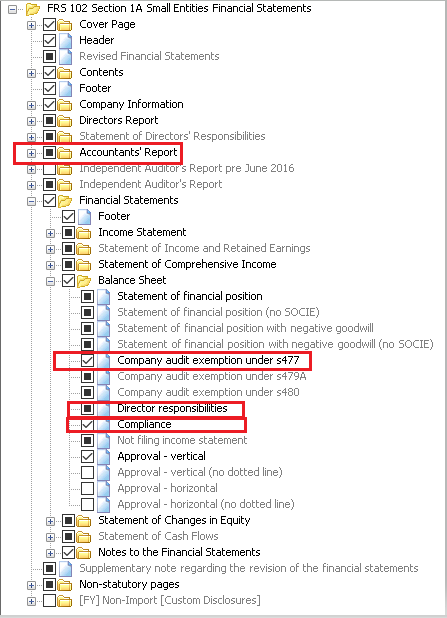
- When you've copied over the 4 templates, right-click each one, then selectDisplayandAlways.
- Remove the Statement of Directors' Responsibilities Introduction template:
- Go to the Statement of Directors' Responsibilities page of the report.
- Right-click on the 1st paragraph, then selectHighlight in Report Structure.
- Right-click the highlightedIntroductiontemplate in the Report Structure, then selectDisplayandNever.
You can now export the report as an HTML file with embedded IXBRL for e-filing purposes.
Related Content
-
Copy a note or report element from one client report to another
Format: Article,
2 min read
Article,
2 min read