Thomson Reuters
Legal Europe
Insights & events
Insights & events
Article Topics
Law Firms
In-House
Courts & The Bar
Public Sector
Academic & Careers
Technology & Innovation
Brexit
Transforming Women's Leadership
Definitive Guides
Definitive Guides for Legal Professionals
Events
The Legal Debates
Webinars
Stay ahead with technology
Reports
Key reports for the legal industry
Podcasts
The Hearing - Legal Podcast
See all articles
Industry insights, research, news and events
Products & services
Products & services
Research and know-how
CoCounsel Legal UK
Practical Law
Westlaw Advantage UK
Westlaw Edge UK
Westlaw UK
Westlaw IE
Lawtel
Data Privacy Advisor
International materials on Westlaw
Legal Taxonomy
Legal AI
CoCounsel Legal UK
CoCounsel Essentials UK
Drafting and document automation
CoCounsel Essentials UK
Drafting Assistant
Knowledge management
Legal Search Connect
Law firm practice & matter management
HighQ
Legal department management
HighQ
Legal Tracker
Commentary
Sweet & Maxwell
ProView eBooks
Books on Westlaw UK
Case management
C-Track
eRecruitment
CVMail
Students
UK Law Student
See all products
The content, technology and expertise that you need to run your legal business.
Solutions
Solutions
Explore solutions by process
Case Management
Case Search
Case Trackers
Document Management
Contract Management and Templates
Settlement and ADR
Help and Support
HighQ
Files module
Download files and folders in bulk
Suspend and restart a bulk download
Download files and folders in bulk
Suspend and restart a bulk download
If you download many files you may suspend or restart a bulk download in the case of a connection issue or failure.
In the
Files module
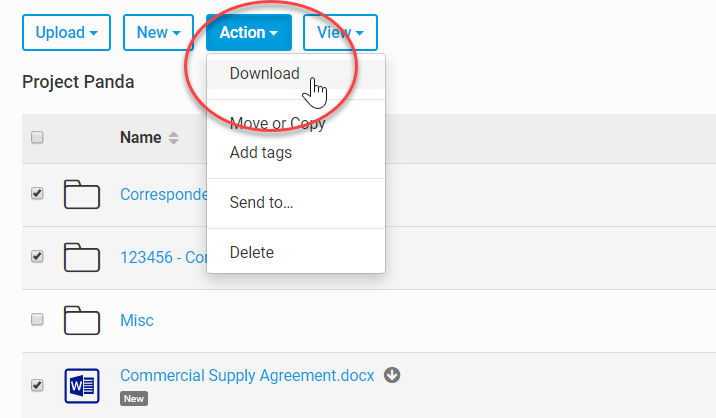
select the files or folders that you need to download. Select
Action
, then
Download
.
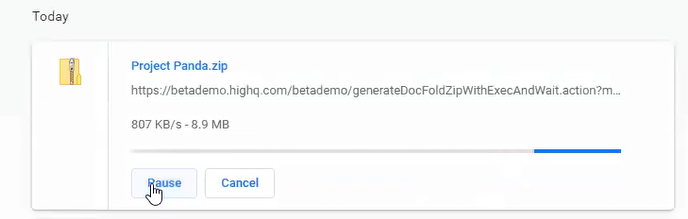
The file download starts. To see the progress, view the
Downloads
option in your browser. If you see that the download is not progressing you can
Pause
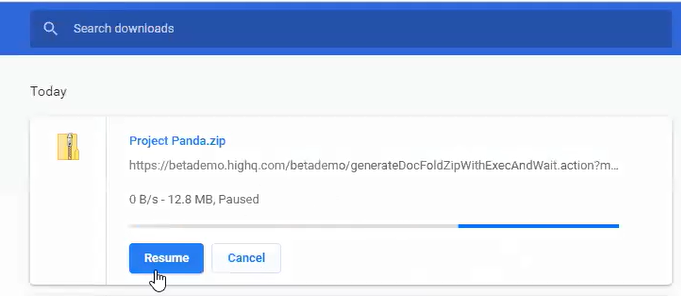
it. If you do use
Pause
, you can also
Resume
the download later.
This article applies to:
Product:
HighQ
Subject:
Documents,File Exchange
Print
Related Content
Download files and folders in bulk
Format:
Article,
12 min read