
Advanced Search in iSheets
Advanced Search in iSheets allows you to filter records using one or more conditions, such as text values or predefined choices. It is optimised to work efficiently with large iSheets and focuses on clarity and performance.
With enhanced search processing, queries execute significantly faster, and the filter model loads instantly with no perceptible latency, even on iSheets containing 100,000+ records. Performance remains consistent under concurrent user activity, reducing wait times and improving efficiency when working with large datasets.
note
Advanced Search is available only in the
modernised (Wijmo)
iSheet UI; it is not supported in the legacy iSheet experience.Using Advanced Search
To access Advanced search, go to the iSheet list view and select the ellipsis menu next to the search field at the top right. Click
Advanced Search
to open the enhanced filtering options.
Select the
view
you want to search in (for example, Priority Matters). Only the columns included in this view are searched. Choose a specific column from a
searchable dropdown
(such as Matter name, Priority, or Risk) and use the Add icon + to add more column filters, if needed.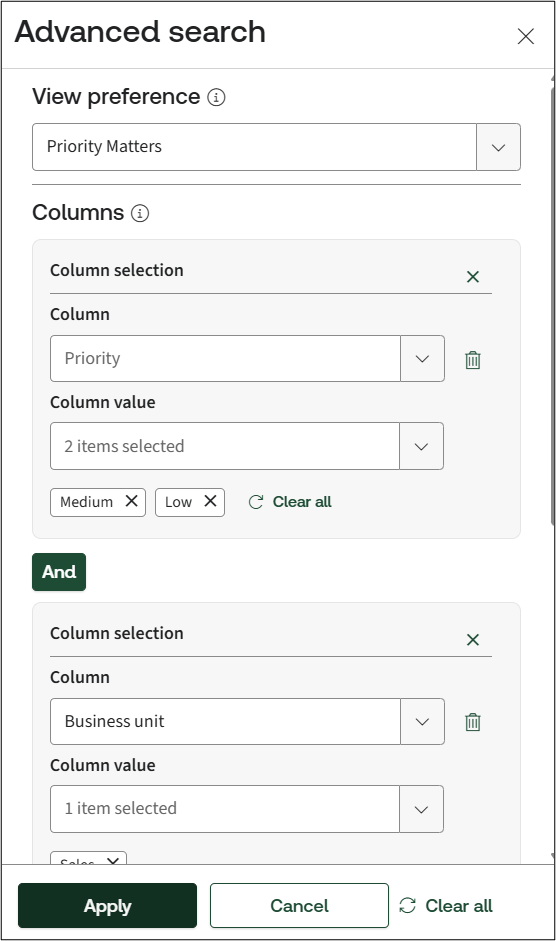
Next, define the keyword you want to match:
- All of these words: include an 'AND' search using the defined terms.
- Any of these words: includes an 'OR' search using the defined terms.
- Exclude these words: adds the terms as a 'NOT' statement.

And enter the text you want to search for in the keyword field.
Click
Apply
to run the search, Clear all
removes all filters and Cancel
to close the panel without searching. Enhanced Filtering Options
You can further narrow down results more accurately by:
- Searching usingpartial text matching.
- Usingdynamic suggestionsfor supported column types, such as choice or dropdown columns, helps you build searches faster and reduces manual typing.
- UseAND/ORlogic, precisely control search results by requiring all conditions to match (AND) or allowing any condition to match (OR), helping you narrow down or broaden results efficiently in large datasets.
How Advanced Search works with View-based search and Saved searches
When you run a search within a selected view, only the columns included in that view are searched. This helps improve performance and ensures results remain relevant to your selected data.
However, saved searches behave slightly differently from view-based searches. Saved searches always search across all columns, not just the columns in the selected view. This ensures existing saved searches continue to work as expected, even if views or columns change over time. This avoids situations where saved searches would return no results due to view changes or missing columns.
Limitations
- Date-type columns are not supported for All Search, Any Search, or Exclude Search.
- Section names are not displayed in the Advanced Search modal. Columns must be selected directly using the searchable dropdown.
- Columns are not displayed in the order defined on the Site Admin page. Explicit ordering is not required due to the searchable dropdown design.
- Custom columns that are not included in the selected view will be excluded from view-based searches.
Best practices
- Useviewsto limit the number of searchable columns when working withlarger iSheets.
- Use saved searches for frequently used queries that need to consistently search across all columns.