
Dealroom Hygiene Analysis and Document Review
Dealroom Hygiene Analysis and Document Review
The
Dealroom Hygiene Check
is an advanced, agent-driven system that automatically evaluates the completeness and adequacy of documents within the Virtual Data Room (VDR) against a predefined Request List. This intelligent process continuously monitors document availability, validates internal references, and identifies any gaps in the due diligence documentation, ensuring a thorough and up-to-date review.
Document Verification System
Feature | System Action |
Missing Document Validation | Regularly review flagged missing documents and coordinate with the Seller to obtain or clarify missing items. |
Reference Validation | Use the validation reports to address missing references and fix broken links to maintain document integrity. |
Manual Control Options | Trigger checks as needed for up-to-date status. |
Continuous Dealroom Surveillance | Monitor changes and review version comparisons. |
Key Features and How to Use Them:
1. Missing Document Validation
Automated Document Analysis continuously scans and verifies VDR documents against the Request List, promptly flagging missing items.
- Continuous Scanning:The VDR contents are scanned against Request List items without interruption.
- Real-Time Verification:Document presence is checked instantly to confirm availability.
- Intelligent Matching:Documents are automatically matched to their corresponding request items.
- Missing Document Identification:Any absent documents are promptly flagged for user review.
2. Reference Validation
The system ensures that all document references within the VDR are valid and complete.
- Automated Cross-Reference Checks:Internal document references are automatically validated.
- Identification of Missing Referenced Documents:Documents mentioned but not uploaded are detected.
- Broken Link Detection:The system identifies and flags any broken or invalid document links.
3. Manual Control Options
Users have the flexibility to initiate document verification and readiness checks manually.
- On-Demand Readiness Check:Users can trigger an immediate hygiene check to assess document status.
How to Use:
- Navigate to the Hygiene Analysis dashboard.
- Click onRun On-Demand Readiness CheckorManual Verification.
- Wait for the system to complete the scan and update the reports accordingly.
4. Continuous Dealroom Surveillance
The system continuously monitors the dealroom for any document changes and updates the hygiene status accordingly.
- Automated Change Detection:Any modifications to documents within the dealroom are automatically detected.
- Delta Analysis:Specific changes between document versions are identified and highlighted.
- Re-Analysis Trigger:The system intelligently re-initiates analysis workflows based on detected changes.
- Real-Time Report Updates:Hygiene reports are updated instantly to reflect the latest document status.
- Version History Tracking:Users can navigate through previous assessment states via a dropdown menu.
- Comparative Views:Enables side-by-side comparison of different analysis versions.
- Timestamp Indicators:All surveillance activities and detected changes are time-stamped for auditability.
Dealroom Hygiene Reporting
Dealroom Hygiene Reporting
Following the automated scan of your dealroom, the
Hygiene Reporting
functionality transforms the findings from this comprehensive Hygiene Check into detailed reports. This feature provides clear visibility into missing documents and identified documentation gaps, which is crucial for efficient communication of outstanding requirements to the Seller.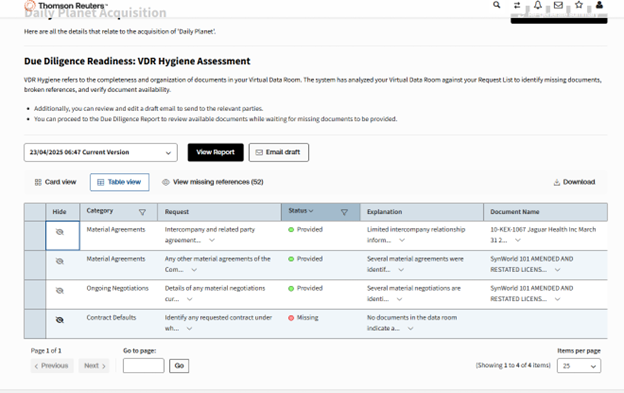
Report Generation
The system organizes report content with precision, ensuring all findings are presented effectively.
- Content Organization:Identified discrepancies are presented in a structured, tabular format, making complex information easy to digest.
- Document Categories:Documents within the report are categorized based on the sections established in the Request List, providing a familiar and logical structure.
- Reference Inconsistencies:Detailed explanations are provided for any reference inconsistencies, with clear links back to the relevant sections of the Request List.
Report Management
The reporting interface offers several interactive features to enhance your ability to manage and utilize the generated reports.
- Dynamic Filtering:You can dynamically filter report contents to focus on specific issues or categories as needed.
- "Not Applicable" Marking:The ability to mark items as "Not Applicable" allows you to refine the report, excluding items that do not require action.
- Export Options:Reports can be easily exported, typically to Excel format, for further analysis, archiving, or distribution.
Summarized View per Category
For a quick overview, the system provides a summarized view of discrepancies.
- Organized View:A cards layout produces a summarized version of the Discrepancy Report, offering a high-level snapshot.
- Categorization by Practice Area:This summary is further categorized per Practice Area, allowing you to quickly assess hygiene status across different legal domains.
Communication Management
Communication Management
The
Communication Management
functionality seamlessly facilitates all interactions between Buyers and Sellers related to document requests and discrepancies. This automated system ensures communication is consistent, fully tracked, and efficient throughout the due diligence process, while maintaining a complete audit trail of every interaction.Initiating Communication
Users begin the communication process by clicking the
Email Draft
action button. Upon activation, the system automatically generates a professionally formatted draft email addressed to the Seller. This draft incorporates relevant discrepancy details and document requests based on the most recent analysis, ensuring that all critical information is included.
Before sending, users have full control to review the draft email. The interface allows inline editing, enabling users to customize the message content and tone, add custom notes or instructions, and modify the list of recipients to target the appropriate members of the Seller’s team. The Hygiene Report generated by the system is attached automatically to the email, providing recipients with a comprehensive overview of the outstanding items.
Key Components
Email Communication System
- Message Generation:The system drafts emails automatically using smart templates tailored with transaction-specific details. Users can customize the message content and tone to suit the context. Relevant attachments, including the Hygiene Report, are included to support clear communication.
- Review and Modification Interface:Users can preview the draft email before sending, make inline edits, add personalized notes, and adjust recipient lists to ensure the message reaches the right audience.
- Service Email Account:Communications are sent via a designated service email account for the Agent (to be determined), ensuring consistency and professionalism.
Individual Document Analysis
Individual Document Analysis
The
Individual Document Analysis Report
provides insight into the comprehensive legal analysis performed on documents across selected practice areas. It details how documents are reviewed using user-configured parameters and highlights the consistency of findings, each supported by precise citations to source content. This report enables you to track the effectiveness of your practice area configurations and review priorities, supporting improved quality and efficiency in document review processes.
Step 1: Configure Analysis Settings
Select Practice Areas
- Navigate to thePractice Areas Configurationpage.
- Choose the relevant practice areas applicable to your legal review (e.g., Corporate, Intellectual Property, Real Estate).
- This selection tailors the analysis parameters and questions to your specific legal domain.
Set Analytical Parameters and Review Priorities
- Define practice area prompts aligned with your legal requirements.
- These settings ensure the system applies a consistent and methodical approach to document analysis.
Step 2: Process Documents for Analysis
Generate Legal Summaries
- The system automatically creates concise, comprehensive summaries of each document.
- Use theInteractive "View Details"option to access an expanded, in-depth analysis of document content.
- Summaries include structured responses to the configured practice-specific questions.
Download Analysis Reports
- Download the system-generated document analysis in Word format for offline review or sharing.
note
While not available today, a key upcoming feature will support each finding in the analysis with precise citations to the source document content, ensuring full traceability
Step 3: Conduct Risk Assessment
Identify Legal Vulnerabilities
- The system highlights potential legal risks, exposure points, and vulnerabilities within each document.
- These findings are organized into a structuredRisk Registerfor easy reference.
Review Risk Findings
- Examine the risk assessments to understand areas requiring attention or mitigation.
- Use this information to inform legal decision-making or further due diligence steps.
Generate Initial Due Diligence Report
The
Initial Due Diligence (DD) Report Generation
functionality streamline the consolidation of individual document analyses into a single, comprehensive, and well-structured due diligence report. Leveraging Practical Law templates, this automated system efficiently compiles critical findings into a professional-grade report that is both traceable and ready for legal team review.
note
Users can download the generated report in their preferred format, enabling seamless updates and edits as the due diligence process evolves.
Key Components
Report Compilation
Content Aggregation:
- Systematic compilation of document summaries ensures that all key information is captured accurately.
- Integration of risk assessments highlights potential issues and areas of concern across documents.
- Consolidation of findings is organized by practice area, providing clarity and facilitating targeted review by subject matter experts.
Template Implementation:
- The final report strictly adheres to Practical Law templates, guaranteeing consistency, clarity, and professional formatting throughout.