
Manage group permissions
This article assumes that you have created and named the groups required by your organisation.
note
To edit a group, either click the name of the group within the
Groups
screen, or navigate to the More actions
button for the group you want to edit. Refer to Manage site groups in Collaborate for more information.Changing a group's permissions
To view and change a group's permissions, navigate to
More actions
> Set group permissions
.
The
Set group permissions
screen opens.
The
Modules
tab in the Set group permissions
window shows module permissions granted for the group. By default, the Files
module is set to View
, but the other View or Edit permissions are not set.note
If
Digital Rights Management
options have been enabled for the site, then two additional columns are displayed in the Files section of the table (Disable print
and Watermark
). This allows DRM features to be enabled or disabled for any folder or file listed.elect the
Files
tab to see file and folder permissions. 
The
Files
tab shows the permissions for the File content for the selected security group. These available columns are:- Inherit- This determines if a folder inherits the permissions of its parent folder.
- Folder Permissions(these are only applicable to folders, not files):
- View- This determines if a folder can be viewed. This permission level is necessary for a group to access any content in the folder or its subfolders. Without View folder permissions, no other permissions can be granted on the folder.By itself, View folder permissions do not allow a group to view files in that folder.
- Add Files- This determines if the user can add files to the folder, as well as if they can edit file metadata or add a new version, regardless of who uploaded those files. If a group has Add files permissions, they can also view files in that folder.
- Admin- This includes the permissions granted by Add files, plus the ability to sort and bulk upload files and folders.
- File Permissions:
- View- This allows you to view and download files in a folder, but not make any metadata changes or add new versions.
- Disable print-This column is only displayed if DRM options are applied.By default, when DRM options are applied, users without Add files permissions can no longer download the native files. (With the PDF/FileOpen DRM option, only the encrypted PDF version of the file can be downloaded.) If printing is disabled, users without add files permissions are no longer able to print a file. Additionally, aPrinting disabledwatermark is added to every page of the file.
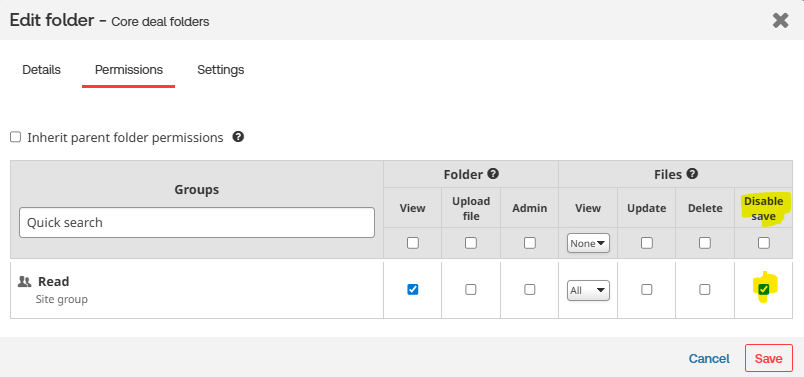
- Disable Save- If save is disabled, users without add files permissions are no longer able to save a file. However, this checkbox can be deselected to permit a group of users to download the native version of all of the files in a given folder, or just specific files, if file-level security has been enabled.Alternatively, saving can also be disabled at the individual file level. To do this, navigate to the desired file (or folder) and click theMore Actionsbutton and selectEdit Details.In the pop-up window, go to thePermissionstab. From the Permissions tab, select the user group and enable theDisable Saveoption.
note
The
Disable Save
option must be enabled at the system level for this to be displayed.Please contact your account manager to have this feature enabled.
- Watermarks- This column is only displayed if DRM options are applied. If watermarks are enabled, the email address and IP address of the current user are added to each file. Both theDisable PrintandWatermarkssettings require that the View files setting is also applied, but it is possible to use any combination of these settings:
- Enable printing and do not apply watermarks (files can be printed without watermarks);
- Disable printing and do not apply watermarks (files can be viewed but not printed, without watermarks);
- Apply watermarks and enable printing (files can be printed with watermarks); or
- Apply watermarks and disable printing (files can be viewed but not printed, and watermarks are shown)
The precise permissions and actions available to each type of folder and file permissions are provided in the Matrix of File and Folder Rights (Excel file).
The key concepts applicable to this page:
- Inheritance- For each folder, there is a flag that indicates whether the folder inherits the permissions of its parent folder (a grey folder) or not (a yellow folder). If the checkbox is selected for a subfolder, then any changes made to the permissions of the parent folder automatically flow down to the subfolder (and any of its subfolders and files). For example, if a subfolder inherits security and Add Files permissions are removed from the parent folder, this change is applied to the subfolder and all its subfolders and files, unless one of those subfolders has broken inheritance. Also, for any object that inherits permissions, the checkboxes under each permission setting (such as Add Files) will be greyed out, as they cannot be changed unless inheritance is disabled.
- Breaking Inheritance- If inheritance is disabled, a subfolder can have different permissions from its parent folder. Permissions at the subfolder level can be more restrictive than the parent. For example, Group A can add files to the parent folder but only view files in the subfolder.
note
Permissions can be
less
restrictive. For example, if the parent folder provides Group B with folder admin permissions, these permissions can be granted to Group B within the subfolder. This way, a group that cannot access files in a parent folder can be given access to files in a subfolder.- Changing Inheritance- Inheritance can be toggled on or off for a folder using the checkbox in theInheritcolumn. The important thing to understand about inheritance is that it applies to all groups. Either a subfolderdoesordoes notinherit the permissions of its parent folder. If it does, then inheritance applies to all groups and for a given group, they will have the same permissions for all subfolders and files. If inheritance does not apply, then different permissions can be given to different folders for the same group. Accordingly, if inheritance has been disabled on a folder and there is an attempt to reenable inheritance, the following message will be displayed: This action will inherit the folder permissions for this group as well as other groups that have access to this folder. Are you sure you would like to continue with this operation? This warning appears because once inheritance is re-enabled, any unique permissions that may have been provided to a group for any subfolders or files will be reverted, which will impact all groups. On the other hand, disabling inheritance does not lead to such a warning, because there is no immediate change in the permissions on any subfolders or files.
Once changes have been made, select
Save
to apply your changes.note
Any changes take effect immediately.
Exporting a group's file permissions
You can export a copy of every group's current File permissions to Excel. Select
Permission report
in the Groups
screen.
The
Group permissions report
screen opens.
Please wait for the report to be generated. Once the report has been generated, a link allows you to download your report.

Click either
Click here to download
or Download
to download your report.
Copying a group's file permissions
In some situations, giving one group the same file permissions as another is useful. For example, if an existing group is split into two, both groups would have the same permissions, but over time, they will diverge. To copy permissions, select
More actions
for the group whose permissions you want to copy and select Copy group permissions to
.
The
Copy permission to
screen opens.
This lists all groups you can copy to, the group type and the number of users.
After selecting the group to copy to, select
Copy
. The group will now be copied.note
- If the group that receives new permissions already has its own, unique file permissions, those permissions will be overwritten.
- This is a one-time copy. Any changes made in the future to the permissions of the source group will not apply to the permissions of the copied group. The permissions of the two groups are not linked.
- This change only applies to the permission settings of the File module, as the security settings in other modules are less complex.
Multiple groups and permissions
If a user is a member of multiple groups, with different permissions, permissions are aggregated - the user is granted the
highest level of access
defined for each item.note
Restrictions (e.g. 'Disable print') are
always
applied unless the user is granted admin access, which negates the restrictions.In the example below, members of the 'normal users' groups may view folders and files, but may not add files or print. If they are also a member of the 'All' group, then they are granted Admin and 'Add files' rights; the 'Disable print' restriction from 'normal users' is removed, as this does not apply to users with admin rights (the selection boxes are greyed out).
Granular file permissioning
Collaborate provides granular file permissioning, allowing you to be more strict with specific permissions for users when uploading and downloading documents.
Granular file permissioning changes the following:
The
Add File
permission is split into Upload File
, Update File
and Delete File
.- Upload Filemeans that a user can upload a new file once, but cannot edit or add a version after that.
- Update Filemeans that a user can add a version to a file, edit that file (including its metadata), but cannot change the file permissions.
- Delete Filemeans that a user can delete this file, but cannot change the permission of the file.
note
Disable Save
is independent of DRM. Meaning, regardless of whether DRM is ON or OFF, this option is available to the user.note
File module capabilities such as Collaborative editing using Office Online and eSignature etc. that create a new version of a document are only available for users with Update file permission and above.
Granular permissions are applied in the following settings:
Setting permissions via Site Admin (Group Based Site)
When editing file permissions, with DRM enabled.

Setting permissions via Site Admin (User Based Site)
When editing file permissions, with DRM enabled.

Setting permissions via Edit Folder > Permission tab (Group Based Site)
When editing file permissions, with DRM enabled.

Setting permissions via Edit Folder > Permission tab (User Based Site)
When editing file permissions, with DRM enabled.

Setting permissions via Edit File > Permission tab (Group Based Site)
When editing file permissions, with DRM enabled.

Setting permissions via Edit File>Permission tab (User Based Site)
When editing file permissions, with DRM enabled.

Editing a group's membership and name
To edit the details of a group, either click the name of the group in the
Groups
screen, or select the More actions
button for the group and select Edit details
.
The
Group details
- group name
screen opens.
- To change the group's name, edit the name in theGroup namefield.
- To add additional members to the group, search for the names in theMembersfield and press enter.
- To remove existing site members, click the redxnext to the member you want to remove.
- SelectSaveto save your changes.
All changes take effect immediately.