
September 2025 release notes
Feature enhancements
- Display ITR Codes in Mapping and Trial Balance Screens:ITR codes are now displayed in both the Trial Balance and mapping screens for entities created using AU NextGen content templates (v2.XXX). Upon clicking “Show amounts,” the ITR codes appear alongside target descriptions for maps created. Additionally, the Account Properties popup has also been enhanced to show the ITR code of the mapped target, providing users with better traceability during account mapping.noteThese changes will be effective from the next NextGen Content template release.
- UI/UX Improvements for Overrides:Toolbar enhancements allow users to list, highlight and navigate through overridden/undecided cells.New icons added on the cells to distinguish override states:
- Cell has user override value:

- Decision between import/brought forward and user override yet to be made:

- Cell has import/brought forward value:

- Usability Improvements to Mapping Screen:
- Mapping screen now retains expanded hierarchy after saving.
- Hierarchy collapses only on clicking refresh or apply changes.
- Persist Filter Selection in Admin Settings:
- Filters in now persist after saving.
- Filters are cleared only on refresh or navigate away from the screen.
- Implement Distinct Labels for Notes and Queries in Print Output:The Print output now clearly differentiates between Notes and Queries. All notes are labelled as “Note” and all queries as “Query” irrespective of whether these are defined at sheet-level or cell-level. This change applies to the prints initiated using both standard and custom print styles and the public print API.
- Align Timestamps with Local Time Zone in Print:Timestamps for notes and queries in printed output now reflect the local time zone of the user, matching the format used in the print footer.
- Enhance Line Items Screen with CLI ID Column:A new optional column “CLI ID” has been added to the Line Items screen to display the GUID of each line item. Users can choose to show this column via grid settings. This exposed metadata (CLI ID) helps to replicate line items across tenants.
- Public API for Dataset Rollforward:
- New API endpoint /datasets/rollforward/{{datasetId}} is introduced to perform a Rollforward operation for a dataset
- Supports adding, updating, and removing entities while rolling forward a dataset
- Excludes client template calculations from rollforward
For more details on how to use the Dataset APIs, refer to the ONESOURCE Corporate Tax Datasets API on the developer portal. - Show Exchange Rate Symbol on the UNDERLYING Cells:Exchange rate symbols are now displayed directly on the cells with UNDERLYING format, mirroring the behaviour of their linked underlying cells. This ensures visibility of exchange rate information without needing to access hidden or referenced cells, and the exchange rate footnote is also included in print outputs.
- Access to Entity Manager Permission in V2:A new permission, “Access to Entity Manager,” has been added under product permissions in V2. Users with this permission can access the Entity Manager screen within the application.
- Enabling New Permissions:Any new customers onboarding henceforth, will have V2 permissions module enabled for them, eliminating the need for manual migration from V1 which provides immediate access to the latest permission features. To know more about V2 permissions module, refer to Configure Product Permissions in Help and Support.
- Default Behaviour for Insertable Row/Column Types:When a template defines a block with multiple insertable row or column types (including the default), all configured types will now be displayed by default for user selection. Previously, this behaviour was controlled by a separate ,Allow user insertion of import proformas, which has now been removed as becomes redundant. Refer to the following screenshots for more details.A popup showing all insertable row types on ‘Foreign exchange gains’ sheet in a AU CT calculation:
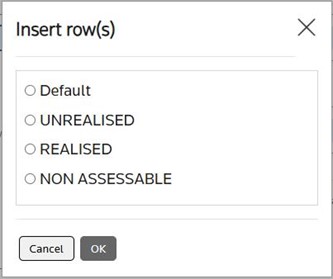 A popup showing all insertable row types on ‘Other allowances’ sheet in a UK CT calculation:
- E-Filing Manager:
- Two new settings have been introduced to restrict user’s access only to those records from the clients and products they have access to. These settings are turned off by default and can be set via the screen in EFM.
- The setting “Restrict access to the records based on client access” when turned on limits user’s visibility to submission records originating from the clients, they have access to. This is applicable on the tenants where ONESOURCE Client Manager (OCM) is enabled.
- The setting “Restrict access to the records based on product access” when turned on limits user’s visibility to submission records originating from the products (e.g., FBT), they were assigned to.
- E-Filing Manager UK:
- The Queue Package API now validates calculations before generating a package. If errors or open queries are present and the “Allow Efiling with errors or open queries” setting is disabled, the API returns a clear error message and prevents package generation.
- A new parameter “ignoreAttachmentErrors” added to the Queue Package API payload to handle the validations related to the files attached via this API.
- When this parameter is present with a value Yes in the payload, the API ignores the validation errors associated to the files attached, and generates the package, although ignores the errors, these are reported as part of Get E-FIling Status API response.
- When it is absent or present with a value No, the API validates the attachments and stops the generation of the package in the case of errors.
- Each package queued via the Queue Package API will now have a unique Submission ID. Previous submission packages will continue to be replaced when a new package is queued for the same calculation.noteA calculation cannot have more than one return in Queued state at any given point in time, the new package queued replaces the existing one. As each package will have its unique submission ID, all other E-Filing APIs which work on the given submission ID will show a meaningful error if the submission ID for the old package was supplied as it would have been replaced or not valid anymore.
- The Queue Package API and Get E-Filing Form Codes List APIs now also work on calculations that are opened in the UI.
- The “Submission ID” column is now available in the Queued, History, and Failed tabs in the EFM application. Users can manually add this column to the grid, and their view preferences persist.
- A new column “Test Submission?” has been added to the Queued, History, and Failed tabs in EFM application. Users can manually add this column to the grid, and their view preferences persist. It shows NA for the records where not applicable or information not available.
- Users are now prompted to explicitly confirm the submission type (Live or Test) before filing a return. A validation message ensures that the selection is made before proceeding which reduces risk of accidental live submissions.
- The PDF in the Review zip will have submission ID printed in the footer along with the IR Mark.
- The iXBRL in the Review and Submission zip files will have submission ID printed on them.
- The PDF in the Review zip is now generated with the default print style respecting the formatting, notes and queries configuration as defined in the print style.
- Performance Improvements:Faster Dataset Creation for Larger Entity Sets: We've optimized backend database operations to improve the speed of dataset creation. This enhancement is especially beneficial for datasets with 50+ entities, where users may observe shorter creation durations.
Notable defects remediated
- Notification Progress Bar Missing for ONESOURCE Statutory Reporting (OSR) Imports:Previous Behaviour:While bringing data from OSR, the notification progress bar for the import job was not displayed, leaving users unaware of the import status.Current Behaviour:The progress bar now appears consistently for all import types, including OSR imports.
- Print Includes Notes/Queries Without Permission:Previous Behaviour:Users without permission to view notes/queries could still see them in printed PDFs.Current Behaviour:Print routine now respects user permissions and exclude printing notes/queries in the PDF output for users without relevant permissions.noteThe permission in the current permission module (V1) is “Notes and Queries”. In the new permission module (V2), these are “Notes, Queries, Manage Notes and Manage Queries”.
- Issues with Large Copy-Paste Operations:Previous Behaviour:When large data was pasted into calculations, there was no progress indication causing confusion leading to repeated attempts and exceptions.Current Behaviour:User experience has been enhanced to show the progress indication of the paste operation.
- Print Error with Long Sheet Reference Names:Previous Behaviour:Using long sheet reference names (above 5 characters) during Excel sheet insertion caused print failures due to validation issues.Current Behaviour:Validation has been added to enforce reference name length limits and ensure compatibility with print routines.
- Formula Linking Fails for Already Selected Cells:Previous Behaviour:Formula linking failed when the target cell was already selected, preventing users from completing formulas.Current Behaviour:Formula linking now works even if the cell you want to refer to in the formula is pre-selected.
- Data Imported to incorrect places in specific sheets:Previous Behaviour:Target based import routine was failing to uniquely identify the dynamically inserted rows/columns and importing data to all the rows/columns.Current Behaviour:Target based import now respects the context of a row/column to uniquely identify them and import data to the intended rows/columns (e.g., Cross Border Royalties sheet in the UK CT Template ).
- Query Response Edits Not Saved:Previous Behaviour:Edited responses to queries were not saved when updated from the cell or sheet-level notes/queries menu.Current Behaviour:Edited responses are now saved successfully across all entry points, including cell and sheet-level menus.
- Import Fails when the default data entry rows/columns are deleted:Previous Behaviour:Import failed when the default data entry rows/columns are accidently deleted. Despite the import status being shown as success, no data was imported.Current Behaviour:Import routine now inserts rows/columns and imports data even when the sheet initially contains no rows/columns.
- Special Characters in Sheet Name Prevented Save Operation:Previous Behaviour:System was failing to save the calculation when the sheet name contains the special characters such as ( ) < > etc.Current Behaviour:The system now parses the special characters, and calculation saves successfully without errors.
- Excel Sheet Reference Conflicts with Template Sheet:Previous Behaviour:Excel sheets with names matching template sheet references were incorrectly treated as template sheets not allowing users to insert the template sheets when needed, also causing invalid cell references, and unintended formula behaviour.Current Behaviour:System now distinguishes between Excel and template sheets even if they share reference names by allowing to insert template sheets. System formulae and its references in the other template sheets do not consider the Excel sheets while evaluating formulae, preventing conflicts and ensuring correct sheet behaviour.
- Undo/Redo Shortcuts Not Working Across Sheets:Previous Behaviour:Ctrl+Z and Ctrl+Y shortcuts did not work when switching between form sheets and other sheets, although toolbar icons functioned correctly.Current Behaviour:Keyboard shortcuts for undo/redo now work consistently across all sheet types.
- Import Inconsistencies on Transitioned calculations: Adds New Row Instead of Updating Existing:Previous Behaviour:Import routine on transitioned calculations was adding new rows instead of updating the existing rows despite matching descriptions.Current Behaviour:Import routine now correctly updates matching rows rather than duplicating them.
- “Current Client” Selection Reverts to “All Clients”:Previous Behaviour:Selecting “Current Client” in the client template settings reverted to “All Clients” upon reopening, ignoring the user’s selection.Current Behaviour:System now retains the selected client scope as intended and restricts the availability of the template to specific client instead of making it available for all clients.
- Income Statement Total Mismatch with Analysis Sheet:Previous Behaviour:Total amount in the income statement did not match the total in the analysis sheet when accounts were mapped to both custom descriptions and account analysis targets.Current Behaviour:System now consolidates values correctly from the analysis sheet into the income statement.
- Default Print Style Changes Affect Other Clients:Previous Behaviour:Changing the default print style for one client affected other clients. Deleting a custom default print style did not reset the default to “Modern”.Current Behaviour:Default print styles now apply only to the selected client, and deletion of a custom style correctly defaults to “Modern.”
- Permissions Not Saved During V2 Migration for Large Clients:Previous Behaviour:Module permissions were not transferred for users and user groups with access over 100 clients during permission transfer to V2.Current Behaviour:Permissions are now reliably transferred for all users and user groups irrespective of their client access.
- Validation Reference Errors on Rollforward:Previous Behaviour:Rollforward routine was failing to retain correct cell references in the validation formula on the cells where user formulae exist.Current Behaviour:Rollforward now retains correct formula references in the validation formula regardless of manual input (e.g., Expense and Income analysis sheet - Disallowable/Non-taxable column of UK CT Template. ).