
Copying an existing price list
Don't use just a <b> tag for a heading, but an actual <section><title> element.
It is possible to copy existing price lists instead of having to create a new price list from scratch.
To do so, go to "
Settle
" and "Price lists
".Search for the price list you want to copy, check the box titled "Select price list" and press "Copy price lists"

A new view will be presented:
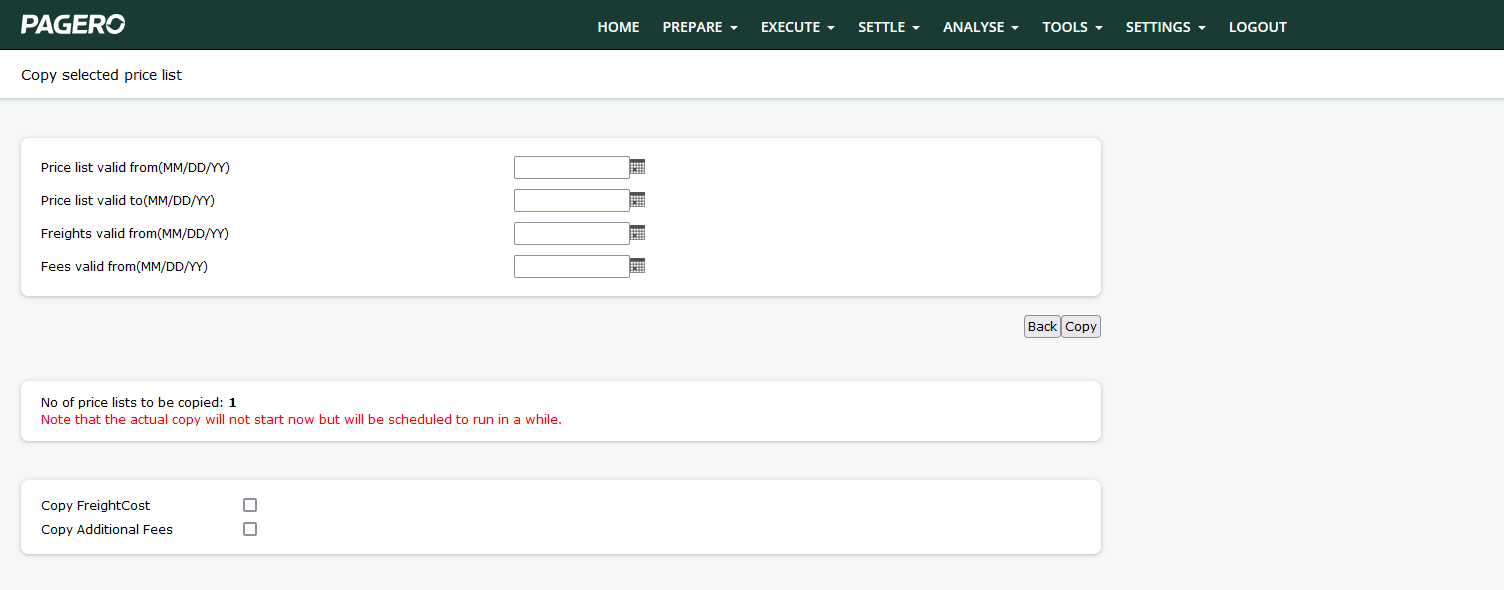
The following parameters are prompted:
Price list valid from/to | The date range for which the price list is to be considered active. |
Freights/fees valid from. | The date for when the new freights and fees are to be considered active. Note that these fields can be left blank if the same date as the " Price list valid from" date is desired. |
Copy freight cost/ Additional fees | If the costs from the original price list is to be copied over, checking these boxes will do so. |
When you are satisfied with the settings, press copy. A background job will now start copying the price list, please note that the process is not instantaneous so it might take a while before the new copy is displayed.
When the copy is ready and uploaded it will have the same name as the original price list but with the " _Copy" suffix.
Related Content
-
Create a Price List Header - Postal Codes
Format: Article,
2 min read
Article,
2 min read
-
Enter your Price List information
Format:
Article,
2 min read