
How do I test my Price List
When you have created your price list, it's a good idea to test it out and see if it works.
In order for an invoice or shipment to match your price list, the information on the invoice/shipment should match the information in the price list marked in green below.
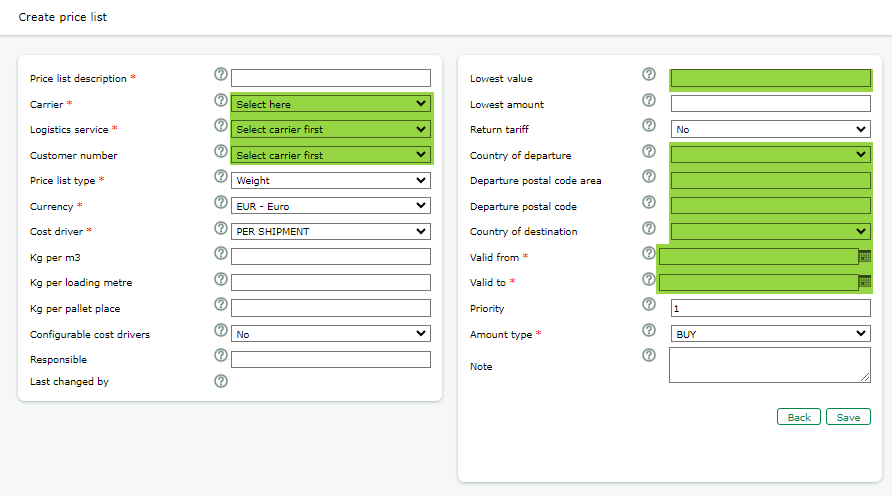
Not a match?
Follow these steps to troubleshoot and find out where the information differs.
- Double check so the header information in the price list is the same as in the shipment/Invoice
- Carrier
- Logistics service
- Customer number at LSP
- Shipment date is within the Price list valid dates
- Address details
- Is there a Lowest value in the price list? What is the value for that in the shipment/invoice? The cost driver for the lowest value is the cost driver in the price list header.
- What is the cost driver in the price list? What is that for the shipment/invoice?
2
. Manage - Postal code area
- Is there matching postal code areas in the price list with the shipment/invoice?
- Is there several postal code areas with the overlapping postal codes?
- Check the spelling of postal codes and postal code areas
- Are there Cities and Zipcodes for the same in the postal codes areas? This will lead to issues since no exact match will be found.
- 3.Is the currency in the shipment? Is it different from to the currency in the price list?
- If you followed all the troubleshooting steps and you still can't get your price list to match to your invoice/shipment, please reach out to Support for assistance.
Related Content
-
Creating Price Lists
Format: Article,
1 min read
Article,
1 min read
-
Creating Price Lists
Format:
Article,
1 min read