
Create a site from a template
Select the site name in the top navigation bar, then
Manage templates
:
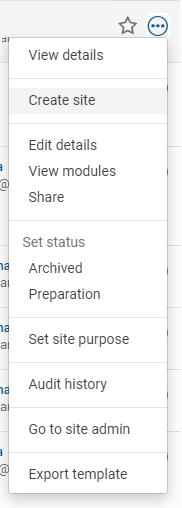
Find the template to use in the list of templates and select
More actions
, then Create site
:
This enables you to create a new site using the selected template.
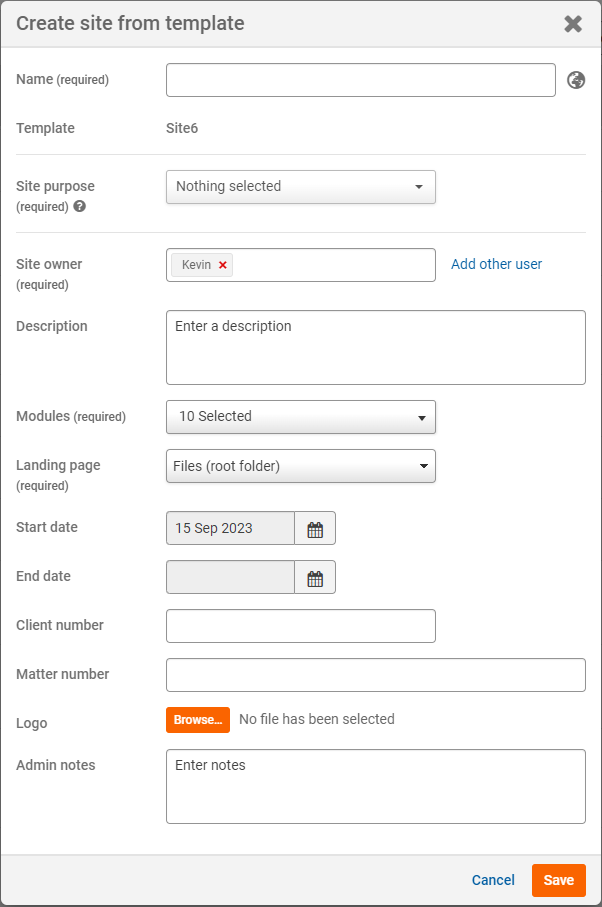
In the
Create site from template
screen, you have access to the following fields:Consider adding the templates to a category to enable you to find and organise your templates. Select
Add
to add a new category.- Name- The name of the new site
- Template- This is the template you are using to create your new site
- Site purpose- Select one or morepurposesfor the site. Only internal site administrators can edit this field
- Site owner- This shows the owner, or owners, of the site. By default, this is the user who created the site
- Description- The description is shown to all users with site access when they hover over the site name on the list of sites in the Dashboard
- Modules- This dropdown contains a predefined selection of the modules within the template. You cannot edit this selection during this process, but modules can be edited once the site is created.
- Landing page- Select which page you want the site to load first
- Start date- The start date can be used to track when a site was put into use. The start date is set by default to the date the site was created but it can be changed if needed. This date is purely for reference
- End date- The end date can be used to track when a site is considered to be no longer in use, even if the site remains available. This date is purely for reference
- Client number- If you always intend to use the site for the same client, consider entering the client's number
- Matter number- If you always intend to use the site for the same matter, consider entering the matter number
- Logo- Consider adding a logo if you want to brand this template for use with the same client
- Admin notes- Add any notes for admin users.
Select
Save
to create the new site from the template. The
Creating site from template
screen opens.Either select
Close
or wait for the screen to close. 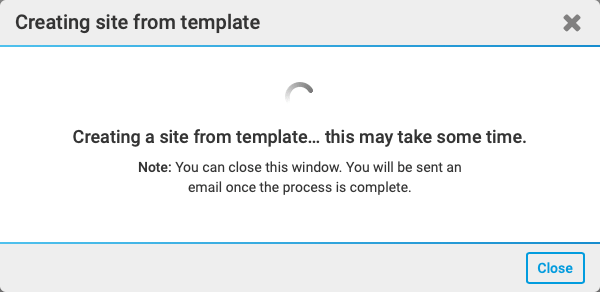
The site will be created.
Related Content
-
Auto deployment of solution templates
Format: Article,
4 min read
Article,
4 min read