
AdobeSign Integration Setup (Single Tenant Hosted or On-Premise)
Configure AdobeSign Integration
To integrate Adobe Sign, go to https://acrobat.adobe.com/us/en/sign and log in to your Adobe Sign account using your credentials.
note
Additional Admin privileges may be required. Please check this with your applicable department.
- Navigate toAPI>API Applicationsand click+to create a new application.
- Enter the required details:
- Name
- Display Name
- Domain:CUSTOMER
- Select the newly created application and clickConfigure OAuth for Application.noteMake a note of the Client ID and Client Secret.
- In the Redirect URL field, enter your Contract Express site URL using the format:https://<your-site>.contractexpress.com/app/esignature/callback(for example: https://globallaw.contractexpress.com/app/esignature/callback).
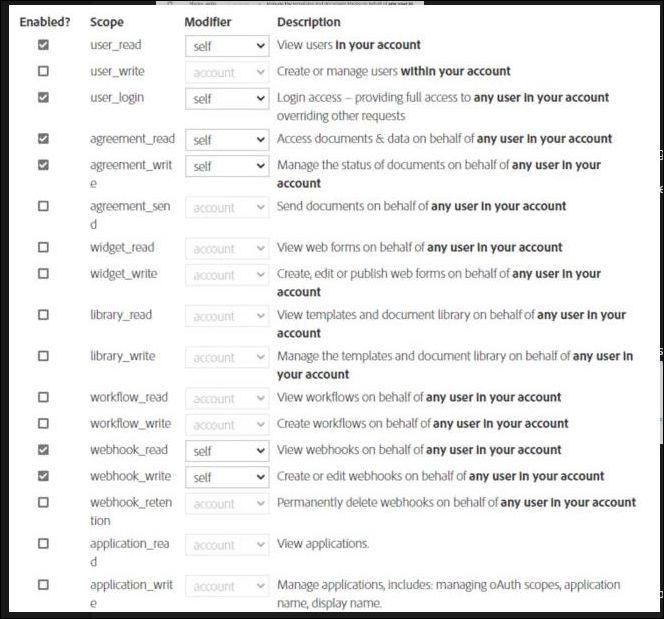
- Enable atleast the below required OAuth parameters.
- Provide the following details to your TR contact:
- Client ID
- Client Secret
- AdobeSign OAuth API URL
Once the connection has been successfully established, it will be confirmed. The final step requires an administrator to enable AdobeSign in Contract Express under
Admin
> Features
> e-signature
> AdobeSign
> SAVE
.