
Matter Group Options
There are three options for configuring accruals with matter groups.
- Option 1: Calculate accruals at the matter group level and require unbilled amounts to be entered in each matter
- Option 2: Calculate accruals at the matter group level, but firms are not required to manually enter unbilled amounts in each matter
- Option 3: Calculate accruals (and departmental budgets) in each matter (not at the matter group level)
OPTION 1: Calculate accruals at the matter group level and require unbilled amounts to be entered in each matter
This is the typical configuration for accruals with matter groups. It enables you to receive unbilled amounts directly from your firms but send one accrual to your finance department for the whole matter group. Moreover, all of the functionality relating to requiring unbilled amounts at the matter level is still available. For example, you could make unbilled amounts not required of any firms in a specific matter, or you could make unbilled amounts not required of certain selected firms in a specific matter.
The diagram below illustrates Option 1.
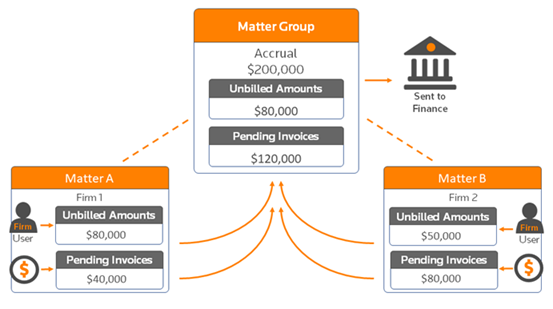
Configuring Option 1
Generating accruals at the matter group level and requiring input for individual matters is the default setting when creating a new matter group. It is also the default setting when your law department activates the accrual module.
- Either create a new matter and clickView Financial and Status Report Options, or open an existing matter group then clickEdit Options.
- UnderDepartmental Budgets/Reforecasts and Accruals, next toWhere is data entered, ensure thatDepartmental budgets/accruals are entered in this Matter Group onlyis selected. The exact options and names may vary slightly depending on whether you have departmental budgeting enabled.
- Next toCalculate an accrual for this matter group?, selectYes, then selectCalculate accrual from unbilled amounts entered in each matteroption.
note
Whether law firms enter unbilled amounts is specified in each matter. If you follow steps 1 and 2 above, generally the default setting will be that the law firms will be required to enter unbilled amounts in each matter. However, that setting can be changed in individual matters so that it is not required of firms (and company users can enter at their discretion).
Turning off the unbilled amounts requirement for a particular firm or matter in a group
One of the advantages to using the Option 1 configuration is that you can turn off the unbilled amounts requirement for a particular firm or matter in the matter group.
Requiring company review of accruals for a matter group
If accruals are calculated at the matter group level, the Company Financial Review page will initially display only the matter group, not the individual matters associated with the matter group. However, users have the option of viewing all matters in the matter group (see image below), and then drilling down to view the firms' unbilled amounts.
However, company users do not edit or approve the unbilled amount in each matter assigned to the matter group. Instead, they approve only the total unbilled amount for the matter group and can edit that total unbilled amount if necessary.
Company users can also review unbilled amounts using the Unbilled Amounts Report. This report will show a matter or a matter group only if the unbilled amount has been entered at that level. Thus, if you require unbilled amounts to be entered in matters not at the matter group level, then the Unbilled Report will only show the individual matters and not the matter group.
Unbilled Total for matter groups
If the law firm posts invoices during the company review period for a total amount greater than the unbilled amount, then the invoiced amount will be used as the unbilled amount. In the matter group context, the unbilled amounts are calculated as follows if there are invoices submitted during the company review period:
Matter | Unbilled Amount | Invoices Posted During Company Review Period |
|---|---|---|
Matter A | $10,000 | $5,000 |
Matter B | $5,000 | $12,000 |
Matter C | $15,000 | $5,000 |
Total | $30,000 | $22,000 |
In the example above, the accrual for the matter group will be derived using $30,000 as the Unbilled Total because $30,000 represents the greater of the unbilled amounts total compared to the total invoices posted during the company review period.
note
Pending Inv./Amounts Unsent to AP is not saved in Tracker
. Although the amount of pending invoices or amounts unsent to AP is summed at the accrual period lockdown and used to calculate the final accrual amount, the total pending invoices amount is not saved and cannot be viewed in the interface. OPTION 2: Calculate accruals at the matter group level, but firms are NOT required to manually enter unbilled amounts in each matter
The Option 2 configuration is appropriate for situations where there are many small, low value matters that have been assigned to the matter group, and you do not want to burden the firms with having to enter unbilled amounts in each of the matters. With this selection, company users must enter an unbilled amount in the matter group (and presumably gather that information from firms outside of Tracker, or the company user could review budgets and come up with an estimate without contacting firms).
The diagram below illustrates Option 2.
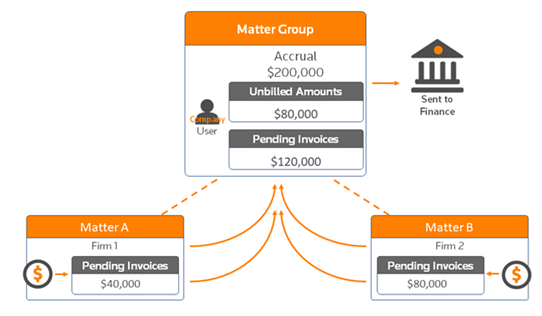
Configuring Option 2
Because this is not the default setting, you must either configure the matter group correctly from the beginning, or edit the matter group options after the group has been created.
- Either create a new matter and clickView Financial and Status Report Options, or open an existing matter group, and then clickEdit Options.
- UnderDepartmental Budgets/Reforecasts and Accruals, next toWhere is data entered, selectDepartmental budgets/accruals are entered in this Matter Group only. The exact options and names may vary slightly depending on whether you have departmental budgeting enabled.
- Next toInclude matter group in the Dept. Budget/Reforecasts?, selectYes (On-budget), then selectCalculate accrual form the unbilled amount entered in this matter group only (firm input not allowed). (Departmental budgets must be activated for this matter group because that is how the accrual will be calculated.)
note
Firms do not have access to the matter group to enter unbilled amounts.
Firms do not have access to the matter group, so they must provide all financial data (invoices, unbilled amounts, and budgets) at the matter level. OPTION 3: Calculate accruals (and departmental budgets) in each matter (i.e. not at the matter group level)
The Option 3 configuration essentially eliminates matter groups from the accrual workflow. Option 3 is the least used configuration because it also requires departmental budgeting and reforecasting at the matter level, and most law departments create matter groups to avoid having those tasks occur for individual matters. Below are the only situations where it makes sense to use the Option 3 configuration:
- You have created matter groups for FAS 5 loss contingency analysis, but all budgeting and accruals occur at the matter level.
- You have set up matter groups not for any workflows, but simply to provide another reporting tool for grouping matters.
The diagram below illustrates Option 3.
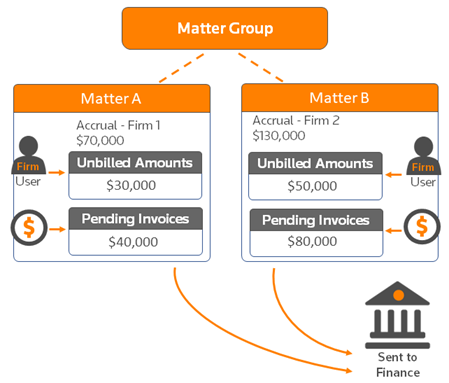
Configuring Option 3
- Either create a new matter and clickView Financial and Status Report Options, or open an existing matter group, and then click the flat Edit Options toolbar button
- UnderDepartmental Budgets/Reforecasts and Accruals, next toWhere is data enteredoption, selectDepartmental budgets/accruals are entered in each Matter. The exact options and names may vary slightly depending on whether you have departmental budgeting enabled.