

Triva isn't available right now.
Check out the support page for our phone number and hours

Type | Simplified Leadsheets | Classic Leadsheets |
|---|---|---|
Binder Type | Only 1040 | 1040 & 1041 |
Tax Software |
|
* You can't import tax return data for Lacerte and UltraTax CS. You will need to enter these amounts manually. |
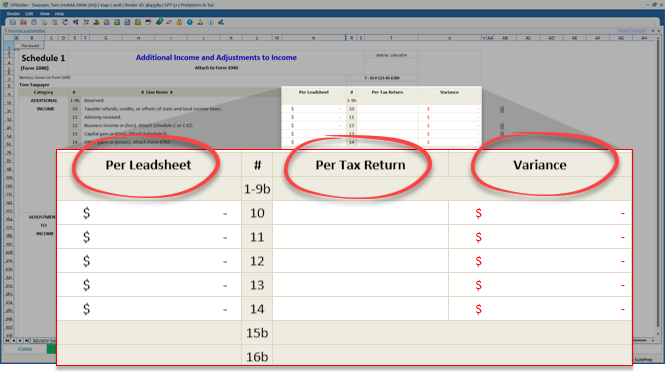
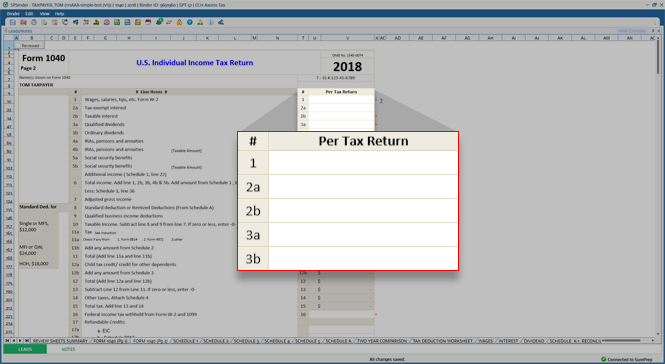
Columns in 1040 Pg 1, Pg 2, & Sch A | Per Tax Returns column only | Per Leadsheet , Per Tax Return , and Variance columns |
Forms Tab | Not available. Don't have to learn it. | Available. Easier to prepare the return using the Forms tab. |
Action | Simplified Leadsheets | Classic Leadsheets |
|---|---|---|
Modify OCR Data in | Tax software | Forms tab |
Capture Standard Documents data not sent/read by OCR in | Manually input in Tax software | Forms tab |
Annotate | Manually place T/R stamps next to input data. | Automatically place Blue/Red references. Pick the data in the Forms tab. |
Capture non-standard documents | Manually input in Tax software | Forms tab. However, if data is not captured then use T/R stamps. |
Delete OCR captured data | Tax Software | Before binder export - Delete in Forms tab.After binder export - you'll need to delete in the Forms tab and the tax software. |
Action | Simplified Leadsheets | Classic Leadsheets |
|---|---|---|
What comes in? | Manual inputs in tax software. | The output forms 1040 Pg1, Pg2, and Sch A |
How are the differences displayed | Variances are indicated by the red asterisk ( * ) | The variances column shows amounts in red |
Do I need to link the amounts in the leadsheet to the source documents? | Yes, manual linking is recommended | No, the amounts link automatically |
What happens to the T/R stamps? | In the Review Tree , items in the Unreviewed T/R stamp node are cleared/removed. | Neither removed nor linked to the leadsheets |
Is there an easier way to review the inputs made directly in the tax software? | Yes. Two new nodes will appear under the Review Tree. | No |
Action | Simplified Leadsheets | Classic Leadsheets |
|---|---|---|
Binder verification has NOT been initiated | Additional Documents will merge with Originally submitted documents. When the binder goes into verification, then the additional documents will subsequently appear after the original documents. | Additional Documents will merge with Originally submitted documents. When the binder goes into verification, then the additional documents will subsequently appear after the original documents. |
Binder verification has been initiated | New documents will be processed after the original documents have been exported. | New documents will be processed automatically after the original documents complete processing. |