
What's new in UltraTax CS
UltraTax CS 2025 is now available to download. The following are new features and enhancements.
Product Downloads
The files to download your CS Professional Suite desktop products are now on Help and Support.
Security
- Two-Factor Authentication no longer has e-mail as an option.
- Master passwords must now contain at least 8 characters and 3 or more of the following:
- An uppercase letter
- A lowercase letter
- A number
- A special character
- Passwords are now masked in .
- We've added more options to restrict access to Data Mining and Tax Automation.
Electronic filing dashboard
- The Electronic Filing Dashboard now showsNet Due/Refundamounts.
- You can now export the E-file Status Report to a PDF (in addition to Excel).
Printing
- You can now print selected pages from thePrint Previewwindow.
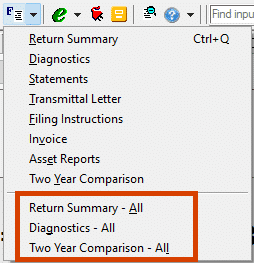
- From theForms viewquick-access menu you can now print:
- Two Year Comparison for the current return you're in, or for the client's federal and all state/local returns attached to the client.
- Diagnostics for federal and all attached state/local returns.
Onvio integration
- If licensed, an Onvio Documents icon
 is now available on the UltraTax CS toolbar.
- When a client’s tax return is open, this will launch Onvio to the specific client.
- When a document is open, it will launch Onvio to that specific document.
- AWeb - Print Onlyoption is now available in forOrganizer Delivery Method. This lets you send PDF organizer copies to Onvio client documents instead of preparer documents.
- You can send an eSignature to Onvio without adding the tax return. Go to tab. When you select this option, you can send the eSignature package without enabling Client Center and creating a web tax return.
SafeSend integration
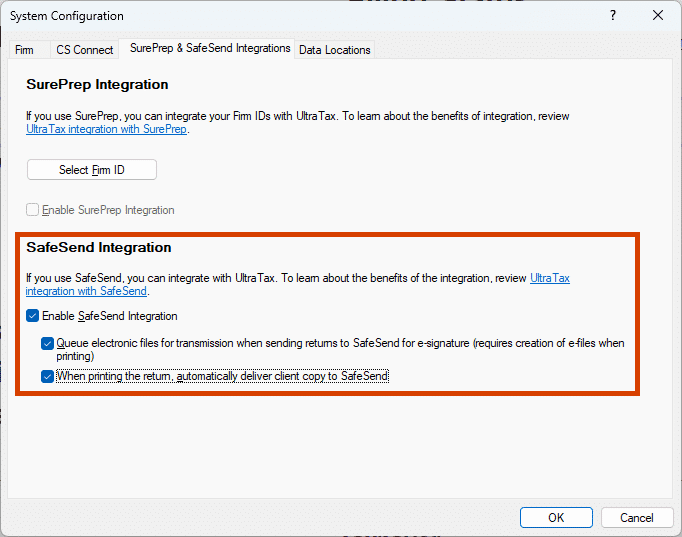
- You now activate SafeSend integration in tab. In this window you can also:
- Choose to automatically deliver a client copy of the return to SafeSend when you print.
- Choose to automatically queue e-files to transmit once the SafeSend signature is completed.noteYou'll need to create the e-file and client copy for SafeSend at the same time for this to work.
- You can now create Organizers in a PDF format that works with SafeSend's requirements.
- Before, you had to manually adjust collations and other settings each time you wanted to send an Organizer to SafeSend, then revert back to your normal settings.
- Now, when you selectSafeSendin or it will automatically apply the required settings without altering your default UltraTax CS configurations.

Tax Automation with 1040Scan
Tax Automation with SurePrep 1040Scan allows you to:
- Upload client source documents directly into Tax Automation to create binders and initiate automated processing.
- Submit binders through SurePrep 1040SCAN Pro or 1040SCANverify (Onshore/Offshore) for automated extraction and verification.
- Review and verify extracted data directly within the workflow before import into UltraTax CS.
- Automatically import verified data into UltraTax CS for a smooth transition into preparer review.
- Download annotated, bookmarked PDFs for efficient review and reference.
- Track clients through upload, verification, issues, and download stages within one centralized dashboard.
Tax Automation with SafeSend Gather
Tax Automation with SafeSend Gather allows you to:
- Create and deliver an Organizer directly to a client with just a few clicks from within UltraTax’s Tax Automation- no more printing and uploading.
- Track SafeSend gather engagement status’ from within Tax Automation
- Automatically process uploaded client documents based on set threshold if you also own 1040Scan
SurePrep integration
- You now activate SurePrep integration in tab.
- SurePrep users no longer need to manage API keys as part of UltraTax CS integration.
- All SurePrep users need to complete the new integration setup in 2025, even if you previously enabled integration in a prior year version of UltraTax CS.
- Prior years of UltraTax CS will continue to utilize API keys previously configured, therefore no additional action is needed in 2024 UltraTax or earlier.
- You can print PDF client copies of the return to SurePrep in .
- If you're licensed for 1040SCAN, you'll have a newTax Automationbutton in the UltraTax CS toolbar. With this you can:
- Create a 1040SCAN binder with the correct entity and tax solution selected, and add documents to that binder.
- Verify data using the web-based Review Wizard.
- Automatically import extracted data.
- Additive will extract K-1 information into a spreadsheet specifically formatted for 1040SCAN.
Protection Plus integration
- Protection Plus enrollment status is automatically verified.
- Activate integration and check enrollment status in tab.
Depreciation
- Bonus Depreciation is now 100%. Elections for 40% and 0% are still available.
- States will accommodate decoupling modifications. Make sure to watch for CS Connect updates as state agencies begin to release information.
- TheDate in serviceis now in YYYY format.
- The asset module now has depreciation limits for passenger automobiles placed in service in 2025 for California.
Electronic Payments
Under Executive Order 14247, the IRS is moving away from accepting checks for balance due returns or issuing paper checks for refunds for all entities. While Electronic Funds Withdrawal (EFW) and Electronic Funds Transfer (EFT) are already available in UltraTax CS:
- Additional business forms will update to allow for EFW.
- Organizers and input screens will update, where applicable, to reflect available payment and refund options.
- 1040 Filing instructions will update to adjust this change.importantBecause of major changes to filing instruction wording, certain filing instructions with payment or refund language won't be available to proforma from 2024 UltraTax CS.
1040
In addition to the OBBBA changes already released for 2024 UltraTax CS, 2025 will have the following changes in a future release:
- Automatic changes (no data entry needed):
- New Senior Deduction
- Increased Child Tax Credit
- A new State and Local Tax (SALT) limitation worksheet calculates automatically, when applicable. It takes into account the new thresholds and limitations.
- Client Analysis diagnostics now include OBBBA provisions.
- TheW2screen:
- HasQualified TipsandQualified Overtimein Box12and the Salary and Wage report has this detail.
- Has a field for theTreasury Tipped Occupation Code (TTOC)in Box14. Note the requirement to report TTOC is for the 2026 tax year. You can enter it in 2025, if known, so it's available for tax year 2026 and help identify clients with qualifying tips.
- The1099K,1099M, and1099NECscreens now accommodate TTOC.
- TheOthAdjscreen now includes other "above the line" deductions reported on Schedule 1-A:
- Qualified new car loan interest
- Qualified Tips Deduction
- Qualified Overtime Deduction
- TheB&Dscreen now accommodates digital assets:
- Capital GainsSchedule for Detailhas letter codes matching Form 8949 instructions.
- Source Data Entry now supports Form 1099-DA
- The following are new forms (which you can also e-file):
- 7207 Advanced Manufacturing Production Credit
- 7217 Partner's Report of Property Distributed by a Partnership
- 7218 Clean Fuel Production Credit
- You can now e-file the following forms:
- 8802 Application for US Residency Certification
- 8621 updated to allow multiple units of Page 3
note
As a reminder, the IRS and state taxing agencies typically delay e-filing for returns that include re-designed forms.
1120
- The following are new forms:
- 1120S: New 2-Year Comparison for Shareholder Basis
- 1120 Ohio: IT-4738 Support for Fiscal-Year filers
- You can now e-file the following:
- 1120 Arizona: Support for Arizona 120X e-file
- 1120 Oregon: Support for EFW for Portland and Metro Estimates
- 1120 Virginia: Support for EFW for Estimates (Form 500ES) and Extension (Form 500CP)
note
As a reminder, the IRS and state taxing agencies typically delay e-filing for returns that include re-designed forms.
1065
- The following are new forms:
- 8082 Notice of Inconsistent Treatment or Administrative Adjustment Request
- 8985 Pass-Through Statement—Transmittal/Partnership Adjustment tracking Report
- 8986 Partner's Share of Adjustment(s) to Partnership-Related Item(s)
- 1065 Iowa: Form 2220 (updated to a calculating form), 128, and 128S
- You can now e-file the following:
- 1065 Iowa: Forms 128 and 128S
- 1065 Indiana: EFW Support for Estimates
- 1065 Kansas: EFW Support for Estimates
- 1065 Oklahoma: EFW Support for Estimates
note
As a reminder, the IRS and state taxing agencies typically delay e-filing for returns that include re-designed forms.
1041
- You can now e-file the following:
- 1041 Iowa: E-file Estimates and Extension (for both main and composite returns)
- 1041 Michigan: Direct deposit
- 1041 New Hampshire: Direct deposit
- 1041 Ohio: E-file Estimates; Direct deposit
- 1041 South Carolina: E-file Estimates; Direct Deposit
note
As a reminder, the IRS and state taxing agencies typically delay e-filing for returns that include re-designed forms.
Other return types
- New and Revised 706 Federal Schedules.
- New Federal Form 709-NA
- 990 Federal: Direct deposit added

