
Edit the RFBA letter
You can use ONESOURCE Fringe Benefits Tax to generate an RFBA letter. RFBA letters can be created as a mail-merged PDF or sent directly to the employee's email. A default letter is provided.
You can't edit the default letter. However, you can use the default letter for your RFBA letter, or create your own by making a copy of the default and editing the copy.
- SelectAdministration, thenRFBA Lettersfrom the navigation bar.
- Make a copy of the default RFBA letter by selectingDefault RFBA letterin theDescriptioncolumn.
- Select theCopybutton on the toolbar. A new row appears, showing a copy of the default letter.
- Select the copy and select theEditbutton on the toolbar. A new window opens that lets you add and edit the text. You can edit the existing letter, or compose a new one, and can copy text from another application, such as Microsoft Word. (Text pasted directly from Word may not retain the original formatting.)
- To add an image, such as your logo, select the insert image icon. You can drag the image into the box that opens, or click into the box and navigate to the image location on your computer.
- To add mail-merge tags, position your cursor where you want to place the merge field. Select the small arrow next to the mail merge icon
 , then select the merge field from the list.
- Select theAssociated Reporting Entitiesbox and check the checkboxes next to the reporting entities to be associated with this letter. You can checkSelect all, or select only specific reporting entities.
Mail merge fields
Merge fields are markers in a document that pull from another source to add to letters and envelopes to facilitate the creation of letters or messages to many recipients. Multiple merge tags are built in to ONESOURCE Fringe Benefit Tax.
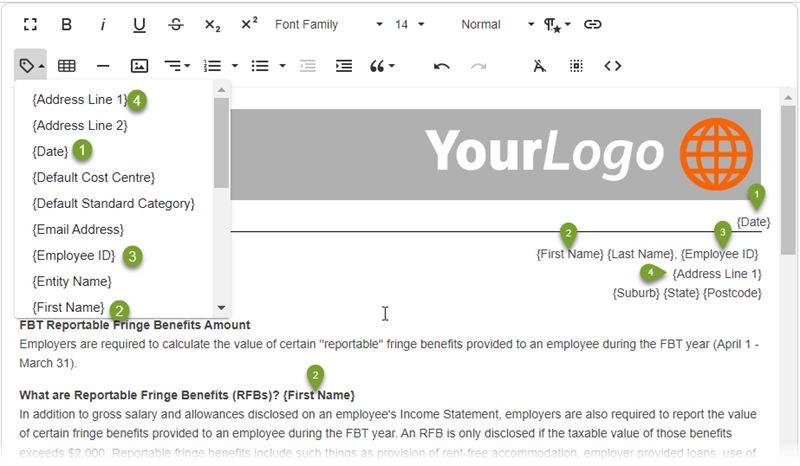
When you generate the letters, individual letters are created for each employee ID that is set up for your organization.
Adding an image
When you click into the
Drop image
box, you can select the location of the graphic file on your computer. The file size limit is 128 kbytes.Related Content
-
Generate RFBA letters
Format: Article,
4 min read
Article,
4 min read