
Upload files from your device to the chat
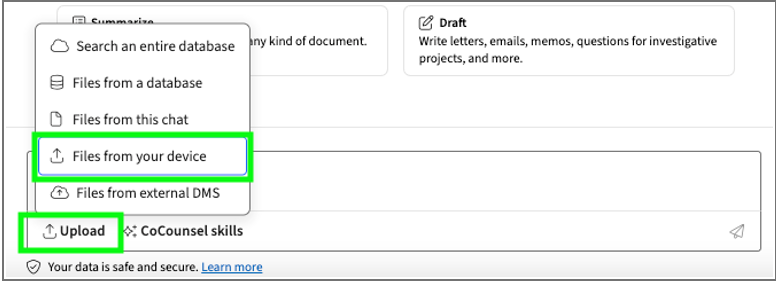
You can upload files from your device in the chat window on the CoCounsel screen:
- SelectUploadthenFiles from your device.
- You can drag and drop files into the space or selectSelect files.
- The files will be staged in the chat window, ready to be used for running in skills that supports document uploads.
- SelectView all # filesto view all files selected or remove individual files before running a skill.
Upload compressed files to search
Do the following to upload compressed files to CoCounsel search:
- In the chat window, selectUploadthenFiles from your device.
- Select your zipped file.
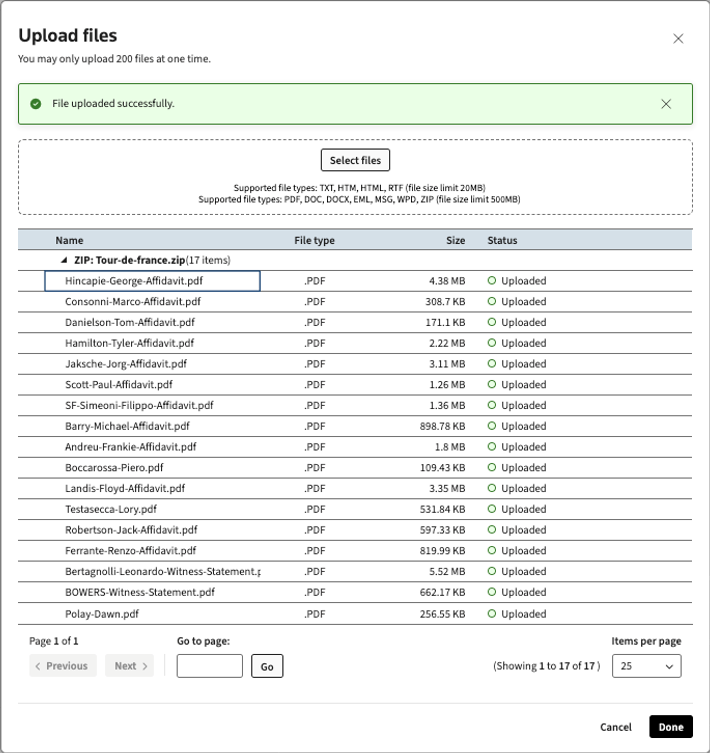
- In the Upload files screen, you can verify the name, file type, size, and status of each file that was extracted.note
- You can selectPreviousorNextto view all the pages sequentially. Or, you can enter a page number in theGo to pagefield then selectGoto go to that page specifically.
- You can use theItems per pagedropdown to customize how many files show on each page.
- Confirm the files you want then selectDone.
- Your compressed files will be staged in the chat and ready to run in a CoCounsel skill.
note
Zip limits
- You can upload up to 200 files in your zip at a time. If you try to upload more than that, you'll get the following error:You can't upload more than 200 files at once. Please try again.
- You can upload up to 20 MB per file for TXT, HTM, HTML, RTF file types.
- You can upload up to 500 MB per file for PDF, DOC, DOCX, EML, MSG, WPD file types.
Related Content
-
Access chat files
Format: Article,
1 min read
Article,
1 min read