
Roles in Publisher
An individual organisation
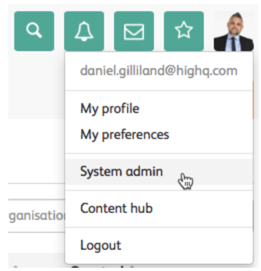
An individual organisation and all of its users can be granted access to more content and modules by increasing their particular organisation permission structure. To add a new organisation, navigate to
Your profile
> System admin
:
Select
Organisations
under Users, organisations & groups
to display the Organisations
screen: 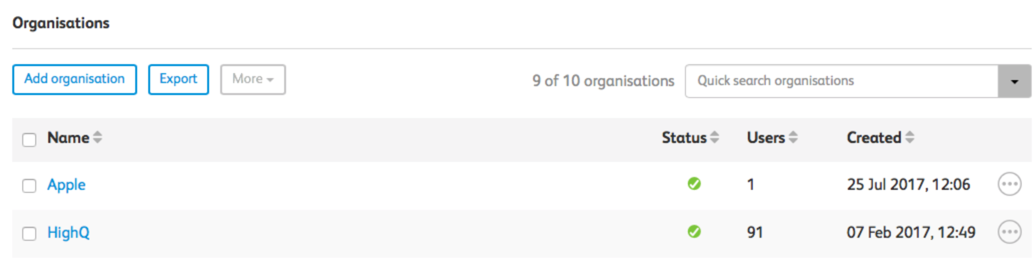
A user group
If you want to provide access to content or a module on a per-user basis and break the organisation inheritance, you can create a 'User group' and add people to it.
Content specific
You can also permission individual content items published in modules to more people if required, by tailoring the permission structure at the time of publishing content.
User roles
There are two main types of user, both of which can be given one or more different roles in the system.
External users
An 'External user' is anyone associated with an external organisation and by default, all new organisations are created as external organisations. There is a drop-down in the
Organisation details
screen: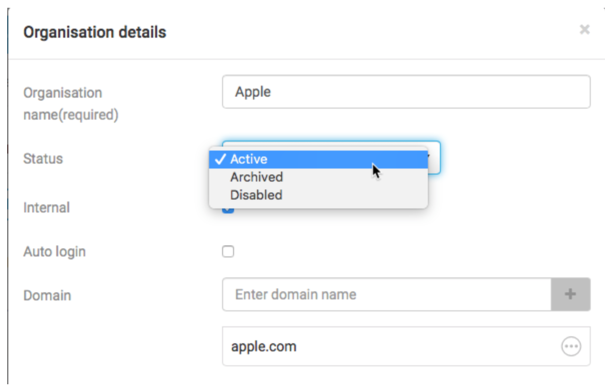
And this is used to change the status of the organisation. Internal users can then be given one or more roles in the system.
There are two main role types which can be assigned to external users:
- External access - This role provides read-only access to content
- .External admin - This role allows the user of an external organisation to manage the users for that organisation. This means you can allow a client contact to manage users for his organisation
Internal users
An 'Internal user' is anyone associated with an internal organisation. Internal organisations are usually just license holders.
There are six main role types which can be assigned to internal users:
- System admin- This is the highest level of access for a user and should only be given to a very few accounts in the application
The system provides five additional roles that are directly associated with modules, so it is possible to have specific roles for specific modules. The module-specific roles are:
- Useradmin- The ability to administer users, organisations and groups in the system, but can only apply permissions for specific modules. Full system admin rights are hidden and restricted
- Internaluser- Read-only user access to the system
- Editor- These users can create content in a specific module, but cannot publish content themselves. Content is submitted for approval and must be approved before it is published. Additionally, they can edit content, and resubmit it for publication
- Approver- Gives the ability to create, edit, and publish content in a module. They are alerted when new content has been submitted by editors for approval
- Moduleadmin- Gives the ability to control all aspects of the module such as dashboard creation, metadata management and content element selection AND all the functionality of the above roles
Related Content
-
Channel admin
Format: Article,
1 min read
Article,
1 min read
-
Form admin roles
Format:
Article,
4 min read
-
System Reporting Administrator Role
Format:
Article,
2 min read