
Email to friend view hits audit
Overview of the report
This report gives the user the ability to report whether content that has been shared via the
Share via email
option has been opened by its recipients.Running the report
Navigate to
System administration
> Audits & reports
> Email
> Email to friend view hits audit
to display the Email to view hits audit
screen.In the
Email to friend view hits audit
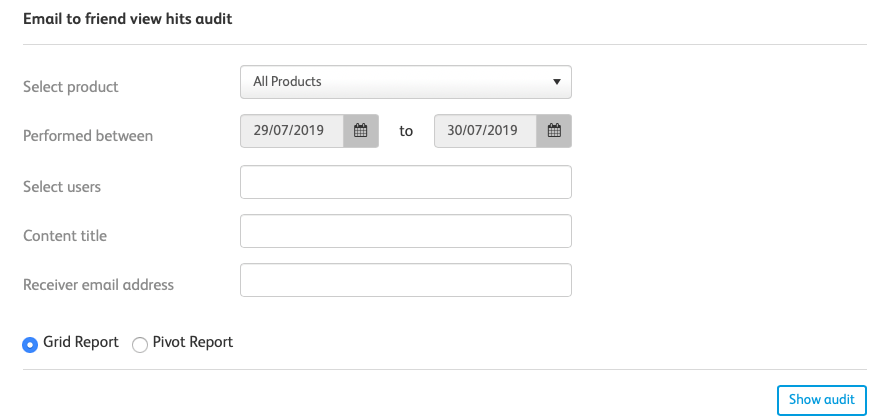
screen, you have access to the following fields:- Select product: Here, you can select any piece of content to run the audit against. If you selectAll products, the report will run against all reportable pieces of content in the instance
- Performed between: This is the date range of the audit
- Select users: Here, you can enter in any specific users you want the audit to run against. If this field is left blank, the audit will perform against all users
- Content title: Here, you can enter the title of any pieces of content you want to specifically audit. If this field is left blank, the audit will perform against all pieces of content
- Receiver email address: Here, you can enter a specific users email address and audit whether they have opened the links sent to them or not
- Grid Report / Pivot Report: Here, you can choose which style of report you want to display.
Select
Show audit
to show your final audit. Once you have clicked Show audit
, you can select Download to excel
to download your report to an excel spreadsheet.Related Content
-
Audits and reports
Format: Article,
2 min read
Article,
2 min read