
Workflow overview
Workflow and process automation empower firms to automate legal processes. Whether it is legal project management, due diligence reporting, AI-powered contract review or transaction and litigation management, workflow brings people, content, and process together.
note
Workflow is a premium feature of the HighQ platform - if you do not have it enabled and want to evaluate it please speak to your account manager.
Watch our introduction video on workflows:
note
A
site administrator
can build a workflow; however any site user can trigger rules, be assigned a task and receive custom emails, as part of the workflow process.note
To make the best use of workflow you should ensure that the
Files
, iSheets
, Tasks
and Events
modules are all enabled. Building workflows and rules overview
Add a workflow in
Admin
> Workflow management
, then build rules that trigger actions in your workflow process.A single workflow can contain multiple rules; then each rule defines the triggers that, if conditions are met, start one or more actions.
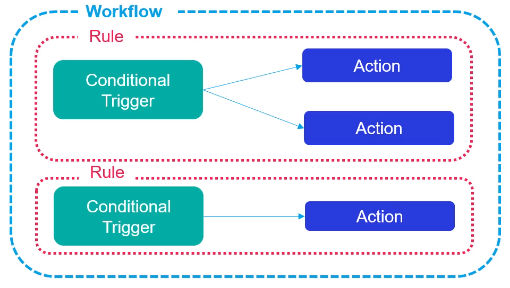
note
See Manage workflows to automate tasks for best practices when adding workflows.
Building rules in Workflow
A workflow is defined in a step-by-step process:
- Add a workflow as a container that will hold a set of related rules.
- Start to build your rule - add a rule description to your workflow.
- Add triggers with conditions to the rule, based on:
- iSheet records
- Files
- Tasks
- Dates
- Schedule
- Add actions to the rule (each article below describes a single type of action):
- Update iSheet columns (choice, date, user lookup, single-line text and multi-line text)
- Send for approval (send a file)
- Activate both the workflow and your rules:
- Open theRule builderscreen and selectMore actionsfor your workflow description, selectActivateto change the status of aDraftworkflow toActive..
- Each rule must also be activated - open the rule then selectMore actionsfor each rule that is needed and selectActivate.
Workflow audit history
The Workflow history audit allows you to search through historical workflow activity and also test workflow rules without searching for the automated outputs.