Auto-verified billing
Auto-verified pages are billed at a different rate letting you to save verification costs and time.
If any modifications are made on an auto-verified page, then only entries/fields that were added, deleted, or modified by a verifier in the verification wizard will be charged the entry fee rate. If there were no modifications made by a verifier, then Non-modified Auto verified page and entry charges will apply for the page and its entries.
What is Auto-verified?
There are two ways a page can be considered auto-verified.
Auto-verification | Description |
|---|---|
Native-PDF | SurePrep's OCR (Optical Character Recognition) extracts the text data directly from a native PDF document and auto-verifies the information. This PDF was digitally created and distributed and was not scanned at any point. |
Non-native PDF | scanned in from a physical paper document and uploaded to the binder as a PDF image. |
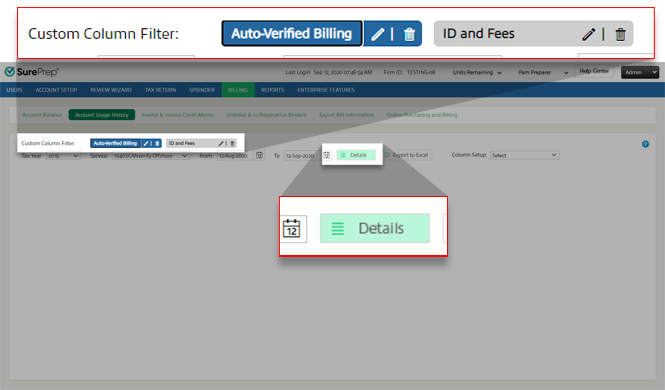
To view auto-verified billing details, go to:
- Account Admin,Billing, thenAccount usage History
- Account Admin,Billing, thenUnbilled & In Preparation Binders.

Select
Service
, 1040SCANverify Offshore
, or 1040SCANverify Onshore
.
Select the billing date range then, select
Details
.
The billing details appear for auto-verified pages and entries (fields). Scroll horizontally to view all the auto-verified columns.
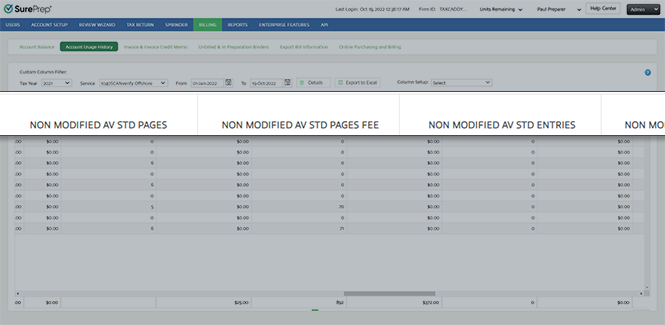
Auto-verified billing is split between the following fields:
Modified AV
: Fields/Entries that were modified by a verifier on an auto-verified page. Non-modified AV
: Fields/Entries that were not modified by a verifier on an auto-verified page. Columns | Auto-verified Document Type | Description |
|---|---|---|
Modified AV Std Entries | Standard | Total number of entries (that is, fields) that were modified or not modified. |
Non Modified AV Std Entries | ||
Modified AV Std Entry Fee | Standard | Total cost for all input entries (that is, fields) that were modified or not modified. |
Non Modified AV Std Entry Fee | ||
Modified AV Organizer Entries | Organizer | Total number of entries (that is, fields) that were modified or not modified. |
Non Modified AV Organize Entries | ||
Modified AV Organizer Entry Fee | Organizer | Total cost for entries that were modified or not modified on Organizer documents that were auto-verified. |
Non Modified AV Organize Entry Fee | ||
Modified AV Std Pages | Standard | Out of all the auto-verified pages, the total number of auto-verified pages that were modified or not verified. |
Non Modified AV Std Pages | Standard | |
Modified AV Std Pages Fee | Standard | Cost of modifying auto-verified Standard document pages that were modified by the verifier. |
Non Modified AV Std Pages Fee | Standard | Cost of not modifying auto-verified Standard documents. When auto-verified pages are not edited in the verification wizard, then non-standard rates are applied for those pages. |
note
Auto verified pages that are not modified will be charged at
Non-Modified
page rate. Modified auto-verified pages will be charged at the standard page fee rate. Auto-verified pages that are identified as Superseded
, Bookmark Only
, or Duplicate
will be charged at the standard page fee rate.Auto-verified Savings
View your total cost savings from submitting auto-verified documents under the
AUTOVERIFIED SAVINGS
column group. 
Column | Description |
|---|---|
AV Total Pages | Total number of auto-verified pages. |
AV Total Non Modified Pages | Total number of auto-verified pages that were not-modified by a verifier. |
AV Page Fee Savings (a) | Total amount of verification fees saved on auto-verified pages that were not modified, compared to other pages that were modified by a verifier and charged a regular rate (including modified AV pages). |
Non Modified AV Std Entries | Total number of entries (that is, fields) that were not modified by a verifier (on an auto-verified Standard page). |
Non Modified AV Std Entry Fee Savings (b) | Amount of verification fees saved on entries that were not modified on a Standard document that was auto-verified. This is in comparison to other Standard pages that were modified by a verifier (including modified AV pages) and charged a standard rate. |
Non Modified AV Organize Entries | Total number of entries (that is, fields) that were not modified by a verifier (on an auto-verified Organizer page). |
Non Modified AV Organize Entry Fee Savings (c) | Amount of verification fees saved on entries that were not modified on an Organizer document that was auto-verified. This is in comparison to other Organizer pages that were modified by a verifier (including modified AV pages) and charged a standard rate. |
AV Total savings (a+b+c) | Sum of the total amount saved through auto-verification. The sum is a total of the following columns:
|
Helpful Tip
Customize the billing report to show specific columns based on your personal preferences. This can be helpful if you only need to view or export billing information for specific items.
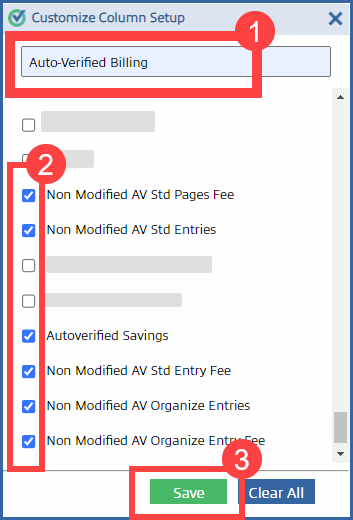
To use the filter, select the saved filter, then select
Details
to view the wanted columns.