
TaxCaddy units
TaxCaddy requires pre-purchased units to perform actions. TaxCaddy units let tax professionals complete essential tasks for their clients in TaxCaddy. Each action type in TaxCaddy is classified as either a Gather or Deliver action. Any action you perform consumes one of these two types (once per taxpayer, per tax year, per tax return type).
For example, when working on Tom Taxpayer's client profile, you will only consume a max of 2 TaxCaddy units per client. 1 unit lets you do all gather activities and 1 TaxCaddy unit lets you do all deliver activities.
note
TaxCaddy Gather/Deliver units purchased online can be utilized for both Gather and Deliver activities, irrespective of unit type. Gather units can be used for Deliver activities. Conversely, Deliver units can be used for Gather activities.
If you want to purchase TaxCaddy units, contact your SurePrep's Sales representative.
TaxCaddy Gather activities
TaxCaddy unit is used to Gather when completing tasks pertaining to the Gather phase of the tax filing process. The following Gather actions can consume a TaxCaddy unit:
- Sending a Questionnaire
- Creating a DRL (Gather unit only charged for Offline Client types, doesn’t charge for Standard Client type)
- Sending a DRL
- Tax professional Uploading documents (Standard (Online) and Offline clients)
- Sending letters to sign without Knowledge-Based Authentication
- Using Smart Links (Upon successfully fetching the document)
Actions taken for an Offline client profile will charge similar to a Standard(Online) client (for example, Uploading Documents). However, unlike Standard clients, you will be charged a Gather unit when creating a DRL for an Offline client.
TaxCaddy Deliver activities
TaxCaddy unit is used to Deliver when completing tasks pertaining to the Deliver phase of the tax filing process.Actions that collect TaxCaddy Deliver unit include:
- Sending letters to sign with Knowledge-Based Authentication (that is, e-file Authorization)
- Uploading invoices
- Uploading tax returns
- Uploading tax payments
- Uploading documents using theSplit Deliverablesfeature in Reviewer Dashboard
For firms using SafeSend Returns (SSR) integration, TaxCaddy charges Deliverable units for each delivered item type only. There is no additional cost for using SSR.
Unit consumption
Each action type listed previous (for example, Upload Documents) will be consumed 1 unit only per tax year/tax return(for example, 1040, 1041) for the taxpayer. For each action, units are only consumed once per client, per tax return type, per tax year. Repeating the same action again won’t consume additional units if it is completed for the same tax year with the same tax return profile.
Example: The first time Paul Preparer uploads a document to Tom Taxpayer's 1040 tax return profile for the year 2022, the firm will incur one TaxCaddy Gather unit charge. For the same 2022 tax year, subsequent document uploads to this client profile's profile will no longer be charged. However, if Paul uploads a document to Tom's 1041 tax return profile, another TaxCaddy Gather unit will be collected.
Example (different tax return profile):
Upload documents - Charged 1 unit once only for 2022 if uploaded to 1040 tax return profile.
Upload documents - Charged 1 more unit once only for 2022 if uploaded to 1041 tax return profile.
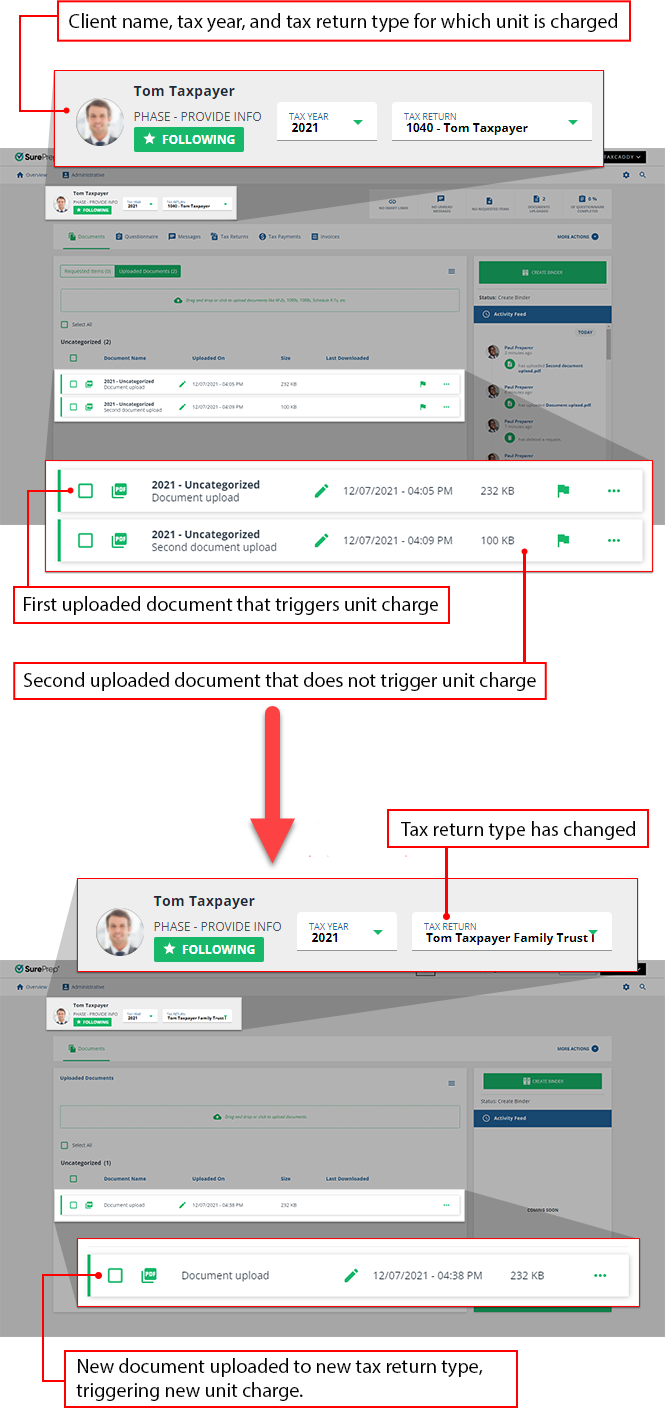
TaxCaddy tasks are bundled together based on Gather or Deliver actions. Once a TaxCaddy unit is charged for a (Gather/Deliver) task, then all other tasks under the respective Gather/Deliver action will be included as part of a bundle. The Gather/Deliver unit will be charged once per client when completed by the tax professional (for the selected tax year/tax return).
Example: Sending a questionnaire to Tom will consume 1 TaxCaddy unit for Gather. You won’t be charged again for completing another
Gather
task like creating a DRL. All other gather tasks will be bundled together and available. Only 1 TaxCaddy Gather unit will be charged once per taxpayer, per tax year, per tax return type.
Checking existing units
In the event that you are completing actions in bulk (using multiple units at once), be sure to have enough units available to complete your task, otherwise, TaxCaddy will only be able to complete as much of the task as possible given the number of units available. You can add more TaxCaddy Gather and Deliver units by contacting your SurePrep Sales representative.
If you are unsure of the amount of TaxCaddy Gather and Deliver units in your account, you can point to
Units Remaining
in FileRoom to check your balance.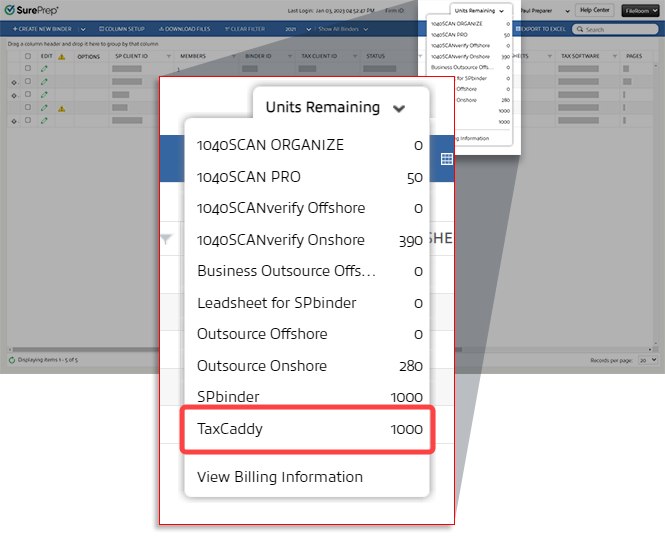
Users with access to
Account Admin
, then BILLING
section can view additional balance details and check the account usage history for TaxCaddy Gather
and TaxCaddy Deliver
services.Notifications
TaxCaddy will alert you if you have insufficient TaxCaddy units available to complete the action. Notifications appear in the bottom left of your screen.

note
Error notifications appear when your firm doesn’t have enough TaxCaddy Gather or Devlier units available to complete an action or your firm is close to using up the remaining balance. Contact your SurePrep Sales representative if you want to purchase additional TaxCaddy units.
Types of notifications:
Gather/deliver notifications will be visible to all Tax Pro users but the email notifications will only go to Firm System Admin users.

Clarification
: This notification appears when you don’t have enough units to complete an action that requires one TaxCaddy Gather unit. Purchase additional units before attempting this action again.Possible Gather causes
:- Adding a Smart Link
- Sending Questionnaire
- Sending letters to sign without Knowledge-Based Authentication
- Sending DRLs
- Creating DRLs
Possible Deliver causes
:- Sending letters to sign with Knowledge-Based Authentication
- Adding a tax returns
- Adding a tax payment
- Uploading an invoice

Clarification
: This notification appears when you don’t have the units to complete an action that requires a TaxCaddy Gather unit. Purchase additional units before attempting this action again.Possible causes
:- Sending DRLs
- Creating DRLs
- Sending letters without Knowledge-Based Authentication

Clarification
: This notification appears when you don’t have the units to complete an action that requires a TaxCaddy Gather unit. Purchase additional units before attempting this action again.Possible causes
:- Sending letters to sign with Knowledge-Based Authentication

Clarification
: This notification appears when you don’t have the units to complete an action that requires more than one TaxCaddy Gather unit. When sending items in bulk, be sure to check your unit balance before starting the process. You much purchase additional TaxCaddy Gather units before attempting this action again.Possible causes
:- Sending questionnaires
- Creating DRLs
- Sending DRLs
- Sending letters without Knowledge-Based Authentication
Clarification
: This notification appears when you don’t have the units to complete an action that requires more than one TaxCaddy Deliver unit. When sending items in bulk, be sure to check your unit balance before starting the process. You much purchase additional TaxCaddy Deliver units before attempting this action again.Possible causes
:- Sending letters with Knowledge-Based Authentication (that is, e-file Authorization)
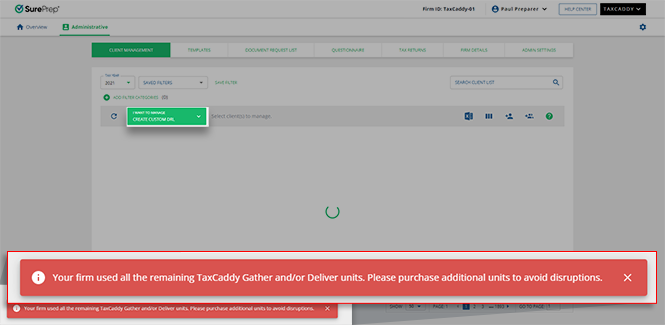
Clarification
: This notification appears when you switch to an action on the MANAGE CLIENTS
menu in Client Management
and your firm doesn’t have enough pre-purchased units available to complete that action. When sending items in bulk, be sure to check your unit balance before starting the process. You much purchase additional TaxCaddy Deliver units before attempting this action again.Possible causes
:- You may be prevented from performing a certain action based on the (Gather or Deliver) units required to perform that action.
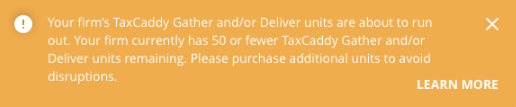
Clarification
: This notification appears when your firm's gather and/or deliver units are approaching zero. You will only be able to complete as many actions as there are units in your account, purchase additional units to avoid interruptions.Possible causes
:- Your firm will soon deplete its gather/deliver units.
Email Notification
Firm System Administrators will get an email notification when TaxCaddy Gather or Deliver units are low or have been completely consumed.
From: noreply@taxcaddy.com
Subject:
- TaxCaddy Units Nearly Exhausted
- TaxCaddy Units Exhausted
