
Generate a Thomson Reuters Account token
Generate and use a Thomson Reuters Account token by transfer type. Downstream API calls don't change. Send your token the same way you do today, using Authorization: Bearer <token>. Only how you obtain the token differs.
Every transfer follows the same 2-call pattern:
- Call 1:Your application gets an access token from the Thomson Reuters Account and caches it.
- Call 2:Your application calls the product API through Apigee with that token. It repeats this call for each business operation until the token is close to expiring.
Machine application (client credentials)
Machine Applications use the OAuth 2.0 Client Credentials transfer to get a token directly from Thomson Reuters Account.
Field | Value |
|---|---|
Token endpoint | Non-PROD: auth-nonprod.thomsonreuters.com/oauth/token
PROD: auth.thomsonreuters.com/oauth/token |
Grant type | client_credentials |
Required parameters | client_id, client_secret, audience |
Token format | Signed JSON Web Token (JWT) |
Token lifetime | 24 hours |
Rate limit | 40 token requests per hour, per client |
How the transfer works
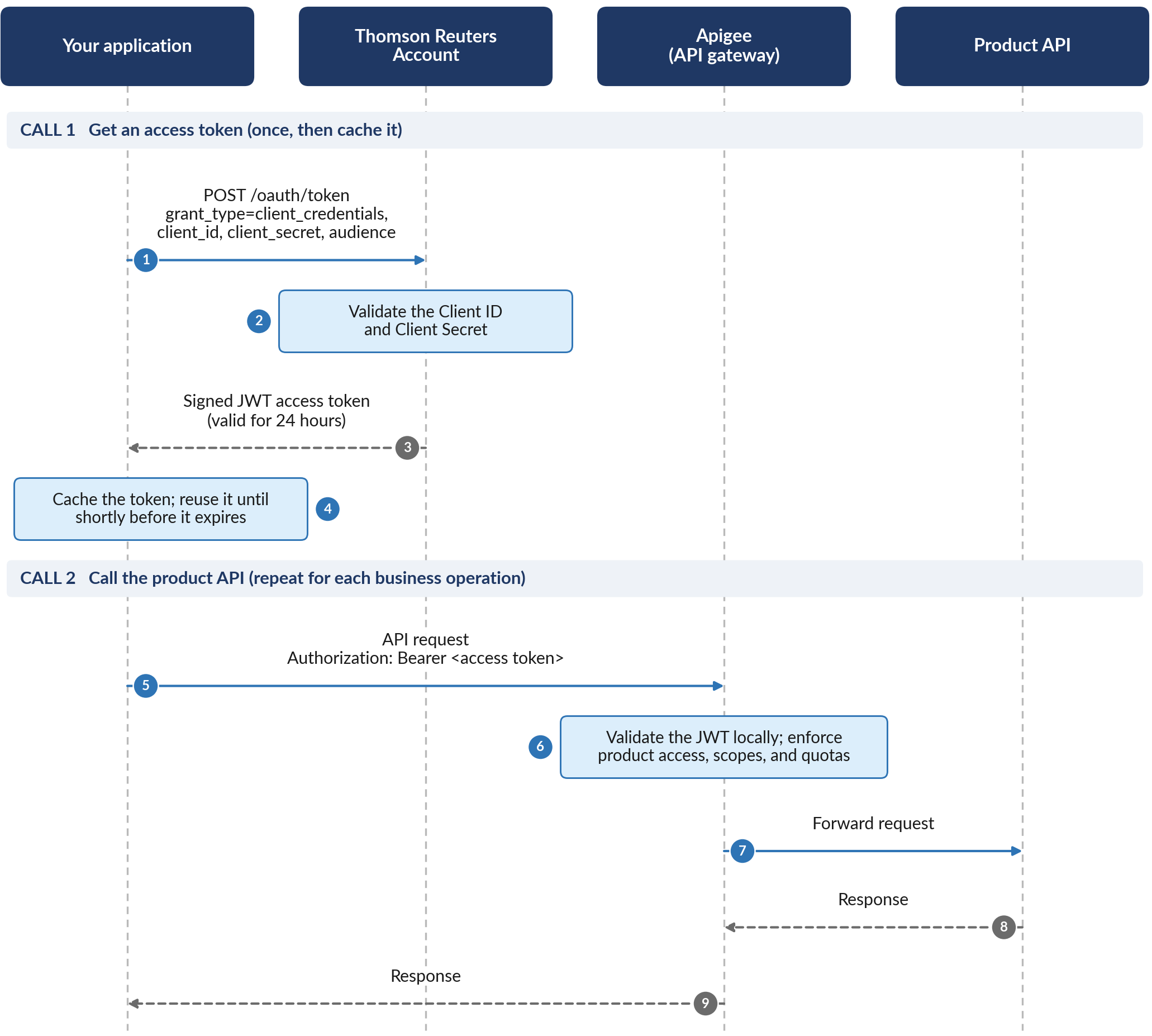
Steps 1 to 4 are Call 1, which gets an access token once so your application can cache it. Steps 5 to 9 are Call 2, which calls the product API and repeats for each business operation.
- Your application sends a POST request to the Thomson Reuters Account token endpoint/oauth/token. The request includesgrant_typeset toclient_credentials, theclient_idandclient_secret, and theaudienceof the API product to call.
- Thomson Reuters Account validates the Client ID and Client Secret.
- Thomson Reuters Account returns a signed JWT access token that's valid for 24 hours.
- Your application caches the token and reuses it until shortly before it expires.
- Your application calls the product API through Apigee and sends the token in the Authorization: Bearer<access token>header.
- Apigee validates the JWT locally against the published Thomson Reuters Account signing keys and enforces your product access, scopes, and quotas.
- Apigee forwards the request to the product API.
- The product API sends its response to Apigee.
- Apigee returns the response to your application.
Sample request:
curl --location 'https://auth-nonprod.thomsonreuters.com/oauth/token' \
--header 'Content-Type: application/json' \
--data '{
"client_id": "<<ClientId>>",
"client_secret": "<<Secret>>",
"audience": "https://cis-api-nonprod.thomsonreuters.com",
"grant_type": "client_credentials"
}'
Where to find each value
Parameter | What it is | Where to find it |
|---|---|---|
client_id | Your application's Client ID. | Application Details page in API Administration. |
client_secret | Your application's Client Secret. | Displayed only once, when you create the application or rotate the secret. API Administration doesn't store it. |
audience | Identifies the API product (resource server) the token is for. | ONESOURCE Products table on the Application Details page. |
scope (optional) | The scopes to request. If you leave it out, Thomson Reuters Account grants the scopes associated with the audience. | ONESOURCE Products table on the Application Details page. |
The token endpoint also accepts form-encoded requests. This example sends the same request as application/x-www-form-urlencoded and includes the optional scope parameter:
curl --location 'https://auth-nonprod.thomsonreuters.com/oauth/token' \
--header 'Content-Type: application/x-www-form-urlencoded' \
--data-urlencode 'grant_type=client_credentials' \
--data-urlencode 'client_id=<client-id>' \
--data-urlencode 'client_secret=<client-secret>' \
--data-urlencode 'audience=<audience>' \
--data-urlencode 'scope=<scope>'
important
- Use the Thomson Reuters Account URL for token generation. Use the Apigee or product endpoint URL for API calls; these are different hosts.
- Request a token for each API product you use. A single token maps to only 1 audience, so cache a separate token per product.
- Cache every ID token and access token, especially M2M access tokens, until it's about to expire or has expired, then request a new one. Don't request a new access token on every API call. Thomson Reuters treats this as abuse and may rate-limit or block your client.
Use the token to call APIs
Once you receive the token, send it as Authorization: Bearer
<token>
against the product API. Downstream API calls work the same way; only how you obtained the token differs.- Authorization header:send the token as a bearer token, the same as today. Use Authorization: Bearer <token>. The token is now a Thomson Reuters Account (Auth0) JWT, not an Apigee opaque token.
- Scopes and products:Apigee continues to govern authorization scopes. Your token's audience maps to the products you're entitled to call.
- Validation:Apigee verifies your token locally against Thomson Reuters Account (Auth0)'s published signing keys. This change adds no extra network call or slowdown.
Sample API call:
curl --location 'https://<product-api-endpoint>/<resource>' \
--header 'Authorization: Bearer <access-token>'
Rotate your Client Secret
Rotate your Client Secret at least once every 12 months. We don't enforce this automatically, so schedule it yourself, following your organization's security policy.
Rotate the secret from the Application Details page in API Administration. As with a new application, the new Client Secret displays only once. Copy it, store it securely, and update your integration to use it.
Machine application (client assertion) JWTCA
Machine Applications can also authenticate with Client Assertion, also called JWTCA, or the
private_key_jwt
method, instead of sharing a Client Secret. Your application signs a short-lived JWT with a private key and presents the signed assertion to prove its identity. Thomson Reuters Account validates the assertion against the public key you registered during onboarding.Select this transfer if your organization's security policy prefers key-based authentication over shared secrets, or if you want to avoid the work of rotating secrets.
Client Secret or Client Assertion?
Method | Use it when | Key consideration |
|---|---|---|
Client Credentials with a Client Secret | Your server-to-server integration can securely store and rotate a shared secret. | Rotate the Client Secret at least every 12 months. |
Client Assertion (recommended) | Your security policy prefers key-based authentication, or you want to avoid rotating a shared secret. | Protect the private key and generate a fresh signed assertion for every token request. |
A Machine Application uses 1 method at a time. You can convert an application from Client Secret to Client Assertion, but not from Client Assertion back to Client Secret.
Register for Client Assertion
During onboarding, generate an asymmetric key pair using RS256 or RS384. Register the public key with the Thomson Reuters Account for your Machine Application.
If you're upgrading an existing Client Assertion application, your already-registered public key is reused automatically to set up your Thomson Reuters Application. You can change the certificate afterward if you'd like.
Your private key never leaves your environment. It is used only to sign the assertion JWT locally.
In API Administration, select
Client Id
and Client Assertion
as the Application Authentication
, then provide the X.509 certificate that contains your public key.Generate a development key pair and certificate
For non-production testing, create a 2048-bit RSA key pair and a self-signed certificate with OpenSSL. These commands use Windows Command Prompt syntax. Don't use development keys in production.
SET KEY_NAME=CERT
mkdir "%KEY_NAME%"
openssl genrsa -out "%KEY_NAME%/%KEY_NAME%.key" 2048
openssl req -new -x509 -key "%KEY_NAME%/%KEY_NAME%.key" -out "%KEY_NAME%/%KEY_NAME%.cert" -days 735
openssl rsa -in "%KEY_NAME%/%KEY_NAME%.key" -pubout -out "%KEY_NAME%/%KEY_NAME%.pub"
openssl rsa -in "%KEY_NAME%/%KEY_NAME%.key" -out "%KEY_NAME%/%KEY_NAME%.rsa.key" -traditional
Register the .cert file, your certificate, with your application. Keep the .key and .rsa.key files, your private key, secure.
Field | Value |
|---|---|
Token endpoint | Non-PROD: auth-nonprod.thomsonreuters.com/oauth/token
PROD: auth.thomsonreuters.com/oauth/token |
Grant type | client_credentials |
Client assertion type | urn:ietf:params:oauth:client-assertion-type:jwt-bearer |
Required parameters | client_assertion_type, client_assertion, audience. The client_assertion value is your signed JWT. |
Assertion JWT lifetime | Short-lived. Auth0 supports a maximum of 5 minutes; we recommend 1 minute. |
Token format/lifetime | Signed JWT / 24 hours |
Rate limit | 40 token requests per hour, per client |
How the transfer works
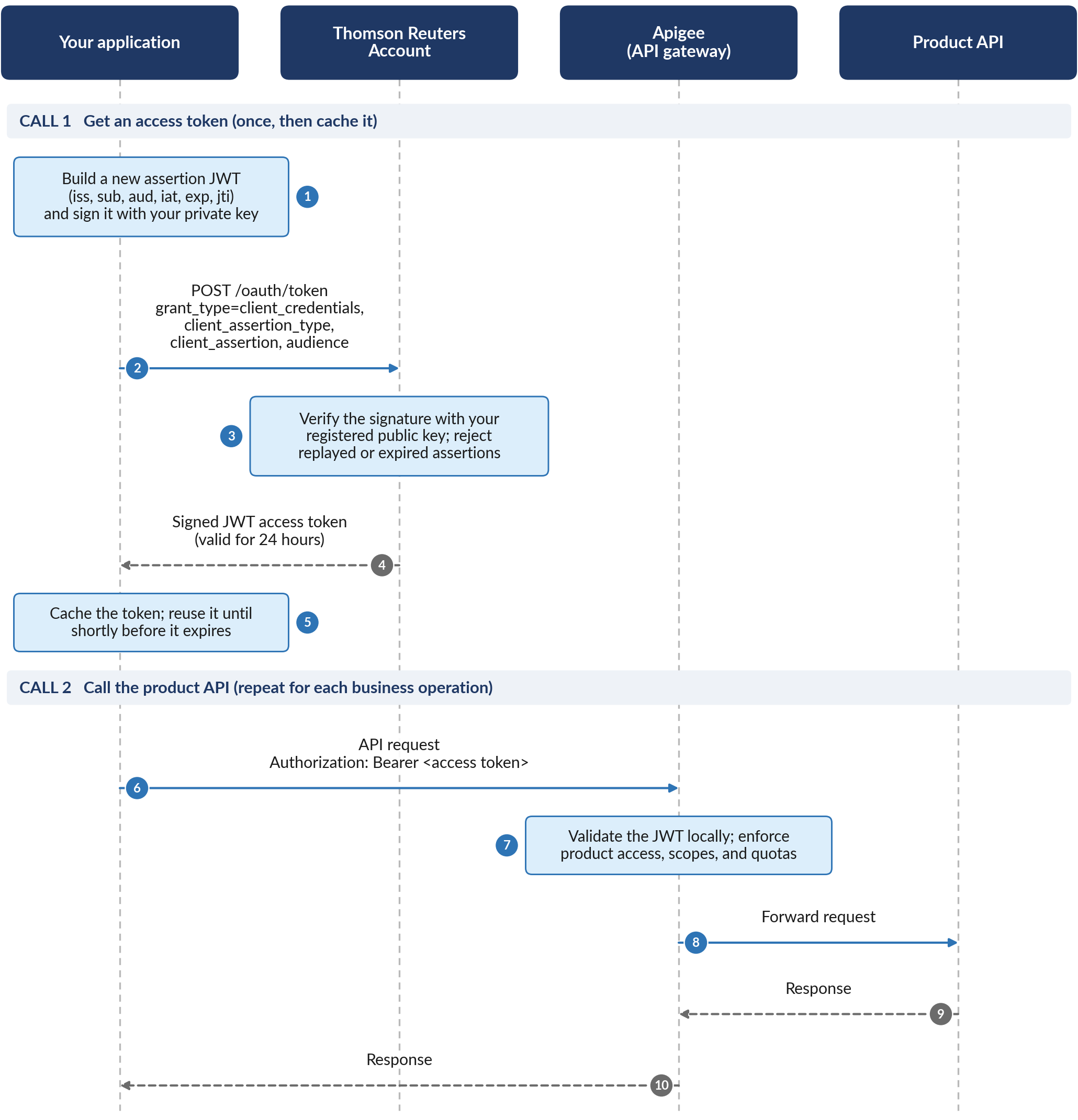
Steps 1 to 5 are Call 1, which gets an access token once so your application can cache it. Steps 6 to 10 are Call 2, which calls the product API and repeats for each business operation.
- Your application builds a new assertion JWT with the iss, sub, aud, iat, exp, and jti claims, and signs it with your private key.
- Your application sends a POST request to the Thomson Reuters Account token endpoint/oauth/token. The request includesgrant_type=client_credentials, theclient_assertion_type, the signedclient_assertion, and the audience of the API product to call.
- Thomson Reuters Account verifies the assertion's signature with your registered public key. It rejects the request if the assertion has expired or has already been used.
- Thomson Reuters Account returns a signed JWT access token that's valid for 24 hours.
- Your application caches the token and reuses it until shortly before it expires.
- Your application calls the product API through Apigee and sends the token in the Authorization: Bearer<access token>header.
- Apigee validates the JWT locally against the published Thomson Reuters Account signing keys and enforces your product access, scopes, and quotas.
- Apigee forwards the request to the product API.
- The product API sends its response to Apigee.
- Apigee returns the response to your application.
Assertion JWT claims
Claim | Requirement | Description |
|---|---|---|
iss | Required | Your application's Client ID |
sub | Required | Your application's Client ID |
aud | Required | The URL of the Thomson Reuters Account tenant or domain that receives the assertion |
exp | Required | Expiration time. Use the shortest expiry. The maximum is 5 minutes. |
jti | Required | A unique claim ID per request. Use a UUID. This prevents replay. |
If you already use Client Assertion with Apigee, review how you build the assertion. For Thomson Reuters Applications, set
aud
to the Thomson Reuters Account token endpoint for your environment, sign the assertion with the key registered for the application, and include the header values in the following table.Value | Requirement | Description |
|---|---|---|
alg (header) | Required | The signing algorithm registered for your credential: RS256, RS384, or PS256. |
kid (header) | When applicable | The key ID assigned to your registered credential. Copy it from the Application Details page. |
iat (claim) | Recommended | The time the assertion was issued (the current time). |
For aud, use 1 of these values:
- Non-PROD: https://auth-nonprod.thomsonreuters.com/oauth/token
- PROD: https://auth.thomsonreuters.com/oauth/token
Example: generating a client assertion (Python)
import uuid
from datetime import datetime, timedelta, timezone

import jwt


def generate_client_assertion():
    with open("./private_key.pem", "r", encoding="utf-8") as private_key_file:
        private_key = private_key_file.read()

    now = datetime.now(timezone.utc)
    client_id = "<client-id>"

    payload = {
        "iat": int(now.timestamp()),
        "iss": client_id,
        "sub": client_id,
        "aud": "https://auth-nonprod.thomsonreuters.com/oauth/token",
        "exp": int((now + timedelta(minutes=1)).timestamp()),
        "jti": str(uuid.uuid4()),
    }

    headers = {"alg": "RS256", "kid": "<key-id>"}

    return jwt.encode(payload, private_key, algorithm="RS256", headers=headers)


if __name__ == "__main__":
    print(generate_client_assertion())
This example uses the PyJWT library. Install it with pip install “pyjwt[crypto]”. Any standard JWT library can produce the same assertion.
Sample: exchanging a JWT assertion for an access token
curl --location 'https://auth-nonprod.thomsonreuters.com/oauth/token' \
--header 'Content-Type: application/x-www-form-urlencoded' \
--data-urlencode 'grant_type=client_credentials' \
--data-urlencode 'audience=<<audience>>' \
--data-urlencode 'client_assertion_type=urn:ietf:params:oauth:client-assertion-type:jwt-bearer' \
--data-urlencode 'client_assertion=<<JWT Assertion>>'
Copy the audience value from the Application Details page in API Administration. You can also add the optional scope parameter, as in the Client Credentials example.
note
- Sign a new assertion JWT for every token request. Don't reuse a previous assertion. Thomson Reuters Account verifies thejtiand timestamp claims to prevent replay.
- Store your private key the same way you store a Client Secret. Use a secrets manager or a hardware-backed key store, never source code.
- A Machine Application supports either Client Assertion or Client Credentials, not both.
- Cache every ID token and access token, especially M2M access tokens, until it's about to expire or has expired, then request a new one. Don't request a new access token on every API call. Thomson Reuters treats this as abuse and may rate-limit or block your client.
Use the token to call APIs
Send a token from this transfer the same way you send a Client Credentials token. Use the header
Authorization: Bearer <token>
when you call the product API. Downstream API calls work the same way; only how you obtained the token differs.User application (authorization code)
User applications include web apps, mobile apps, and single-page apps that act on behalf of a signed-in end user. They authenticate using the OAuth 2.0 authorization code transfer. Thomson Reuters Account requires PKCE (Proof Key for Code Exchange) for every user application, public and confidential clients alike, with no exceptions.
Unlike Machine Applications, a User Application doesn't present a Client Secret from a browser or mobile client. Instead, the user signs in interactively, and your application receives tokens through a redirect.
Field | Value |
|---|---|
Authorization endpoint | Non-PROD: auth-nonprod.thomsonreuters.com/authorize
PROD: auth.thomsonreuters.com/authorize |
Token endpoint | Non-PROD: auth-nonprod.thomsonreuters.com/oauth/token
PROD: auth.thomsonreuters.com/oauth/token |
Grant type | authorization_code |
Required authorization parameters | client_id, redirect_uri, response_type=code, scope, state, code_challenge, code_challenge_method=S256 (PKCE), max_age. Thomson Reuters Account requires max_age on every request. |
Required token parameters | grant_type, code, redirect_uri, client_id, code_verifier (PKCE) |
PKCE | Mandatory for all clients, public, and confidential. Thomson Reuters Account rejects authorization requests submitted without a valid code_challenge. |
Access token lifetime | 24 hours |
Token format | Signed JSON Web Token (JWT). Thomson Reuters Account also generates an ID token if you request the openid scope. |
Refresh token | Thomson Reuters Account generates one if you request the offline_access scope. Use grant_type=refresh_token to renew without another interactive sign in. |
important
- PKCE is mandatory for every User Application, with no exceptions.
- Theredirect_uriyou send in the token request must exactly match the one you used in the authorization request.
- Don't embed a Client Secret in a mobile app or single-page app. These are public clients and shouldn't receive one. If your onboarding materials show a secret for a browser-based app, contact your API support contact.
Choose your client type
Feature | Regular Web Application | Single Page Application (SPA) |
|---|---|---|
Client type | Confidential client: server-side code can keep credentials secret. | Public client: all code and memory are accessible in the browser. |
Client Secret | Used during the back-end token exchange. | Never used. Anyone could read it in the browser. |
Token storage | Server-side session (encrypted, HttpOnly cookie) or a secure vault. | In memory (for example, Web Workers or transient storage). |
PKCE | Mandatory, as defense in depth against authorization code injection. | Mandatory, to protect the authorization code in place of a Client Secret. |
Choose the client type (
User Client Type
) when you create the User Application in API Administration. The 2 types are mutually exclusive, and you can't change the type after you create the application. Both use the authorization code transfer with mandatory PKCE.How the sign-in transfer works

Steps 1 to 6 are Call 1, which signs the user in and gets an access token. Steps 7 and 8 are Call 2, which calls the product API on the user's behalf.
- The user selectsSign inin your application.
- Your application generates aPKCE code_verifierand itsS256 code_challenge, then redirects the user's browser to the Thomson Reuters Account authorization endpoint.
- The user signs in with Thomson Reuters Account using email and password or single sign-on, with multi-factor authentication where required. If the user has more than 1 ONESOURCE profile, they select a profile.
- Thomson Reuters Account redirects the browser to your registered redirect URI with an authorization code and your state value.
- Your application exchanges the code at the token endpoint, sending the originalcode_verifierand the sameredirect_uri.
- Thomson Reuters Account checks the code andcode_verifierand returns a signed JWT access token. It also returns an ID token and a refresh token if you requested them.
- Your application calls product APIs through Apigee with Authorization: Bearer<access token>.
- Apigee validates the JWT locally, enforces the token's scopes and your quotas, and forwards the request to the product API. The product API's response returns to your application through Apigee.
Parameter | Description |
|---|---|
client_id | Your User Application's Client ID. |
redirect_uri | A redirect URI registered for your application. The token request must use exactly the same value. |
response_type | Must be code. |
scope | The user and API scopes your application needs. Include openid to receive an ID token, and offline_access to receive a refresh token. |
state | A unique value for each request. Use it to match the response to your request and to protect against cross-site request forgery. |
code_challenge | The PKCE challenge derived from your code_verifier. |
code_challenge_method | Must be S256. |
max_age | Required by Thomson Reuters Account on every authorization request. Sets the maximum time, in seconds, since the user last signed in. |
Example authorization request:
GET https://auth-nonprod.thomsonreuters.com/authorize
  ?response_type=code
  &client_id=<client-id>
  &redirect_uri=<url-encoded-redirect-uri>
  &scope=<scopes>
  &state=<state>
  &code_challenge=<code-challenge>
  &code_challenge_method=S256
  &max_age=<max-age>
Line breaks are added for readability; send the request as a single URL. Generate a new state and
code_challenge
for every authorization request. Keep the matching code_verifier
secure, and send it only when you exchange the authorization code for tokens.Exchange the authorization code for tokens
After the user signs in, exchange the authorization code at the token endpoint. Use the same redirect_uri and the original code_verifier.
curl --location 'https://auth-nonprod.thomsonreuters.com/oauth/token' \
--header 'Content-Type: application/x-www-form-urlencoded' \
--data-urlencode 'grant_type=authorization_code' \
--data-urlencode 'code=<authorization-code>' \
--data-urlencode 'redirect_uri=<redirect-uri>' \
--data-urlencode 'client_id=<client-id>' \
--data-urlencode 'code_verifier=<code-verifier>'
Regular Web Applications, which are confidential clients, also send their
client_secret
in this request from their back end. Single Page Applications never send a Client Secret.Refresh an access token
If you requested the
offline_access
scope, use the refresh token to get a new access token without asking the user to sign in again.curl --location 'https://auth-nonprod.thomsonreuters.com/oauth/token' \ --header 'Content-Type: application/x-www-form-urlencoded' \ --data-urlencode 'grant_type=refresh_token' \ --data-urlencode 'refresh_token=<refresh-token>' \ --data-urlencode 'client_id=<client-id>'
Use the token to call APIs
Once your application has an access token, call our APIs the same way as today:
Authorization: Bearer <token>
. The token's bespoke claims, audience, and scopes determine which product APIs and operations the end user has authorized your application to access on their behalf.- Refresh:When the access token is near expiry, use the refresh token against the token endpoint (grant_type=refresh_token) to obtain a new access token without another interactive sign-in.
Always send the access token, not the ID token, to product APIs. The ID token tells your application who signed in; product APIs accept only access tokens.
Bespoke claims are ONESOURCE-specific claims, carried in the https://tr.com/bespoke claim, that describe the tenant, products, environment, and region associated with the token. Refer to reference: access token claims.
Reference: access token claims
Thomson Reuters Account issues access tokens as signed JWTs. You don't need to read the token to call product APIs, but its claims can help you troubleshoot an integration. Treat tokens as credentials and don't log or share them.
Claim | Description | Found in |
|---|---|---|
iss | The Thomson Reuters Account issuer URL for the environment that issued the token, for example https://auth.thomsonreuters.com/ | All tokens |
sub | The subject: the M2M client (ending in @clients) or the signed-in user. | All tokens |
aud | The API audience (product) the token was issued for. | All tokens |
iat, exp | When the token was issued and when it expires, as Unix timestamps. | All tokens |
scope | The space-delimited scopes granted to the token. | All tokens |
azp | The authorized party: the Client ID of the application that requested the token. | All tokens |
gty | The grant type: client-credentials for M2M tokens. | M2M tokens |
https://tr.com/bespoke | ONESOURCE-specific context: tenant, products, environment, and region. Refer to the next table. | All tokens |
https://tr.com/dynamic-api-scopes | ONESOURCE-specific API scopes associated with the token. | M2M tokens |
https://tr.com/federated_user_id
https://tr.com/federated_provider_id | The user's federated identity and the identity provider that authenticated the user. | User tokens |
https://tr.com/euid
https://tr.com/persona | The user's Thomson Reuters account identifier and persona identifier. | User tokens |
Field | Description |
|---|---|
APIProducts | The API products granted. |
Tenant | The ONESOURCE tenant where the application is hosted. |
UniversalId | The Universal ID associated with the application or user. |
OneSourceUserX500 | The ONESOURCE X.500 identifier, for example uid=<name>, o=OneSource, ou=<tenant>. |
emailaddress | The email address associated with the application or user. |
env | The environment, for example UAT, AMER, EMEA, or APAC. |
ft | The transfer type: ClientCredentials for M2M tokens and AuthorizationCode for user tokens. |
IsUge, hr | Whether the tenant is a UGE tenant (true or false) and, for UGE tenants, the home region. |
note
Claims that begin with https://api.thomsonreuters.com/ are Thomson Reuters metadata for internal use. Always use the https://tr.com/bespoke claims instead.
Related Content
-
Migrate API applications to Thomson Reuters Account
Format: Article