
Track credit card purchases
This sample walkthrough assumes you want to track the purchases on a credit card through each individual vendor along with paying the credit card company.
The credit card statement has 2 charges totaling $401.98:
- Ruth's Chris Steak House $249.11
- Best Buy $152.87
The general ledger accounts used in this example:
- 130 - Operating Account (current asset)
- 230 - Credit Card - Visa (current liability)
- 220 - Accounts payable (current liability)
- 515 - Meals and Entertainment (expense)
- 520 - PC Repairs (expense)
Set up the credit card as a bank account
- Go toSetup, thenBank Accountsand add a bank account for the credit card company. Use the Credit Card - Visa account (230 in our example) as theGeneral Ledger Accountnumber.noteA valid bank routing number is required.
- On the Check Layout tab, select a vendor check layout forAccounts Payable.
- SelectEnterto save your changes.
Set up the credit card as a vendor
- Go toSetup, thenVendorsand add the credit card as a vendor.
- In thePayment Preferencessection, select the bank account you use when processing accounts payable and whichever payment method you typically use to pay the credit card.
- On the Distributions tab, select the general ledger account for the credit card liability (230 in our example).
Set up the vendors listed on the credit card statement
- Go toSetup, thenVendorsand add a vendor for each unique line item on the credit card statement.
- In thePayment Preferencessection, select the bank account you use when processing accounts payable, andPaymentfor theMethod.
- On the Distributions tab, select the general ledger account for the expense account (515 in our example).
Enter the vendor payable
- Go toActions, thenEnter Payables.
- On the Detail tab, enter the payable listed on the credit card statement for each vendor, debiting the appropriate account (515 in our example).
Enter the AP Payment for the individual vendor
Create the payment in the
Enter Transactions
screen using an AP Payment type transaction. In the Bank Account
field, select the credit card bank account instead of the operating bank account. This results in a credit to the credit card liability account and a debit to the expense account. Repeat for each credit card charge on the statement.Apply the payments
- Go toActions, thenManage Payments.
- Select the payable and AP Payments from the credit card statement (There should be a payable and a payment selected for each item on the statement.).
- SelectApply Payments.
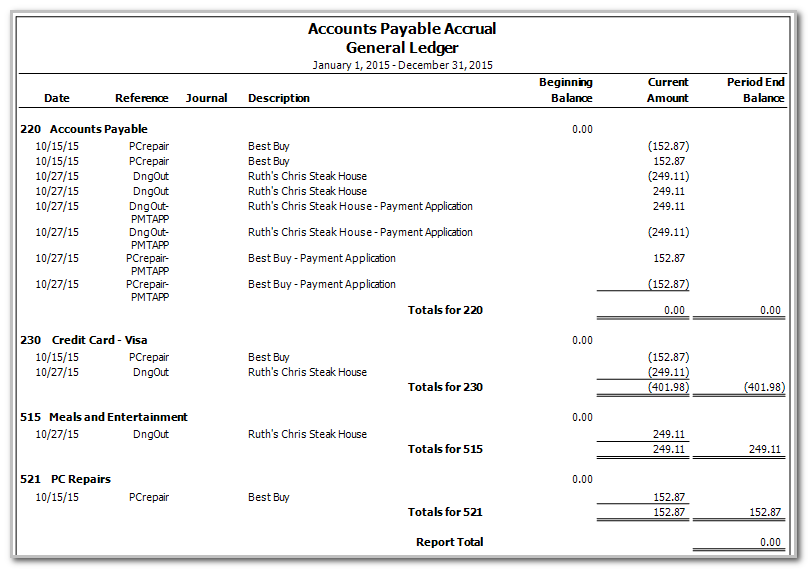
The result is a debit to the expense accounts and a credit to the credit card liability account, with a wash through the Accounts Payable account.

note
When running Accounts Payable reports (such as the Aging Schedule), filter to include the operating bank account, excluding the Visa credit card bank account so that the reports show the true accounts payable balance.
Enter the payable for the credit card statement
- Go toActions, thenEnter Payables.
- Enter the total credit card amount on the statement as the payable.
- In theDistributionssection, use the credit card liability general ledger account (230 in our example).
Pay the credit card statement balance
Go to
Actions
, then Manage Payments
and pay the credit card company as you typically would, using the typical bank account for payables (130 in our example).The final payment to the credit card company will wash through the Accounts Payable (credit) and Credit Card - Visa liability (debit) accounts and Cash account (credit).

