
Check summary memo examples
You can create Check Summary Memo type transactions for your clients in the
Enter Transactions
screen. The application uses check summary memos to group printed and handwritten checks and payments for a bank account, journal, and posting period into 1 credit distribution.Transaction-based reports, such as the General Ledger report, display the check summary memo as 1 cash entry distribution instead of listing the individual distributions for each check and payment.
note
You'll need to be in Journal mode (as set up in the
Enter Transactions Options
screen) to create check summary memos.- The Check summary memo type won’t be available if theEnter Transactionsscreen is inBank Accountmode.
- Checks can't be added to an existing Check Summary Memo transaction.
- Printed checks can be summarized in the general ledger by selecting a summarized Journal Entry Format within Report options of Print Reports from File.
- You can use theDistributions,Notes, andEventstabs on this screen to enter and review information that may be helpful with the check summary memo transactions.
Example
If you have the following checks and payments on the
Enter Transactions
screen:
Date | Reference | ID | Description | Accounts | Amount |
|---|---|---|---|---|---|
3/23/2016 | None | 16 | Staples | 101.640 | 566.18 |
3/24/2016 | None | None | Tim Riggins | 101.663 | 250.00 |
3/12/2016 | 119 | None | AT&T | 101.645 | 229.87 |
3/23/2016 | 120 | Elect | Detroit Edison | 101.661 | 447.23 |
3/23/2016 | 121 | 16 | Staples | 101.640 | 69.88 |
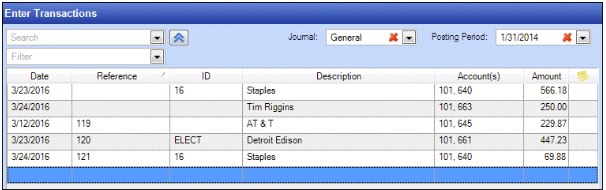
The General Ledger report displays the credit distributions of the checks and payments individually.

If you create a Check summary memo type transaction for the selected bank account, journal, and posting period, the application automatically calculates the transaction amount by summing the amounts for those checks and payments.
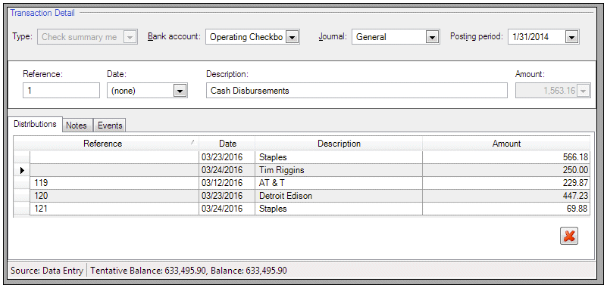
The General Ledger report lists a single credit distribution with the summary amount.

Related Content
-
Enter accounting transactions
Format: Article,
6 min read
Article,
6 min read

