Checks print the remainder of distribution rather than deductions
Scenario
When you print checks for employees with many deduction items, it's possible they won't fit on the selected check layout. In this situation you will see a summary of the remaining deduction items totaled on the check stub. The check stub in this example has room for only 7 deduction items. The remainder of the deductions is summarized in the 7th row.
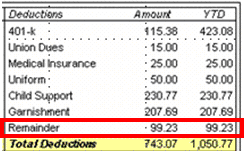
You can choose a different check layout, modify the current check layout, review the employee setup, and remove the Remainder line.
Choose a different check layout
If you've flexibility in check layouts, you can switch to another layout to make space for deduction items. To change layouts, select the
Check Layouts
tab in the Setup > Bank Accounts
window.Check layout capacity for deduction items | Check layouts |
|---|---|
Up to 6 |
|
Up to 7 |
|
Up to 8 |
|
Up to 9 |
|
Up to 10 |
|
Up to 12 |
|
Modify the current check layout
Use the following steps to make the text and repeating area smaller.
- SelectFile, thenLayout Designer.
- Select the payroll layout.
- Select the variables in the deduction section of the layout.noteYou can useCtrl+select.
- SelectFormat, thenTextand select a smaller font size.
- In the Design area, select the green repeating region around the deduction variables and drag the bottom line up to make the area smaller.
If there are more deduction items that don't fit on the layout, you can add another region that will continue the one that does not have enough space.
Review employee setup
Go to the
Payroll Items
tab on the Setup > Employees
window. Check if there are any deduction items that are no longer being used for certain employees. Clear the checkbox in the Active column to tun off Deduction items for that employee.Remove the Remainder line
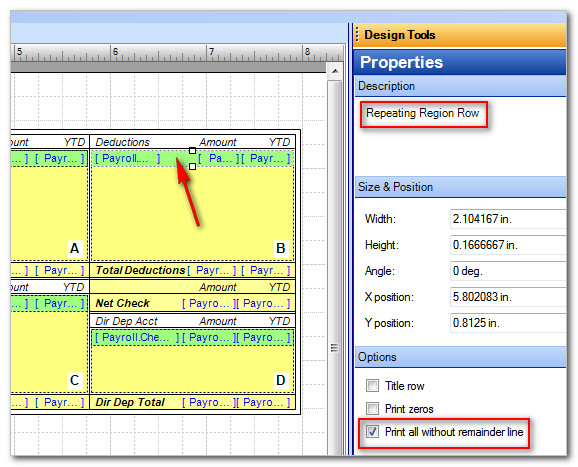
To remove the Remainder line in the Deductions section of the layout, edit the Repeating Region Row.
- Open your check layout in theLayout Designer.
- Select the repeating row (colored green) without selecting a variable.
- Mark thePrint all without remainder linecheckbox in the Options section of the Properties in Design Tools.