
EFTPS payment file format
The Electronic Federal Tax Payment System (EFTPS) offers you the convenience of making clients' federal tax payments electronically 24 hours a day and 7 days a week. EFTPS allows tax payments to move electronically from the taxpayer's bank account to the federal government's account. The taxpayer's records with the IRS are automatically updated for each such payment.
The following image shows a typical EFTPS file from the Process EFTPS screen.
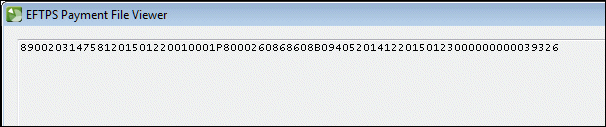
note
For clients that are set up as household type employers, the file differs. It will include I (for individual) rather than B (for business) and it will use the code 10406 for the 1040 tax type.
File format details
Field name | Type | Length | Details |
|---|---|---|---|
Batch Filer ID | Numeric | 9 | Go to Actions , then Process EFTPS and select the Setup button. |
Master Inquiry PIN | Numeric | 4 | Go to Actions , then Process EFTPS and select the Setup button. |
File Date | Numeric | 8 | Must be valid date YYYYMMDD. Accounting CS set this as the date the file was created. |
Filer Sequence Number | Numeric | 3 | Must be unique within day. Accounting CS starts with 001 and increments by 1 |
Payment Reference Number | Numeric | 4 | Must be ascending within file. Accounting CS starts with 0001 and increments by 1. |
Action Code | Character | 1 | This is always P for payment. |
Taxpayer TIN | Character | 9 | Retrieved from the Clients screen. |
Taxpayer PIN | Numeric | 4 | Retrieved from the Payment Preferences section of the Vendors screen for the 94X vendors. |
Taxpayer Type | Character | 1 | The type is generally B for business, but if the client is set up as a household type employer, the type is I for individual. |
Tax Type Code | Numeric | 5 | The codes are as follows:
|
Tax Period | Numeric | 6 | Must be valid date YYYYMM. This is the period for which there are liabilities. For 940, 943, 944, 945, and 1040 tax codes, the tax period is the year-end date of the liabilities. A separate file is created for each subsequent year for which there are liabilities. For 941 tax codes, the tax period is the quarter-end date of the liabilities. A separate file is created for each subsequent quarter for which there are liabilities. |
Settlement Date | Numeric | 8 | Mist be valid date YYYYMMDD. This is the due date of the liability. If you have marked the Use transaction date as settlement date checkbox in the Process EFTPS screen, then the settlement date is the check date that appears on the checks. |
Payment Amount | Numeric | 15 | Must be greater than 0 and less than 100,000,000. This is the amount of the liabilities that appears on the checks. |
Subcategory Code 1 | Numeric | 3 | Not a required field. If present must be valid IRS code |
Subcategory amount 1 | Numeric | 15 | Not a required field; if present, sum of subcategory amount must equal total payment amount. |
Subcategory code and amount repeated up to 5 | |||
Subcategory code 5 | Numeric | 3 | Not a required field. If present must be valid IRS code |
Subcategory amount 5 | Numeric | 15 | Not a required field; if present, sum of subcategory amount must equal total payment amount. |

