Calculation type examples
You can set the calculation type on the
Main
tab of the Payroll Items
screen. The options in this section vary depending on the type of the current payroll item.Select the appropriate calculation type from the drop-down list and then enter the amount, rate, or percentage.
Refer to the following examples for more information:
Example 1- employer contributions
In this example, the employee receives regular wages (which use the Hourly rate calculation method) and also receives a 401k Employer Match contribution amount (which uses the Hourly rate - Total hours calculation method).
During this pay period, the employee worked 40 regular hours, 10 overtime hours, and 6 double-time hours. The application totals the hours as follows.
Hours worked | Hours x multiplier | Total hours |
|---|---|---|
40 Regular | 40 x 1 | 40.00 |
10 Overtime | 10 x 1.5 | 15.00 |
6 Double-time | 6 x 2.0 | 12.00 |
Total | N/A | 67.00 |
The Employer Match contribution for this employee is 1.4 per hour worked (Total hours x 1.4).
When you enter wage hours for the employee, the application automatically calculates the 401k Employer Match contribution (67 hours x 1.4).

note
You can modify the calculation of the payroll item in various ways by selecting items to be excluded, such as by marking the
Premium wages
checkbox in the Exclusions section or by limiting the employer contribution to a percent of the employee's 401k deduction.Example 2 - deduction items
In this example, the employee receives regular wages (which use the Hourly rate calculation method) and has a Union Dues deduction amount (which uses the Hourly rate - Total hours calculation method).
During this pay period, the employee worked 40 regular hours, 10 overtime hours, and 6 double-time hours. The application totals the hours as follows.
Hours worked | Hours x multiplier | Total hours |
|---|---|---|
40 Regular | 40 x 1 | 40.00 |
10 Overtime | 10 x 1.5 | 15.00 |
6 Double-time | 6 x 2.0 | 12.00 |
Total | N/A | 67.00 |
The Union Dues deduction for this employee is $0.25 per hour worked, with a per-check limit of $15.
When you enter wage hours for the employee, the application automatically calculates the Union Dues deduction (67 hours x $0.25 = $16.75, but a $15 limit is applied).

note
You can modify the calculation of the payroll item in various ways by selecting items to be excluded, such as by marking the
Premium wages
checkbox in the Exclusions section.Example 3 - pay items
Hourly rate - total hours
In this example, the employee receives regular wages (which use the Hourly rate calculation method) plus a Union Premium Pay amount (which uses the Hourly rate - Total hours calculation method).
During this pay period, the employee worked 40 regular hours, 10 overtime hours, and 6 double-time hours. The application totals the hours as follows.
Hours worked | Hours x multiplier | Total hours |
|---|---|---|
40 Regular | 40 x 1 | 40.00 |
10 Overtime | 10 x 1.5 | 15.00 |
6 Double-time | 6 x 2.0 | 12.00 |
Total | N/A | 67.00 |
When you enter wage hours for the employee, the application automatically calculates the Union Premium Pay (67 hours x $2) as a separate payroll item when the wage hours are entered.

note
You can modify the calculation of the payroll item in various ways by selecting items to be excluded, such as by marking the
Premium wages
checkbox in the Exclusions section. Salary - hours sensitive
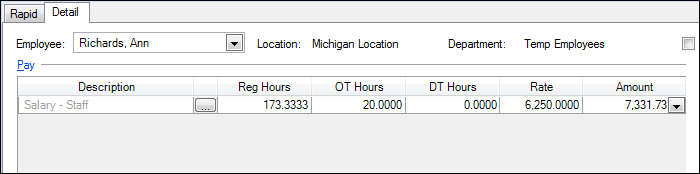
In this example, the employee’s annual pay (Salaried – Hours sensitive calculation type) is $75,000.00, and she is on a Monthly payroll schedule. Her monthly pay rate, then is $6,250.00. The employee worked 20 hours of overtime during this payroll period. Adding these hours during payroll check entry increases her pay amount to $7331.73, although her rate is still $6, 250.00.
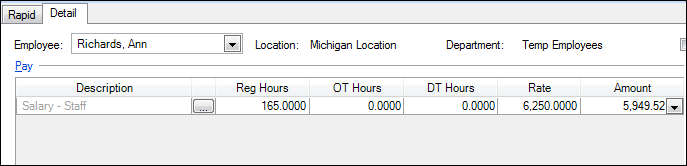
When this employee works fewer than the required hours, her pay amount decreases to $5,949.52, although her rate is still $6, 250.00.
Salary amount
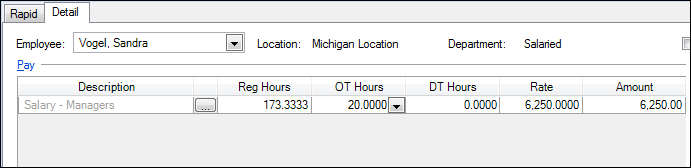
In this example, the employee’s pay item (Salary – Managers) uses the Salary calculation type. Her salary amount is $75,000.00 and she is on a Monthly payroll schedule. Accounting CS divides the salary amount into 12 payments of $6,250.00. The employee worked 20 hours of overtime during this payroll period, but adding those hours during payroll check entry does not change her pay amount.