
Pennsylvania: Determine which local taxes should calculate
Accounting CS calculates Pennsylvania Local Services Tax (LST) and Earned Income Tax (EIT). You can set up client and employee locations and addresses so that local taxes are calculated.
In Pennsylvania, there are 2 types of local taxes: Local Services Tax (LST) and Earned Income Tax (EIT). This article explains how calculations are determined for each tax type.
You'll need to know how to:
- Set up the client's work locations.
- Set up the employee's resident address.
- Set up the employee's work locations.
- Make sure the client has nexus with the resident locations.
Set up the client work location
Add or verify the work locations for the client in the
Client Locations
window. Select the Locations
on the Main tab of the Clients
screen.Set up the employee residential address
Add or verify the residential address for the employee in the Main tab of the
Employees
screen. When you enter or modify the address, make sure to:- Use theaddress verification featureto verify the address.
- Mark theResident addresscheckbox.
Set up the employee work location
All the work locations that are set up and verified for the client will be available for you to select for the employee from the Locations and Departments grid in the Main tab of the
Employees
screen. Select the locations from the dropdown lists in the Location column.note
If an employee works in multiple locations, Accounting CS calculates the LST tax that corresponds to the work location selected during data entry. Additionally, if the work location has the higher EIT tax, Accounting CS calculates the EIT tax accordingly.
Specify that the client has nexus in the resident localities
Once the employee and employer addresses have been verified through the address verification feature, you'll need to specify that the client has nexus in these localities. In the
Local
window, mark the Nexus
checkbox for the localities' EIT and LST tax.Use the Pennsylvania tax calculator
Accounting CS tries to match Pennsylvania's own online tax calculator. The examples in this article are intended to help you to read the reports that the tax finder generates.
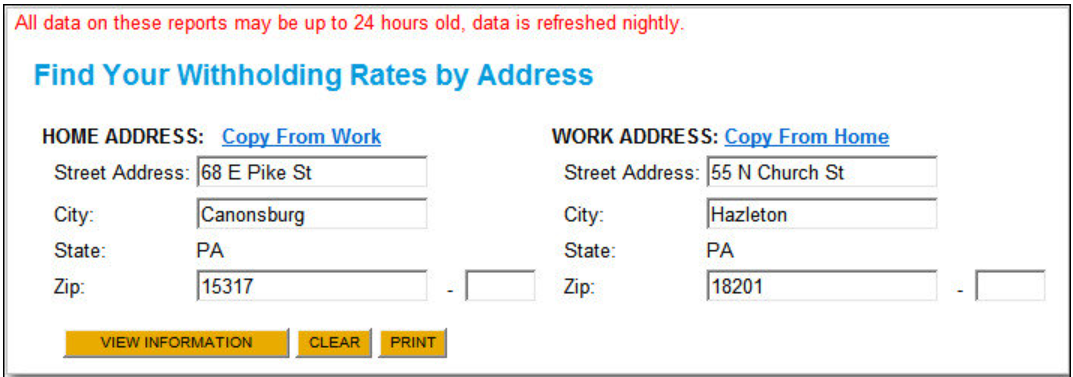
The main page of the site is where you enter the employee's home and work location addresses, and then select
View Information
.
In the LST and EIT examples that follow, we’ll use the information that displays when you select
View Information
in the online tax calculator.Local Services Tax (LST)
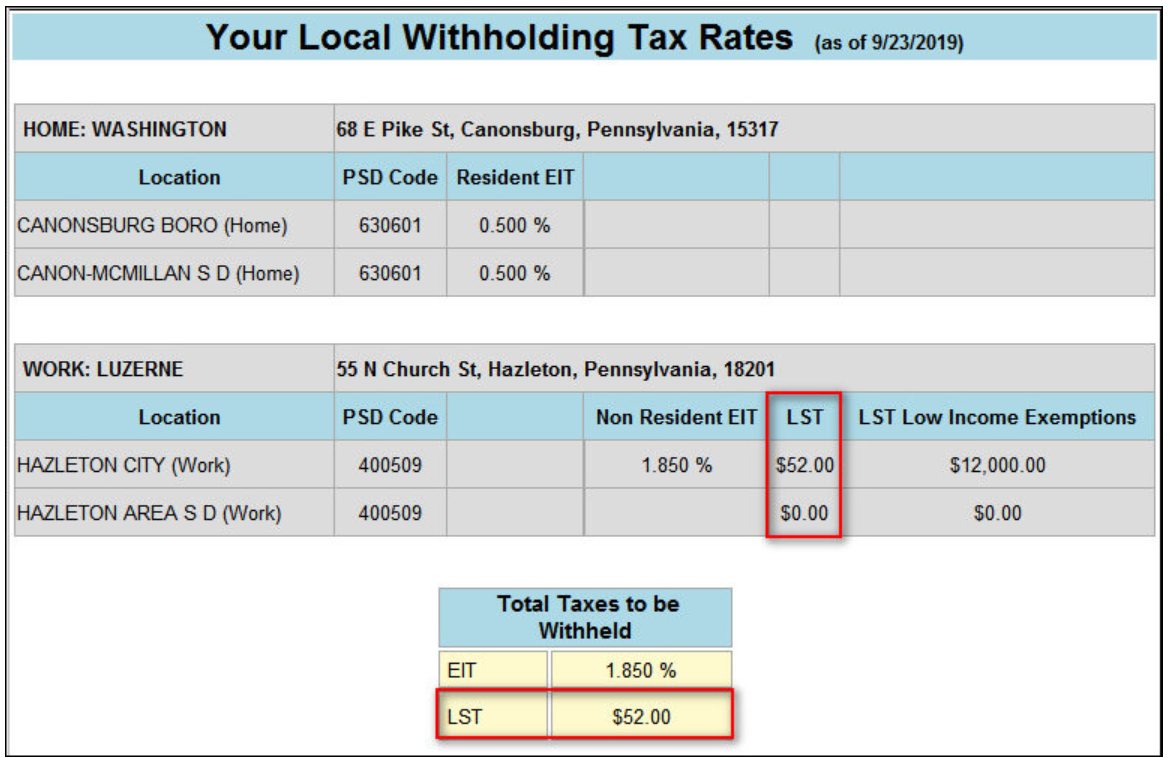
Accounting CS calculates the LST that corresponds to the employee's work location. In this example, the work address is in Hazleton.
Combining the LST taxes for both locations, you can see in this sample report that the total LST amount in the Total Taxes to be Withheld section is $52.
note
The LST amount listed is the amount due annually. Accounting CS divides this amount by the number of pay periods per year to determine the single check amount. For example, a weekly pay schedule employee would pay $1 per check ($52 / 52 weeks = $1).
Earned Income Tax (EIT)
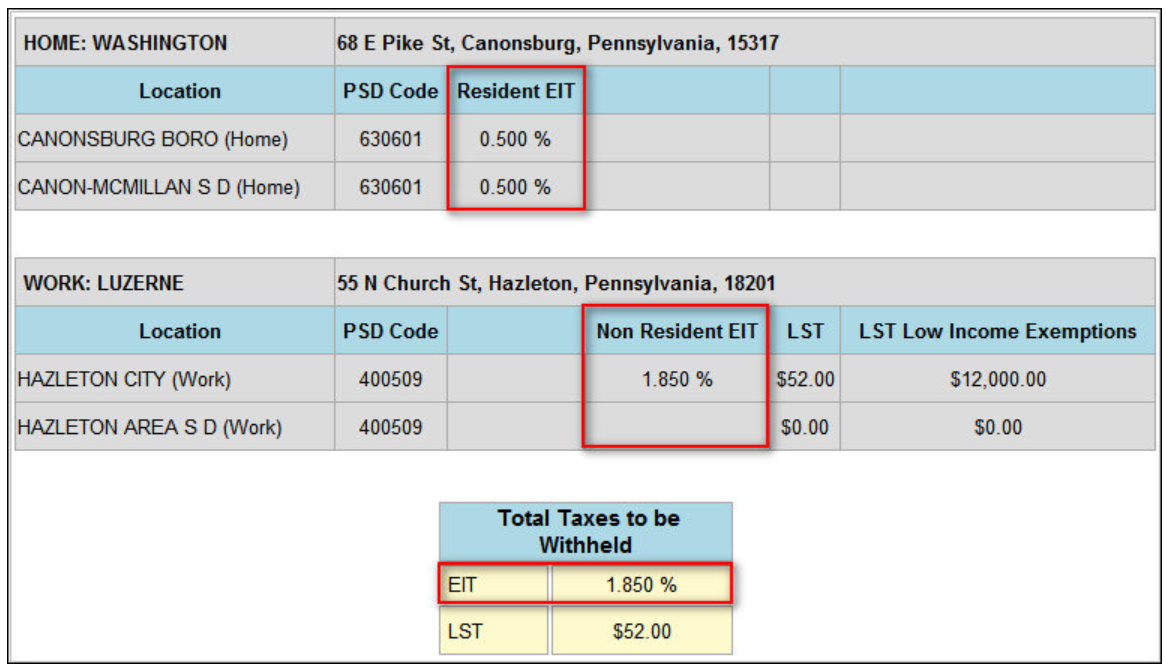
Accounting CS compares the rates of the employer and employee EIT taxes and calculates based on the higher rate.
In this example, the employee's work location tax rate is 1.85% and their residence location tax rate is 1%, so Accounting CS calculates the higher 1.85% work location rate and assumes that the taxes will be remitted to Hazleton City.
Accounting CS uses the total of the municipality and school district rates to determine the total EIT rate. So, in this instance, the total EIT rate based on the home address is 1%. The work location municipality is Hazleton (1.85%), and the school district is also South Fayette Township (0%).
note
When the employee's home rate is the same as the work location rate, Accounting CS calculates the work location EIT (as specified under Act 32).
Internal use only
In some circumstances, we have made exceptions and updated individual rates when they are reflected in the Real-Time Register but before they are reflected in the Official Register. However, there are ongoing maintenance and risk issues in making these exceptions, so we don't do this as a rule.
What to do if you encounter this situation
If you get notification from a user, or another source, that a PA locally has updated a rate with an effective date prior to the next update of the Official Register:
- Duplicate the incorrect rate. Use the work and resident address in your application to reproduce it. You'll need to select the Nexus for the locality in button.
- Once you've duplicated the incorrect rate, get as much information as you can. This includes - the tax type. school district name, county, new rate, effective date - from your source.
- Visit the Resolver with this information to obtain permission to enter an ADO item.
- Write the information up for Development's review in ADO. Include the information you have gathered about the situation. From there, it will be verified and entered into the Development's Database (ADO). Development will research, evaluate, and decide if/when to update.

