
Certified mail options for Calendar classic
The new ONESOURCE Calendar doesn't support direct printing of certified mail forms. You can keep your current vendor or switch to a different one.
You have several options for printing the needed forms when you move from classic:
- Add your current addresses to your certified mail provider's site. When you need to print certified mail forms, select the addresses and print.
- Add the address information for each classic Event into the new ONESOURCE Calender custom fields. When you're ready to print the certified mailers:
- Export a file with the addresses and then import it directly into the vendor's website to print.
- Use APIs to pull data from Calendar and trigger your vendor's APIs to print the forms.
Get addresses from Calendar classic
Identify which events require you to send certified mail items.
- You'll need to identify the authority name and form number associated with the events.

- Identify the address in . Search individually or select .
Select a vendor for certified mail services
Select a vendor for certified mail services
Many options are available to obtain certified mail services. Each vendor may differ in their requirements. For example, some vendors require you to buy forms while others let you print directly. Some vendors require address imports in CSV format while others use Excel. Some vendors offer APIs to automate the process. Most websites also provide a PDF of the confirmation, which you can now add directly to the new Calendar as an attachment.
The following list includes the current vendor plus examples of other companies who market these same services. This list is not exhaustive. We recommend that you examine the offerings and quality of available vendors to determine the best fit.
- Laser Substrates is the current vendor where you have been obtaining forms that work with Calendar Classic. Visit their website at www.lasersubstrate.com.
- Your organization already has an account with this vendor. You can find your username in the Calendar ClassicCertified Mailer Informationsection.
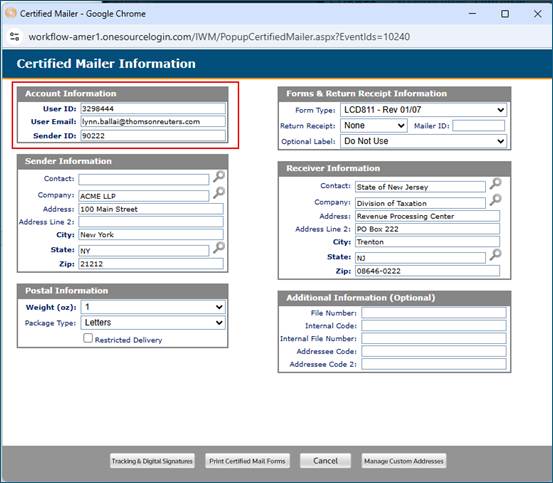
- If the account email belongs to someone who left your company, contact Laser Substrates at support@lasersub.com. They'll reset it or register a new account.
- Other vendors that provide Certified Mail Services include the following:
- Simple Certified Mail
- Stamps.com
- Certified Mail Labels.com
Field requirements for your preferred vendor
Vendors typically require the following fields to send a certified mailer:
- Contact
- Company
- Address and Address Line 2
- City and State
- Zip
Your vendor may also request these optional fields:
- File Number
- Internal Code
- Internal File Number
- Addressee Code
Print your mailers
Print your mailers
If you store addresses on your vendor's website:
- Select the addresses you want to print. You can optionally preview each mailer to copy the certified mail number into a corresponding Calendar custom field.
- You can also print PDFs, if available, and upload them to the Calendar Documents section of each file.
If you store addresses in Calendar:
- Filter Calendar to select due dates that need certified mail forms. Export the data and remove all fields except those needed for import into your vendor's website. Import the file to generate certified mailers.
- You can optionally preview each mailer to copy the certified mail number into a corresponding Calendar custom field. You can also print PDFs, if available, and upload them to the Calendar Documents section of each file.