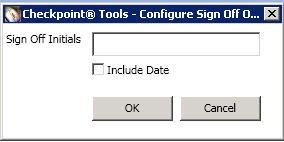
Configure Sign-off
The user can indicate a single step sign-off of a step or multiple sign-offs of a conclusion step with either user initials and optional date sign-off or the N/A option.
To use this feature:
- To configure the Sign-Off information, enter the initials or other Sign-Off information to display in the signoff column of the audit program or checklist.
- Click in the Include Date box to include the Sign-Off date in each Sign-Off.