
Use Conversations and Workspaces together
Many workflows benefit from using both Conversations and Workspaces, as each tool excels at different stages of analysis. Workspaces help structure and organize information, while Conversations provide an interactive environment for deeper research, follow-ups, and final deliverables. Workspaces are particularly useful for extracting key insights and preparing structured information, which can then be leveraged in Conversations for further analysis, verification, and summarization if needed.
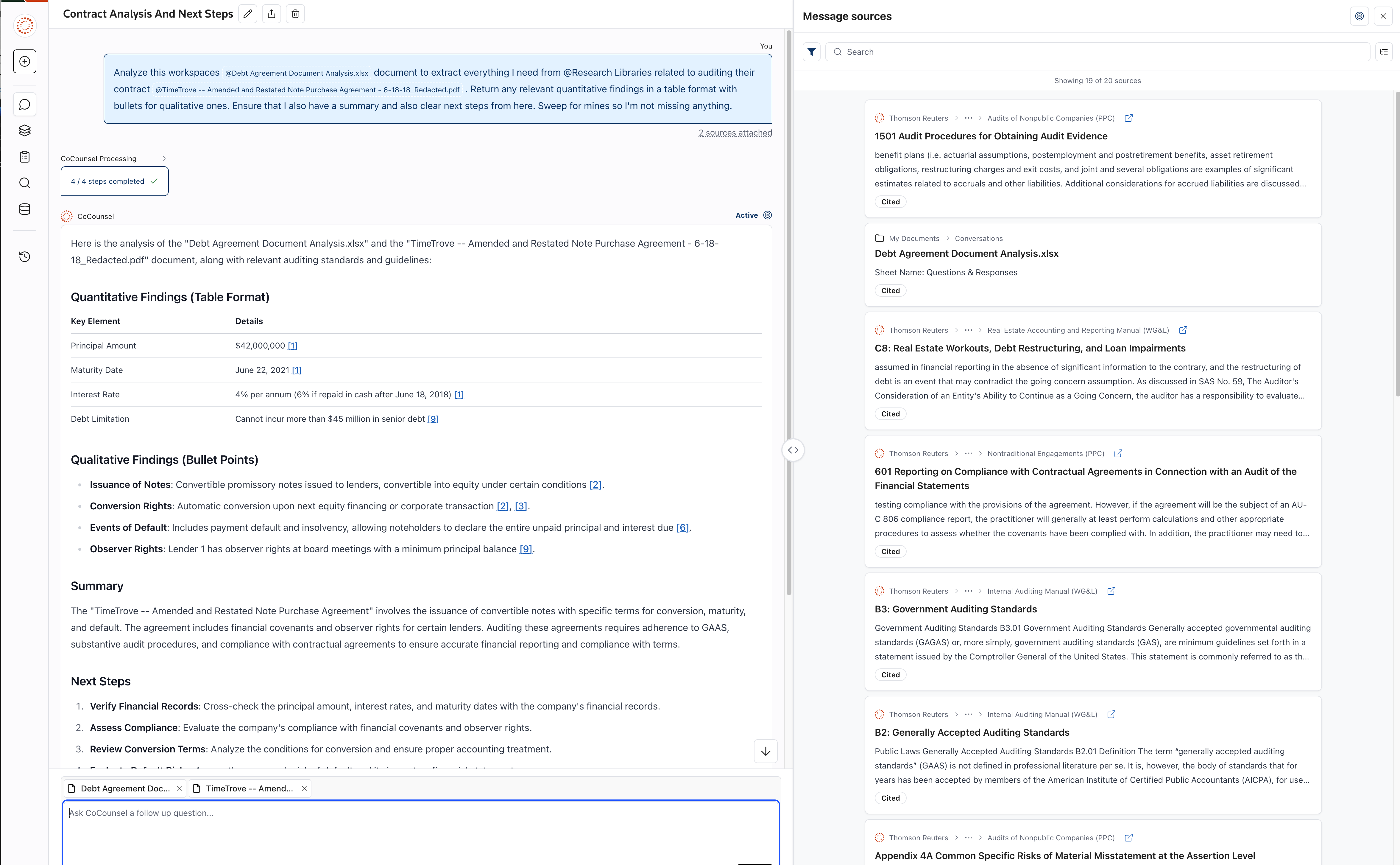
Use both Conversations and Workspaces in sequence
Extract then analyze
- Use Workspaces to extract key information, then move to Conversations for interpretation:
- Workspaces help break down documents like, financial statements, tax filings, or audit workpapers into structured insights.
- You can export findings and upload them into a conversation to analyze the results, ask follow-up questions, or verify details using authoritative sources like Checkpoint.
- Export from Workspaces for further analysis in Conversations:
- After using Workspaces to pull key numbers, clauses, or provisions from multiple documents, you can export this information to Excel.
- You can upload the exported file into a conversation for further refinement, such as identifying inconsistencies, summarizing findings, or drafting an explanation for a client.
- Structure information in Workspaces, then summarize in Conversations:
- Use Workspaces to organize findings across multiple tax or audit documents, reports, or contracts.
- Once the information is structured, you can export it and upload it into a conversation to draft a final summary, report, or client email that clearly communicates key takeaways.
Expanded Use Case Table
Scenario | Start with | Move to |
|---|---|---|
Reviewing tax documents such as partnership agreements, federal or state filings, or other complex tax forms | Workspaces to extract key terms, obligations, and financial data | Conversations to verify insights, analyze tax implications, and summarize findings |
Analyzing contracts related to debt, leases, or equity agreements in an audit engagement | Workspaces to break down key provisions and obligations | Conversations to refine understanding, compare with firm and/or authoratative guidance, and generate summaries |
Preparing a client-ready report or memo | Workspaces to gather structured information | Conversations to refine findings and generate a polished draft |
Comparing information across multiple agreements (e.g., debt covenants, lease obligations, equity financing terms) | Workspaces to extract key sections and export them into a structured format | Conversations to analyze differences, refine insights, and generate conclusions |
Identifying inconsistencies in financial statements or tax filings | Workspaces to isolate key figures and provisions | Conversations to run additional verification, compare with prior guidance, and summarize concerns |
Standardizing audit and tax review processes | Workspaces to apply predefined templates and categorize key findings | Conversations to draft documentation based on structured insights |
By using Workspaces to prepare structured insights and Conversations to refine, verify, and summarize, you can maximize efficiency across tax, audit, and financial workflows.