
EFIN verification
EFIN
An Electronic Filing Identification Number (EFIN) is a unique identifier issued by the IRS that authorizes you to electronically file tax returns. You must have a verified EFIN before you can transmit returns through Ready to Review.
important
If you previously provided an EFIN for another Thomson Reuters tax product, you need to submit it again for Ready to Review.
Apply for EFIN verification:
- Retrieve your GST Account Number:
- Go toSettings, thenOrganizationin Ready to Review.
- Locate and copy your GoSystem Tax Account ID.
- You'll need this number for the verification form.
- Complete the EFIN Verification Form:
- Access the self-service verification form.
- Enter the GoSystem Tax Account ID from step 1 into theAccount Number (PAN)field.
- Provide your EFIN and other required information.
- Submit the form.
- Wait for verification:
- Your application will be reviewed and processed and could take up to 5 business days.
- Once approved, your EFIN will be verified in the system.
- If there are any issues with your application, you will be contacted.

Enter Your EFIN in Ready to Review
Once your EFIN is verified, you need to enter it into your tax returns:
Option 1: Set EFIN in Tax Defaults (Recommended)
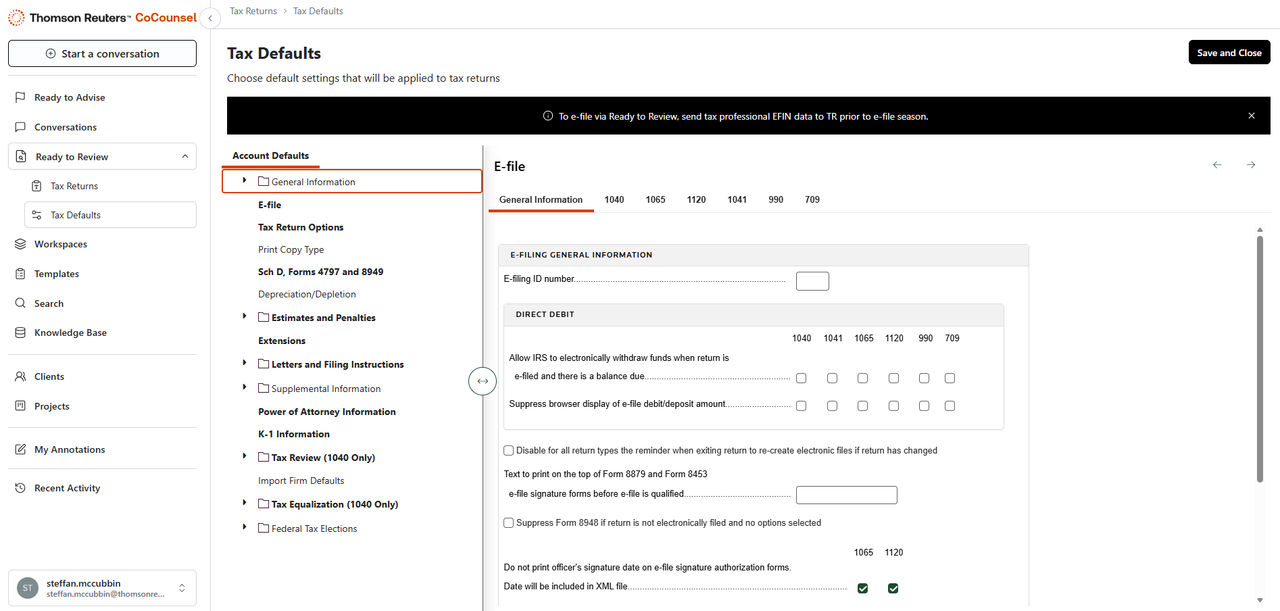
- As a company admin, go toReady to Review - Tax Defaults.
- Go toE-file.
- Enter your firm's E-filing ID number.
- This EFIN will automatically apply to all new returns.
Option 2: Enter EFIN Manually in Each Return
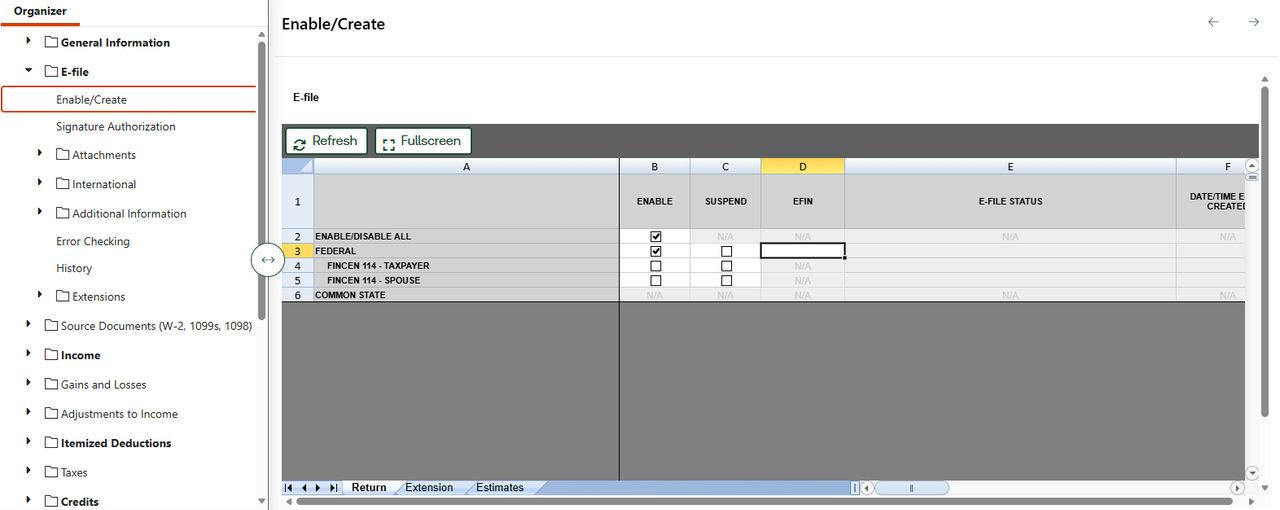
- Open the tax return project.
- Go to thePreparetab.
- Go toE-File, thenEnable/Create.
- Enter or override the EFIN value.
EFIN verification diagnostic
If your EFIN is not verified or not entered correctly, you'll see a critical diagnostic error when you attempt to approve the return for e-filing. The diagnostic message will direct you to:
- Verify your EFIN has been approved in the system.
- Complete the EFIN verification process if you haven't already.
- Ensure the EFIN is correctly entered in Tax Defaults or the individual return.
important
You can't successfully e-file returns until this diagnostic is cleared.
Related Content
-
E-filing in Ready to Review
Format: Article