
Configuring data connections
Contract Express allows you to connect to Document Management systems (DMS), external data sources and UK and Dutch company registers. It is possible to export generated documents to widely used Document Management Systems (DMS) NetDocuments, iManage and SharePoint Online, as well as client collaboration tool HighQ. Contract Express also allows you to pull data from SharePoint Online, HighQ, Salesforce and OData. All these connections require a connection setup.
Configuring connection settings
The first step to configuring your connection with your chosen Document Management System or data source must be done in the Document Management System itself. For more details on the process please see the documentation for your chosen Document Management System or the relevant Contract Express DMS Configuration quick guide.
Once you have completed the integrator-side configuration you must then configure the connection within Contract Express:
- Go toAdmin>Connection settings.
- ClickAdd connection, select a connection type and enter the required details.
- Save.
- When configuring a HighQ connection, there is an extra step to authorise the connection using HighQ system admin credentials. please see the Contract Express HighQ Configuration quick guide for full details.
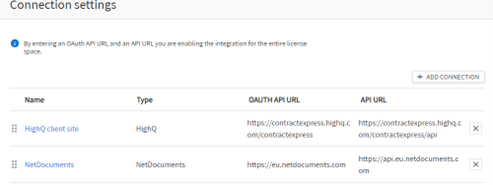
Once a connection to NetDocuments, HighQ, iManage, or SharePoint Online has been configured, all users with valid credentials for that connection will be able to export documents to it.
You can also configure export settings per template, if desired. For more details, see Configuring export settings for a template.
Configuring company search
Contract Express has integrations with the UK Companies House, Dutch Chamber of Commerce and Orbis company search (solution from Moody’s Analytics Company). UK Companies House searches are available to all customers without an individual subscription. However, it is possible to use connection settings to switch to the use of your own subscription if needed.
Dutch Chamber of Commerce search and Orbis company search are only available to customers who have an individual subscription and their own API key.
To add a company search connection, click Add connection, choose the Integration Type "UK Companies House", "Dutch Chamber of Commerce" or "Orbis company search", enter a name (any text) and complete the API key details.