
Creating a new variable and inserting it into a template
Inserting a field from the Contract Express tab
A field in a
Contract Express
template is a region of the document that will contain data. The most common type of field is a field that contains the name of a variable where that variable is a date, name or number which the user will enter on the questionnaire.The Insert Field button on the
Contract Express
tab in Microsoft Word can be used to create new variables which are then inserted as a field into the Contract Express
template. This is a quick and convenient way to add fields such as names, numbers, dates and Contract Express Author
will add the variable name and field mark-up elements into the template.Fields can be inserted at various places within a document:
- the body of the document
- the page headers and footers associated with a section
- within footnotes and endnotes
To insert a new text variable called BuyerName into the document, first select the point in the document where the new field will be inserted and then click the "Insert Field" button in the Markup section of the Contract Express tab in Microsoft Word:
This will open the variable editor:

Enter the details of the BuyerName variable as:

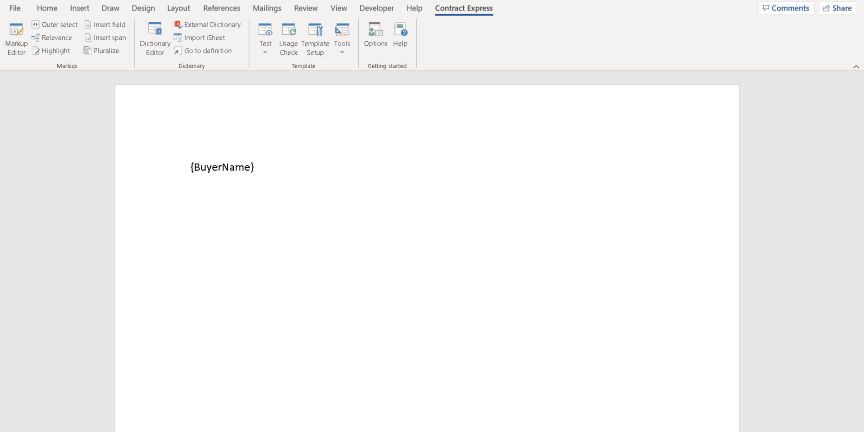
Click the OK button and the new variable will be inserted:
note
Variable names that contain certain characters such as spaces will require quoting - e.g.:
{'Client Name'}
Note that if these characters are entered into the Name field of the Variable Editor, Contract Express will automatically add the single quotes when it is added into the document. See Special characters in variable names, template names, lookup column names, and text strings for more details.
Note that variables are not case sensitive so NAMEBUYER and namebuyer refer to the same variable. For more on case sensitivity see Case sensitivity in Contract Express.
Replacing a string of text throughout a document with a new variable
When marking up a document in Contract Express Author, your existing manual precedent or model form may contain a specific string of text through the document such as
Party name
. By selecting this text and clicking Insert Variable will replace this text with a field containing the new variable. Contract Express Author will also provide an option to replace all occurrences of Party name
in the document with a field containing the new variable.
Applying text formatting to variables
note
Fields inherit the characteristics of the opening bracket {. For example, if the opening bracket is emboldened:
{
BuyerName }{
BuyerName }
{ BuyerName }
then the value in the generated document will be emboldened:
John Smith
Inserting a field using the Markup Editor
To insert a new field using the Markup Editor, place your cursor where you wish the field to be inserted or highlight the text you want to replace with the field, then press the  in the Markup Editor toolbar.
Field
button in the Markup Editor toolbar.
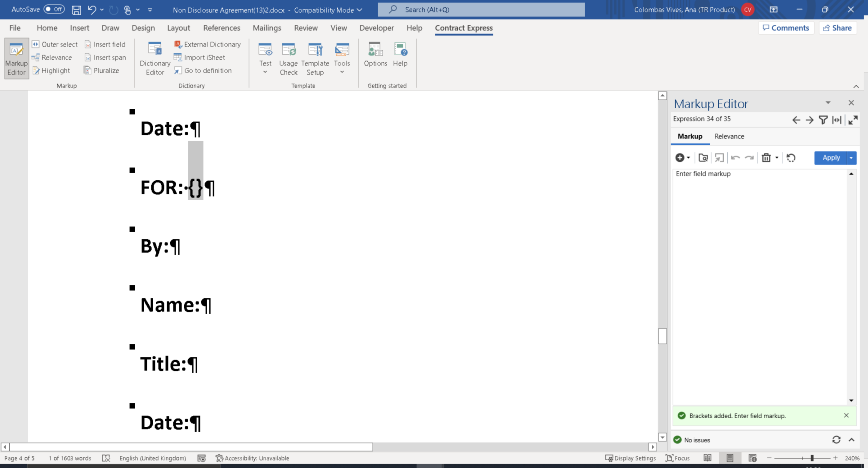
This will automatically replace the selected text with field brackets and the Markup Editor will display the placeholder text “Enter field markup” where you can type in your field.
Reuse a field
To insert an  in the Markup Editor. The reuse tool contains all the fields currently used in the template plus all variables in the dictionary.
existing
field around your highlighted text, select the Reuse
button in the Markup Editor. The reuse tool contains all the fields currently used in the template plus all variables in the dictionary.
To add a field from the reuse window, double-click the field or select it and then click the
Apply
. You can type in the search bar to filter through the results shown.You can also access the Reuse tool when editing an existing or new expression by clicking on its icon  in the toolbar. Either double-click the expression or select it and then click
in the toolbar. Either double-click the expression or select it and then click Insert
. This will add it to the Markup Editor where you can tweak it as needed.
New variable detection
You can enter new variables into the document using the Markup Editor. When you apply an expression that contains a new variable name, a new variable will be automatically created in the Dictionary.
The Markup Editor will display the link to the newly created variable at the bottom of the panel, click the link to navigate to the variable in the Dictionary Editor and edit the details as needed.

Inserting a field using the Dictionary Editor
You can also quickly insert a field containing a pre-existing variable from the
Dictionary Editor
. To do this, click the Dictionary Editor in the Ribbon and locate the variable you want to place in the document in either All Variables or Questionnaire. Place your cursor at the position in the document where you would like the new field. Now right click the variable in the Dictionary Editor and select Insert to document
. This will insert the field at the position that you placed the cursor. If you select text in the document and then click the quick insert arrow, the selected text will be replaced by a field containing your chosen variable.It is also possible to insert a field into your template using drag and drop. Select the variable name from the
Dictionary Editor
and drag and drop into your template at the desired location.Inserting a field as-you-type
Note also that as an alternative to using the Insert Field icon, it is possible to simply type the field mark-up element directly into the template using the correct bracket mark-up for Fields.
In addition to inserting variable fields manually, it is also possible to insert fields which contain calculations, cross references or even the text from other templates.
Fields containing an expression
To insert an expression that represents the VAT (Value Added Tax) on the UnitPrice formatted as a currency, first select the point in the document where the new expression will be inserted and then enter the text:
{UnitPrice * 17.5 / 100 Format "currencydigits"}
See Expression field for more details.
Fields containing an include
To include a sub-template containing a boiler-plate clause, first create a blank paragraph at the point where the clause will be included (n.b. the style of the paragraph does not matter as it will disappear from the generated document), and then enter the text:
{Include Template BOILER_PLATE_CLAUSE}
where BOILER_PLATE_CLAUSE is the template name of the sub-document
See Include template field for more details.