
Unresolved markup
Controls how unresolved fields, spans, and conditions are represented, formatted, and highlighted in generated documents.
Markup brackets for unresolved fields
Controls how unresolved fields are displayed when they contain no answer. They can be customised according to symbols and brackets ({}).
Default alternative text for unresolved fields
Specifies the default alternative text (...) displayed when a field is unresolved and contains no content, which can be customised as required.
note
In versions 8.10.8 and below, this setting is labelled
Default alttext for unresolved fields
.Markup brackets for unresolved spans
Controls how unresolved spans are displayed when they contain no resolved content, for example [original text here]. You can customise the symbols or brackets used.
Unresolved spans and fields
Controls how unresolved spans and fields are represented in the generated document.
- Include alternative text for fields and nothing for spans– Inserts alternative text for unresolved fields and leaves unresolved spans empty (for example, {Tenant Name} becomes [Tenant Name]).
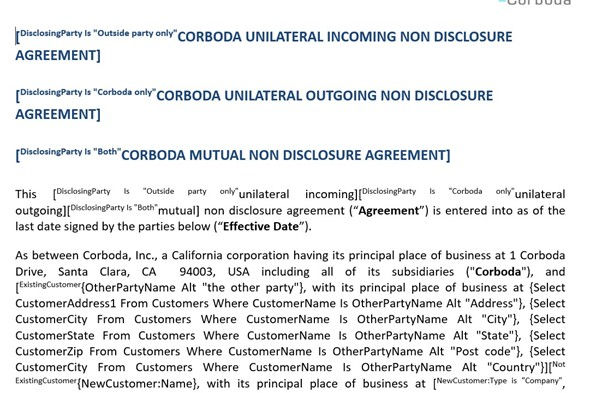
- Include markup definition for both– Inserts the full Contract Express markup code for unresolved spans and fields.
Highlight unresolved fields
Controls whether unresolved fields are visually highlighted in the generated document.
- Yes– Applies a highlight (for example, yellow) to unresolved fields.
- No– Does not apply highlighting.
Bracket formatting
Controls the formatting applied to brackets used for unresolved spans and fields. For example:
<w:rPr xmlns:w="http://schemas.openxmlformats.org/wordprocessingml/2006/main"><w:highlight w:val="green"/></w:rPr>
(Replace green with other colours as necessary).
Each span whose condition is not fully determined
Controls how spans are treated when their conditions cannot yet be fully evaluated.
- Exclude the span as if the condition were false– Excludes the span from the document.
- Include the span as if the condition were true– Includes the span in the document.
- Keep as an unresolved span– Leaves the span unresolved in the generated document (recommended).
Field prefix
Controls the prefix added to unresolved fields. You can specify an optional character sequence that appears before unresolved fields.

Representation of unresolved markup
Controls how unresolved markup is represented in the generated document.
- Character-based markup– Displays unresolved markup using character symbols (for example, {...}).
- None– Displays unresolved markup as plain text (...) without markup.
- XML element markup– Represents unresolved markup as XML elements (API only).
Related Content
-
Document
Format: Article