
Hide or show questions
Controls which questions are displayed to users based on question status, relevance, and completion state.
Display a subset of questions on the questionnaire
Controls which questions are displayed to users when completing the questionnaire.
- Show all questions– Displays all questions in the questionnaire, regardless of status or type.
- Show no questions at all– Hides all questions from the questionnaire.
- Show only compulsory questions– Displays only questions that are marked as compulsory.
- Show only compulsory questions that have not been answered– Displays only compulsory questions that are still unanswered.
- Show only key questions– Displays only questions marked as key questions.
- Show only key questions that are compulsory– Displays only key questions that are also marked as compulsory.
- Show only key questions that have not been answered– Displays only key questions that are still unanswered.
- Show only questions that have not been answered– Displays all unanswered questions, regardless of whether they are compulsory or key.
Handling of questions which have not yet been confirmed as relevant or irrelevant
Controls how questions are treated when their relevance depends on answers to controlling variables that have not yet been answered.
- Disable when the controlling variable is on any page– Displays only the questions that meet the selected criteria. Ensure that mutually dependent variables are placed on the same questionnaire page.
- Disable when the controlling variable is on the same page– Displays the question only if the controlling variable is on the same questionnaire page and has not yet been answered.
- Show as editable– Displays the question as editable even if the controlling variable has not yet been answered.
Handling of questions confirmed as irrelevant due to their controlling variables' answers on other pages
Controls how questions that are confirmed as irrelevant based on answers provided on other questionnaire pages are handled.
- Always exclude– Removes irrelevant questions entirely from the questionnaire.
- Include as disabled– Displays irrelevant questions in the questionnaire but disables them so they cannot be edited.
Display of questions that are disabled (as specified in the two settings above)
Controls how disabled questions are displayed in the questionnaire.
- Ghost– Displays the question in a visually muted or greyed-out state to indicate it is disabled.
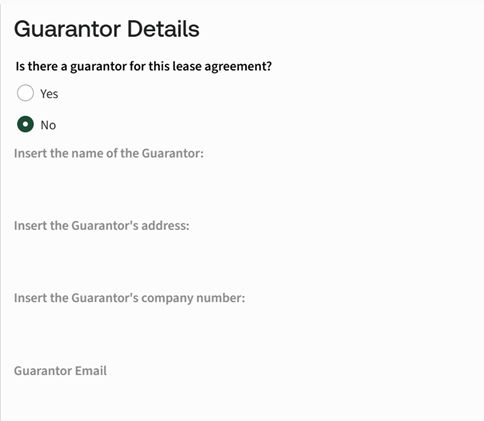
- Hide– Completely hides disabled questions from the questionnaire.
Show information icons
Controls whether information icons are displayed in the questionnaire to provide additional context to authors.
- Yes– Displays information icons to help authors understand how each page and question is constructed, showing their relevancy.
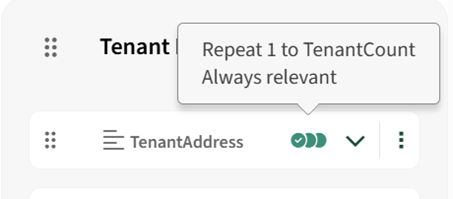
- No– Does not display information icons in the questionnaire.
Related Content
-
Questionnaire
Format: Article