
Layout and navigation
Controls how questionnaire pages are structured, navigated, and displayed to users during questionnaire completion.
Composition of questionnaire pages
Sets the layout of the questionnaire according to the option selected. Available options include:
- Collapse everything onto a single page– Displays all questionnaire questions together on one continuous page with no pagination.
- Show each group on a separate page– Organises the questionnaire so that each group of questions appears on its own page.
- Show each question in a separate group on a separate page– Presents each question as a standalone page within its own group.
- Show pages as defined in the template (default)– Uses the page structure exactly as configured in the template during authoring.
Show page navigation links
Choose which pages appear in the left-hand sidebar. Available options include:
- Show all pages– Displays every questionnaire page in the navigation sidebar, regardless of whether the pages are currently relevant.
- Show relevant pages– Displays only the pages that are relevant based on the user's current questionnaire answers.
- Show visited pages– Displays pages only after they have been reached; for example, page two appears only after the user navigates forward from page one.
Save & Close button on the last questionnaire page
Determines whether users can end the questionnaire from the final page using Save & Close.
When a questionnaire page loads, scroll to and set focus on the first question
Selecting Yes automatically scrolls the page and places focus on the first question when a questionnaire page is loaded.
Layout of groups on a questionnaire page when not specified in the template
Defines how groups are displayed on a questionnaire page in the generated template. Available options include:
- Show all groups– Displays all groups on the questionnaire page at the same time.
- Show one group at a time using vertical tabs– Collapses all groups and displays one group at a time using vertical tab navigation.
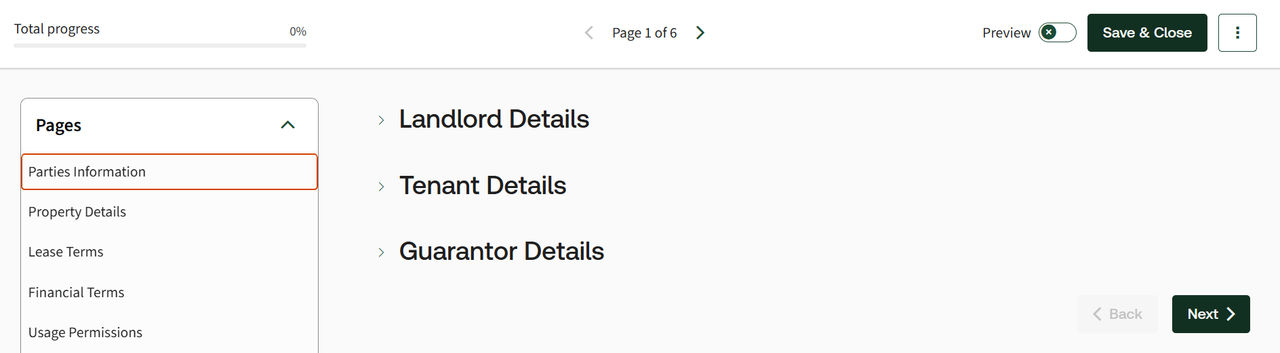
Show the page title on the questionnaire
Choose when the page title (e.g. "Parties") should appear. Available options include:
- Always– Shows the page title at the top of each questionnaire page.
- Never– Does not show the page title on the questionnaire.
- When previewing a document– Shows the page title only when the document is previewed.
Related Content
-
Questionnaire
Format: Article