
Variables in repeating spans
Although the repeat statement itself is very straight forward, probably its most important effect is on those variables used within the scope of the repeated span. Any variable inside a repeat span is treated as a repeated variable by
Contract Express
(apart from non-repeated variables - see below).Let us take the text variable
CompanyName
and the numeric variable NumberDirectors
as an example. It may be included in a repeat span thus:[
Repeat NumberCompanies
{CompanyName} has {NumberDirectors} directors]In the generated document we may get this:
ABC Corp has 5 directors
Real Enterprises has 3 directors
My Company Plc has 12 directors
Corboda Inc has 7 directors
XYZ.com has 3 directors
For every company (the number of companies is recorded with the NumberCompanies variable), the variables CompanyName and NumberDirectors have been repeated. We refer to NumberCompanies as the repeat generator since it determines how many times the span will be repeated. In this case the repeated variables CompanyName and NumberDirectors have both been repeated 5 times (the value of the NumberCompanies variable). This becomes more complicated when you consider that you can nest repeated spans to an arbitrary depth.
Beware variables that are both repeated and non-repeated
Although not strictly forbidden, you should beware having variables that are both repeated (i.e. occur within a repeat span) and non-repeated (i.e. occur outside any repeat spans). For example:
[
SingleBorrower
The agent and {BorrowerName} (the borrower) agree ...][
MultipleBorrowers
The agent and [Repeat NumberOfMultipleBorrowers Punctuation ", | and |"
{BorrowerName}{Mark}] (the borrowers) agree ...]This will give a multiple repetition context warning:
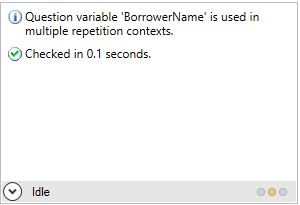
In these circumstances you are advised to repeat the BorrowerName variable even when there is only a single borrower:
[
SingleBorrower
The agent and [Repeat 1
{BorrowerName}] (the Borrower) agree ...][
MultipleBorrowers
The agent and [Repeat NumberOfMultipleBorrowers Punctuation ", | and |"
{BorrowerName}{Mark}] (the Borrowers) agree ...]Finally, the recommended approach is to merge the repeat spans using a common computable variable:
[
SingleBorrower
The agent and [Repeat NumberOfBorrowers
{BorrowerName}] (the borrower) agree ...][
MultipleBorrowers
The agent and [Repeat NumberOfBorrowers Punctuation ", | and |"
{BorrowerName}{Mark}] (the Borrowers) agree ...]where the definition of the variable NumberOfBorrowers is:
If MultipleBorrowersThen NumberOfMultipleBorrowers Else 1
Collecting repeated values
Often we need to refer to the repeated answers as a whole, say, for example to sum the number of directors in all the companies. Functions such as
Sum
are performed on lists. We therefore need a list of the repeated answers. We use the Collect function to build this list:{
Collect
( NumberDirectors ) }We can now apply the Sum function on our list:
{
Sum
( Collect( NumberDirectors ) ) }This would give us:
30
Once we know how to turn a repeated variable into a collection of its answers, we can now use any of the
List Functions
on it, for example the Distinct
function which removes duplicates from a list:{
Distinct
( Collect( NumberDirectors ) ) }This would give us:
5
3
12
7
since two repetitions share the value of 3 for NumberDirectors (Real Enterprises and XYZ.com)
Manipulating the list of repeated values
If we think of our repeat context as being all variables inside the repeat span, we can manipulate the results of the
Collect
function based on any variables in that repeat context. We do this by extending the Collect
function and supplying arguments. Let's say we only wanted to return the names of large companies with more than 5 directors:{
Collect
( CompanyName, ( NumberDirectors IsMoreThan 5 ) ) }This would give us:
My Company Plc
Corboda Inc
To extend this further we could then sort them, in ascending order, according to their names:
{
Collect
( CompanyName, ( NumberDirectors IsMoreThan 5 ), CompanyName ) }This would give us:
Corboda Inc
My Company Plc
If we wanted to remove the constraint of being a large company but retain the ordering by name:
{
Collect
( CompanyName, true, CompanyName ) }This would give us:
ABC Corp
Corboda Inc
My Company Plc
Real Enterprises
XYZ.com
Other examples of list functions:
- First( Collect( CompanyName ) )
- Mean( Collect( NumberDirectors ) )
- Distinct( Collect( NumberDirectors, NumberDirectors IsLessThan 10, NumberDirectors ) )
The above expressions generate:
- the first of the repeated companies (ABC Corp)
- the average number of directors across all companies (6)
- the distinct numbers of directors, where each number is less than 10, in ascending order (3, 5 and 7)
The RepeatCounter
We mentioned above that the variable NumberCompanies is referred to as the repeat generator. You can refer to the specific iteration within the repeat span using the keyword
RepeatCounter
.For example, to index the companies:
[
Repeat NumberCompanies
Company #{RepeatCounter
}: {CompanyName} has {NumberDirectors} directors] giving us the following in the generated document:
Company #1: ABC Corp has 5 directors
Company #2: Real Enterprises has 3 directors
Company #3: My Company Plc has 12 directors
Company #4: Corboda Inc has 7 directors
Company #5: XYZ.com has 3 directors
Although most repeat spans are generated by number values, sometimes they are generated by a list of multi-choice options (see Working with repeating spans - an extended example). For this reason the
RepeatCounter
itself is always a text value. It can be converted from a text value to a whole number value using the function ToInteger
, which can then be formatted like any other number:[
Repeat NumberCompanies
Our {ToInteger
(RepeatCounter
) Format "wth" lower} company, {CompanyName}, has {NumberDirectors} directors]and the generated document now looks like this:
Our first company, ABC Corp, has 5 directors
Our second company, Real Enterprises, has 3 directors
Our third company, My Company Plc, has 12 directors
Our fourth company, Corboda Inc, has 7 directors
Our fifth company, XYZ.com, has 3 directors
Nonrepeated and Unrepeated function
Occasionally we may want to use a variable inside a repeat span that should remain constant for all repetitions. This may be because we want to use it outside the repeat span in addition to inside. To do this we refer to that variable as
Nonrepeated
inside any repeat spans.Consider the following:
[
Repeat NumberCompanies
As at {DateOfReport}, {CompanyName} has {NumberDirectors} directors] As we have seen above, all variables inside the repeat span will be repeated. This means for every company we will ask the date of the report. In order to use the same value for this variable for all the repeated companies, we use the
Nonrepeated
function:[
Repeat NumberCompanies
As at {Nonrepeated
(DateOfReport)}, {CompanyName} has {NumberDirectors} directors]The
Unrepeated
function is used when you are nesting repeats in order to refer to a variable that appears in the repeat context above the one where you are using it:Consider the following:
[
Repeat NumberCompanies
{CompanyName} [Repeat NumberDirectors
{DirectorName} is a director of {CompanyName}]]The correct repeat context for the variable CompanyName is inside the top level repeat - NumberCompanies. We want to refer to it inside the second repeat context - NumberDirectors. To do this and avoid it being repeated a second time we refer to it as
Unrepeated
:[
Repeat NumberCompanies
{CompanyName} [Repeat NumberDirectors
{DirectorName} is a director of {Unrepeated
(CompanyName)}]]This would give us the following:
ABC Corp
John Smith is a director of ABC Corp
Amy Jones is a director of ABC Corp
My Company Plc
Maria Venebles is a director of My Company Plc
George Fathing is a director of My Company Plc
It may be the case that you want to refer to variables from one repeat span in another (separate) repeat span.
Let's take the example of a repeat on the number of lenders in the parties area of an Agreement:
This Agreement is between [
Repeat NumberLenders
{LenderName} and {BorrowerName}]In the definitions area we may then want to refer to a number of different Facilities:
[
Repeat NumberFacilities
Facility: {FacilityLenderName} will enter a commitment of {FacilityCommitment}] Here the names for the Facility LenderName variable (perhaps a single-or multi-select variable) will need to be those in the full collection of LenderNames. We know we can get this list by using:
Collect(LenderName)
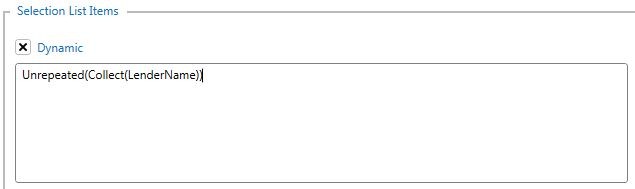
however because we are using LenderName inside the context of the NumberFacilities repeat span, we need to define the variable as:
Unrepeated(Collect(LenderName)):
Nonrepeat and Unrepeat spans
Sometimes it is more convenient to change the repeat context for a whole span, rather than apply Nonrepeated or Unrepeated functions to individual expressions in the span.
So, if our earlier example was to include both time and date of the report this could be done as:
[
Repeat NumberCompanies
As at [NonRepeat
{TimeOfReport} on {DateOfReport}], {CompanyName} has {NumberDirectors} directors]Or if we wanted to construct something more complex for each lender than their name, we could nest some repeat spans as follows:
[
Repeat NumberFacilities
Facility: [UnRepeat[Repeat NumberLenders
{LenderName} of {LenderLocation}]] will enter a commitment of {FacilityCommitment}]Related Content
-
Repeat spans
Format: Article