
Set up the ONESOURCE upload connector
The
ONESOURCE Upload Connector
allows you to store data from an Alteryx workflow directly in Data Hub. Data Hub is flexible and doesn't limit the shape or structure of the data you can upload using the connector. While there are no preset requirements for data structure, you can apply a pre-defined Data Hub schematic during the upload process if you've created one. This schematic will help process the data according to your specifications.
- To set up the connector:
- Make sure you added theONESOURCE Login Connectorto your workflow first.noteThis connector verifies your access to theONESOURCE Upload Connector.
- Add theONESOURCE Upload Connectorto your workflow.
- Select theONESOURCE Productdrop-down, then selectData Hub.
- You can change the default name ofNew_Alteryx_Fileto any name you want in theNamefield.
- Select a template from theSchematicdropdown, then select a schematic if you want.noteThis list shows schematics you've created before. If you skip choosing a schematic, you can still upload the data and process it later in Data Hub. If you select a schematic, Data Hub will upload and process the data right away.
- Enter aYear(between 1600 and 9999) and aPeriod(between 1 and 9999) for the data if you want.
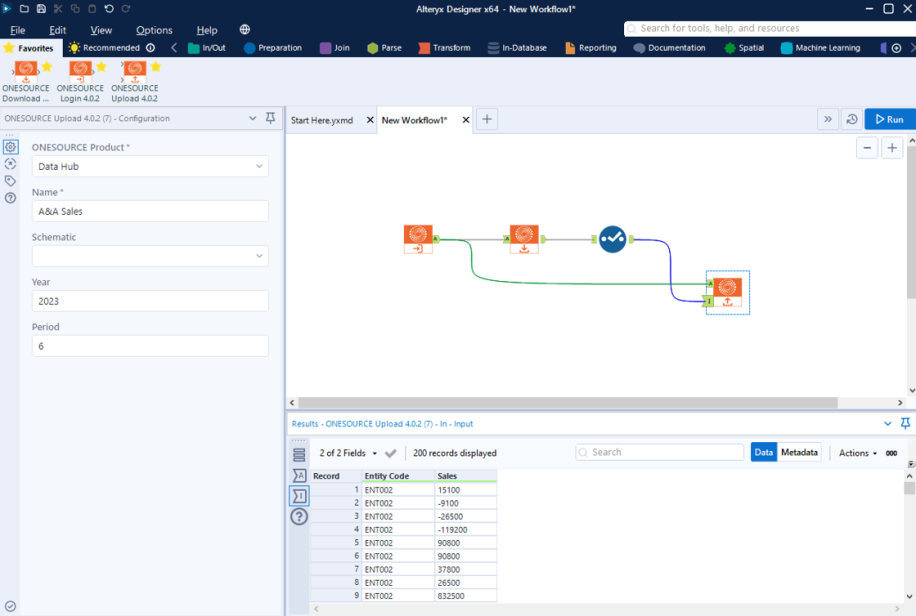
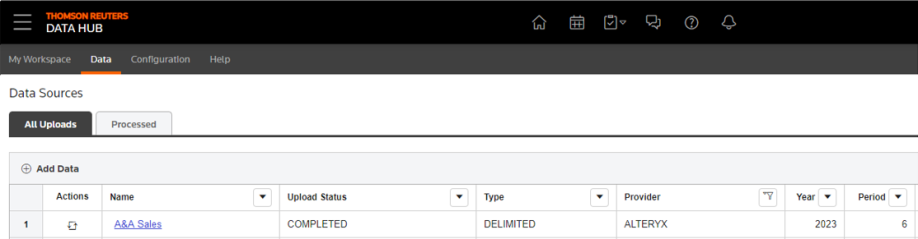
- SelectRunwhen you're done. The process transfers the data to create an upload in Data Hub on theAll Uploadstab.
Related Content
-
ONESOURCE Connectors for Alteryx
Format: Article